Instrument and control functions
3-9
3
Select the transmission gear that
is appropriate for the vehicle
speed.
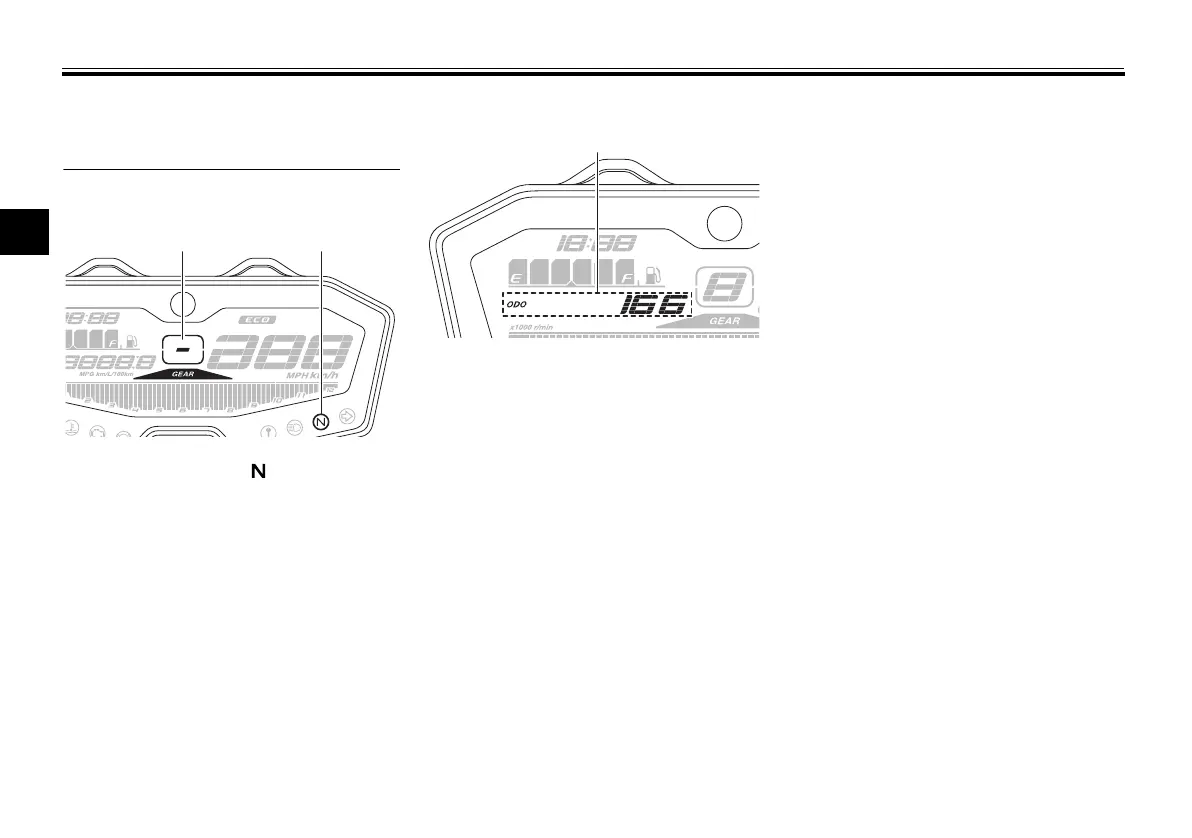
Transmission gear display
The transmission gear display shows
the selected gear. The neutral position
is indicated by “–” and by the neutral
indicator light.
Multi-function display
The multi-function display is equipped
with the following:
odometer
two tripmeters
fuel reserve tripmeter
instantaneous fuel consumption
average fuel consumption
coolant temperature
air temperature
brightness control mode
Navigating the multi-function dis-
play
Push the left set button to change the
display between the odometer “ODO”,
tripmeters “TRIP 1” and “TRIP 2”, in-
stantaneous fuel consumption “km/L”
or “L/100 km”, average fuel consump-
tion “AVE_ _._ km/L” or “AVE_ _._
L/100 km”, coolant temperature “_ _
°C”, and air temperature “Air_ _ °C” in
the following order:
ODO → TRIP 1 → TRIP 2 → km/L or
L/100 km → AVE_ _._ km/L or AVE_ _._
L/100 km → _ _ °C → Air_ _ °C → ODO
For the UK:
Push the left set button to change the
display between the odometer “ODO”,
tripmeters “TRIP 1” and “TRIP 2”, in-
stantaneous fuel consumption “km/L”,
“L/100 km” or “MPG”, average fuel
consumption “AVE_ _._ km/L”, “AVE_
_._ L/100 km” or “AVE_ _._ MPG”,
coolant temperature “_ _ °C”, and air
temperature “Air_ _ °C” in the following
order:
ODO → TRIP 1 → TRIP 2 → km/L,
L/100 km or MPG → AVE_ _._ km/L,
AVE_ _._ L/100 km or AVE_ _._ MPG →
_ _ °C → Air_ _ °C → ODO
1. Transmission gear display
2. Neutral indicator light “ ”
1. Multi-function display
UBU2E0E0.book Page 9 Friday, September 9, 2016 9:23 AM



 To Next Page