Instrument and control functions
3-11
3
To switch the instantaneous fuel con-
sumption settings, push the left set
button for one second.
If traveling at speeds under 20 km/h
(12 mi/h), “_ _._” is displayed.
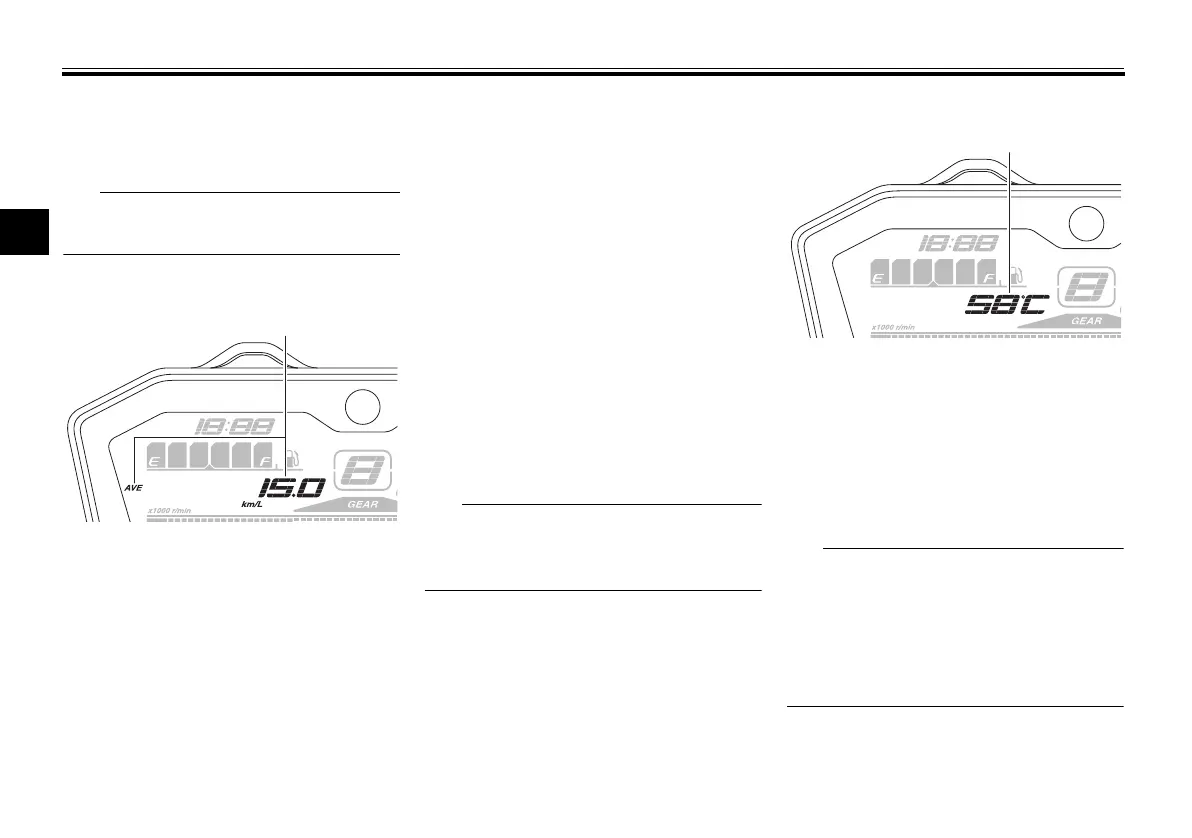
Average fuel consumption
This function calculates the average
fuel consumption since it was last re-
set.
The average fuel consumption can be
set to either “AVE_ _._ km/L”, “AVE_
_._ L/100 km” or “AVE_ _._ MPG” (for
the UK).
“AVE_ _._ km/L”: The average dis-
tance that can be traveled on 1.0 L
of fuel is shown.
“AVE_ _._ L/100 km”: The average
amount of fuel necessary to travel
100 km is shown.
“AVE_ _._ MPG” (for the UK): The
average distance that can be trav-
eled on 1.0 Imp.gal of fuel is
shown.
To switch the average fuel consump-
tion settings, push the left set button
for one second.
To reset the average fuel consumption,
push the right set button for at least
one second.
After resetting the average fuel con-
sumption, “_ _._” will be shown until
the vehicle has traveled 1 km (0.6 mi).
Coolant temperature
This shows the coolant temperature
from 40 °C to 116 °C in 1 °C incre-
ments.
If the message “HI” flashes, stop the
vehicle, then stop the engine, and let it
cool. (See page 6-40.)
When the coolant temperature is
below 40 °C, “LO” will be dis-
played.
The coolant temperature varies
with changes in the weather and
engine load.
1. Average fuel consumption display
1. Coolant temperature display
UBU2E0E0.book Page 11 Friday, September 9, 2016 9:23 AM



 To Next Page