6
MX49 MX61 MX88 Owner’s Manual
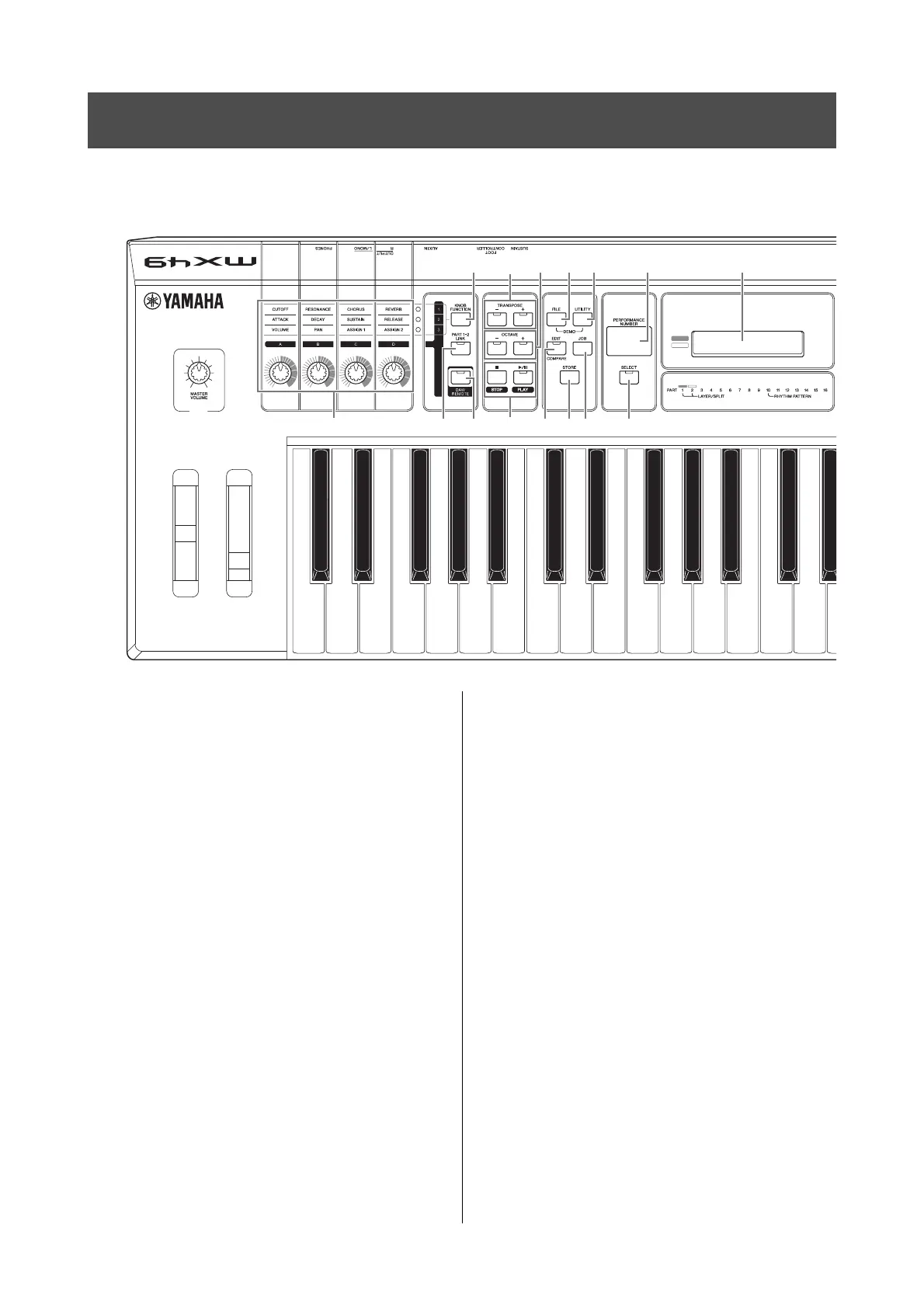
Front Panel
1 [MASTER VOLUME] knob (page 10)
Adjusts the volume of the overall sound.
2 Pitch Bend Wheel (page 17)
Bends the pitch of the notes up or down while playing
the keyboard.
3 Modulation Wheel (page 17)
Controls vibrato applied to the sound.
4 Knobs [A] – [D] (page 17)
These four highly versatile knobs let you adjust various
aspects or parameters of Parts 1 and 2.
5 [KNOB FUNCTION] button (page 17)
Changes the functions assigned to Knobs [A] – [D].
6 [PART 1-2 LINK] button (page 17)
Determines the sound which is applied to the Knob
effects.
7 [DAW REMOTE] button (See Reference
Manual)
Turning on this button enters the Remote mode. The
Remote mode lets you control DAW software on your
computer from the panel controls of the instrument.
8 TRANSPOSE [-]/[+] buttons (page 20)
Use these buttons to raise or lower the pitch of the notes
in semitone steps.
9 OCTAVE [-]/[+] buttons (page 20)
Use these buttons to change the note range of the
keyboard.
) Transport buttons (pages 21 and 23)
[J] (Stop) button
Press to stop playback of Rhythm Pattern or Song data.
[R/K] (Play/Pause) button
Press to alternately start/pause playback of a Rhythm
Pattern or Song data from the current point.
! [FILE] button (page 31)
Calls up the File display from which you can transfer files
between this instrument and USB flash memory.
@ [UTILITY] button (page 31)
Calls up the Utility display from which you can set
parameters that apply to the entire system of this
instrument.
# [EDIT] button
Calls up the display from which you can edit a
Performance (page 20). Also, pressing this button while
editing lets you switch between the just-edited sound
and its original, unedited condition, allowing you to hear
how your edits affect the sound (Compare function).
$ [JOB] button (Refer to the Reference Manual)
Calls up the Performance Job or Utility Job display.
% [STORE] button
Stores the Performance/Voice/Utility settings.
Controls and Functions
C2 D2 E2 F2 G2 A2 B2 C3 C4
1
23
46#%&$7)
5@^*!89
(The illustration is of the MX49; however, the controls and terminals of the MX61 and MX88 are the same.)



 To Next Page