EasyManua.ls Logo

Yamaha NX-50 - User Manual

Yamaha NX-50
8 pages
Print Icon
To Next Page IconTo Next Page
Loading...
Powered Speaker
AB
NX-50
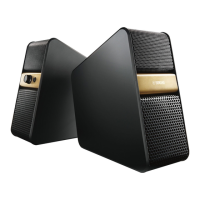
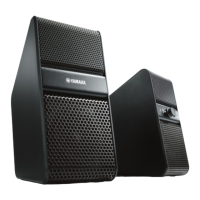
Aesthetically neutral design
Solid and stylish metal grill design in a
compact size that will t into a variety of
home environments.
Loudness control
e Loudness control function of
the speakers allows you to enjoy rich
bass tone sounds even at low volumes.
Plays a variety of contents
with high-quality sound.
You can enjoy a variety of contents with
high-quality sound by connecting to external
devices such as computers or TVs.
Auto-standby
When no sound is input for a period
of time, the speakers go to
standby mode automatically.
Since you do not have to
turn on/o the power every time,
you can save energy.
OWNER’S MANUAL
FEATURES

Questions and Answers

  • A
    Andrea JohnsJul 26, 2025
    How to fix Yamaha NX-50 Speakers when there is no sound?
    • U
      ucampbellJul 26, 2025
      If no sound is coming from your Yamaha Speakers, or the sound is too quiet, try these steps: * Ensure the AC adapter is properly connected to the wall outlet. * Make sure the power is turned on (the indicator light should be lit). * Verify all connections are correctly made. * Adjust the volume control by turning it to the right to increase the volume. * Increase the volume on the connected device. * Disconnect any headphones that are plugged in.
  • A
    Amanda DavisAug 1, 2025
    How to fix Yamaha Speakers when no sound is output?
    • T
      Theresa BanksAug 1, 2025
      If no sound is coming from your Yamaha Speakers, or the sound is too quiet, here are several things to check: * Ensure the AC adapter is properly connected to the wall outlet. * Verify the power is turned on (the indicator light should be lit). * Check that all connections are correctly and completely made. * Adjust the volume control on the speakers by turning the VOL control to the right. * Increase the volume on the connected device. * Make sure headphones are disconnected from the speakers.
  • R
    Robert StuartAug 5, 2025
    Why is the sound distorted on my Yamaha NX-50?
    • T
      Theresa DelgadoAug 5, 2025
      If the sound from your Yamaha Speakers is distorted, try lowering the volume of the connected device.
  • C
    Calvin CaldwellAug 11, 2025
    Why is there noise coming from my Yamaha Speakers?
    • A
      andreatuckerAug 11, 2025
      If you're hearing noise from your Yamaha Speakers, consider the following: * Ensure all connections are correctly and completely made. * Check the stereo mini jack and stereo mini plug cable for dirt and clean them if necessary. * Keep devices that emit electromagnetic waves (like mobile phones, wireless appliances, microwaves, or inverter lighting equipment) away from the speakers. * Try changing the power source by directly connecting the AC adapter to the wall outlet.
  • R
    rnovakAug 16, 2025
    What to do if my Yamaha NX-50 are making noise?
    • A
      Aaron BarajasAug 16, 2025
      To troubleshoot noise issues with your Yamaha Speakers: * Ensure all connections are correctly and securely made. * Check the stereo mini jack and stereo mini plug cable for dirt; clean them if necessary. * Keep the speakers away from devices that emit electromagnetic waves, such as mobile phones, wireless appliances, microwaves, and inverter lighting equipment. * Try changing the power supply by connecting the AC adapter directly to the wall outlet.
  • M
    matthewhuntAug 20, 2025
    What to do if the sound is distorted on Yamaha NX-50?
    • C
      Christine SnowAug 20, 2025
      If the sound from your Yamaha Speakers is distorted, try lowering the volume of the connected device.

Summary

Product Features

Aesthetically Neutral Design

Stylish metal grill design in a compact size for various home environments.

Loudness Control

Enjoy rich bass tone sounds even at low volumes with automatic correction.

Versatile Content Playback

Connect to external devices like computers or TVs for high-quality sound.

Auto-Standby Mode

Saves energy by automatically entering standby mode when no sound is input.

Important Safety Precautions

Installation and Environment

Ensure proper ventilation, avoid heat, moisture, and liquid exposure for safe operation.

Electrical Safety and Usage

Use correct voltage, avoid modification, unplug when not in use, and handle cables properly.

Fire and Shock Hazard Warnings

Protect from rain/moisture; keep away from CRT TVs to prevent picture distortion.

UK Model Specific Instructions

Mains Lead Wiring

Connect the blue (neutral) and brown (live) wires correctly for the UK plug.

Disposal of Old Equipment

Follow national legislation for proper collection, treatment, recovery, and recycling of used products.

General Operating Precautions

Unit Handling and Care

Avoid pressure on controls, loud input, magnetic media interference, and unplug if problems occur.

Controls and Functions

Front Panel Overview

Details on headphone connector, volume control, and loudness adjustment located on the front panel.

Power and Standby Features

Power;Indicator LED

Explains the power button function and LED status for normal and standby modes.

Auto-Standby Functionality

Unit enters standby mode automatically after a period of no audio input or low volume.

Rear Panel Connections

Audio Input Ports

Connect external devices like portable players or computers via AUDIO INPUT 1/2.

Speaker Link and Power Input

Connects the left speaker and the AC adaptor for power to the right speaker.

Connecting the System

Audio Input and Multi-Source Mix

Connect devices via 3.5mm cable and utilize multi-source mix for simultaneous audio playback.

Troubleshooting Guide

No Sound or Low Volume Issues

Addresses issues like disconnected adaptor, power off, incorrect connections, or low volumes.

Sound Distortion and Noise Problems

Covers causes like loud volume, bad connections, dirty connectors, or external electromagnetic interference.

Technical Specifications

Input;Output and Power Specs

Lists connector types, power voltage/frequency, and power consumption.

Weight and Dimensions

Provides physical specifications including weight and physical size of the speakers.

Yamaha NX-50 Specifications

General IconGeneral
Driver diameter70 mm
Number of drivers-
Speaker placementTabletop/bookshelf
Audio output channels2.0 channels
Subwoofer driver diameter (imperial)2.75 \
Product colorBlack
Recommended usageUniversal
Impedance6 Ω
Frequency range55 - 20000 Hz
RMS rated power14 W
TypePortable speakers
Ethernet LANNo
CompatibilityTV, PC, tablet, smartphone
Speaker power7 W
Depth (imperial)7.25 \
Width (imperial)3.375 \
3.5 mm connectorYes
Headphone connectivity3.5 mm
Connectivity technologyWired
Power consumption (typical)13 W
Weight and Dimensions IconWeight and Dimensions
Depth184 mm
Width83 mm

Related product manuals