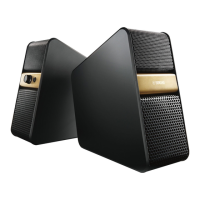
Why does my Yamaha Speaker System sound distorted?
- XXavier HuberSep 5, 2025
The most likely cause is that the volume is set too high. Try lowering the volume on the connected device to see if that resolves the distortion.
Why does my Yamaha Speaker System sound distorted?
The most likely cause is that the volume is set too high. Try lowering the volume on the connected device to see if that resolves the distortion.
What to do if there is no sound or interrupted sound during Yamaha NX-B55 Speakers playback?
If you're experiencing no sound or interrupted sound during playback with your Yamaha speakers, here are some things to check: * Make sure the other device is connected to the unit via Bluetooth. * Ensure the distance between the unit and the Bluetooth device is within 10 m (33 ft). * Move the unit away from devices that output signals in the 2.4 GHz frequency band, such as microwave ovens or wireless LANs. * Verify that the Bluetooth function of the other device is enabled and properly set. * Make sure the unit is registered on the other device’s Bluetooth device list; if not, perform the pairing operations again. * Confirm that the other device is set to send Bluetooth audio signals to the unit. * Ensure the pairing setting of the other device is set to this unit. * Incr...
Why is there still sound from the TV when Yamaha Speakers are connected?
If you're still hearing sound from the TV even after connecting your Yamaha speakers with an audio cable, the TV is not suitably set. Change the settings of the TV.
Why does the sound from my Yamaha Speakers keep muting automatically?
If your Yamaha speakers are automatically muting, it is likely due to the auto-standby function. To resolve this, increase the volume level of the connected device, or press the power button twice to turn the unit back on.
Why is my Yamaha NX-B55 sound distorted?
Sound distortion from your Yamaha speakers often occurs when the sound is too loud. Try lowering the volume of the connected device.
Why does Yamaha Speaker System auto-power on not work?
The volume of the connected device might be too low, so increase its volume level. Also, the unit may not turn on if the sound duration is too short, such as a click.
Why is auto-standby not working on my Yamaha Speaker System?
The AUTO STANDBY switch may be set to OFF. Set the AUTO STANDBY switch to ON. Also, make sure the unit is not close to mobile phones, radio devices, microwaves, or inverter lights, as external noise can interfere with the function.
Why is the sound muted automatically on my Yamaha Speaker System?
This is likely due to the auto-standby function. Try increasing the volume level of the connected device. Alternatively, press the power button twice to turn the unit back on.
How to fix noise heard on Yamaha Speaker System?
Check the connections to ensure they are secure and not faulty. Clean the stereo mini jack and stereo mini plug cable if they are dirty. Ensure devices emitting electromagnetic waves (like mobile phones or microwaves) are not near the unit. Try connecting the AC adapter directly to the wall outlet to change the power supply source.
Why is there no sound coming from my Yamaha Speakers, or why is the sound very quiet?
There could be several reasons for this issue: * The unit and the other device might not be correctly connected, so ensure they are properly connected. * The connections could be faulty or incomplete; double-check that all connections are secure, or try reconnecting the unit to the Bluetooth device. * The unit's volume might be set too low; adjust the VOL (volume) control to increase the volume. * The connected device's volume might be too quiet; increase the volume on that device. * Headphones might be connected, which mutes the speakers; disconnect the headphones. * The AUTO STANDBY switch at the rear might be set to INIT; set it to ON or OFF.
Explains how the unit automatically enters standby mode when no audio signal is received.
Provides methods to disable auto-standby mode, either by volume adjustment or switch setting.
Details connecting external devices via the 3.5mm stereo mini plug cable.
Guides on establishing a wireless connection using Bluetooth technology.
Explains the process to register Bluetooth devices for wireless music playback.
Guides on how to play music wirelessly after a Bluetooth connection is established.
Provides steps to delete all previously paired Bluetooth devices.
Addresses common problems like unit not turning on, no sound, or distorted sound.
Solves problems with pairing, connecting, or maintaining Bluetooth connections.
Addresses issues with missing sound, interrupted playback, or device recognition.
Explains how the unit automatically enters standby mode when no audio signal is received.
Provides methods to disable auto-standby mode, either by volume adjustment or switch setting.
Details connecting external devices via the 3.5mm stereo mini plug cable.
Guides on establishing a wireless connection using Bluetooth technology.
Explains the process to register Bluetooth devices for wireless music playback.
Guides on how to play music wirelessly after a Bluetooth connection is established.
Provides steps to delete all previously paired Bluetooth devices.
Addresses common problems like unit not turning on, no sound, or distorted sound.
Solves problems with pairing, connecting, or maintaining Bluetooth connections.
Addresses issues with missing sound, interrupted playback, or device recognition.
| Product color | Black, Titanium |
|---|---|
| Volume control | Rotary |
| Housing material | - |
| Recommended usage | Universal |
| Suitable for outdoor use | No |
| Speaker type | 1-way |
| Driver diameter | 70 mm |
| Number of drivers | 1 |
| Speaker placement | Tabletop/bookshelf |
| Audio output channels | 2.0 channels |
| Impedance | 6 Ω |
| Frequency range | - Hz |
| RMS rated power | 14 W |
| Total Harmonic Distortion (THD) | 10 % |
| Bluetooth | Yes |
| Bluetooth range | 10 m |
| Bluetooth version | 2.1+EDR |
| Headphone connectivity | 3.5 mm |
| Connectivity technology | Wired & Wireless |
| AC input voltage | 100 - 240 V |
| DC input voltage | 12 V |
| Power source type | AC |
| AC input frequency | 50 - 60 Hz |
| AC adapter output current | 1.5 A |
| Power consumption (typical) | 13 W |
| Cables included | Audio (3.5mm) |
| Depth | 184 mm |
|---|---|
| Width | 83 mm |
| Weight | 2100 g |