Using the application
7
Initialization procedure
If you want to initialize all current settings of the PM1D
Manager and its scene memories and libraries, you can
use the following procedure to restore the factory-set
condition.
1. In the Function menu screen, click the OPTION
button.
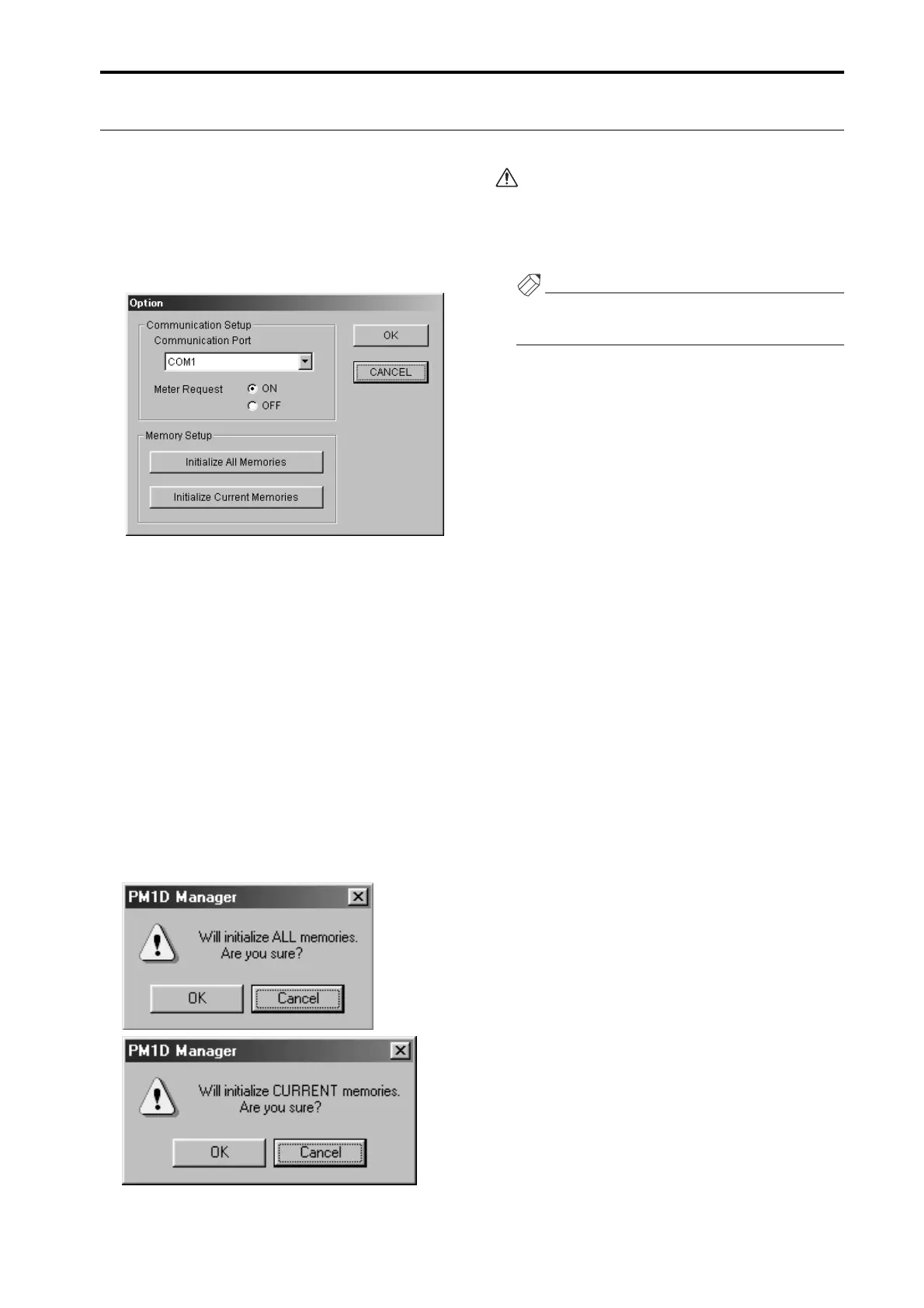
The Option settings popup window will appear.
2. According to the content that you want to initialize,
click either the “Initialize All Memories” button or
the “Initialize Current Memories” button.
•
If you click the “Initialize All Memories” button
The current settings of the PM1D Manager, as well as
the scene memories and the various libraries will be
initialized to the factory-set condition.
•
If you click the “Initialize Current Memories” but-
ton
The current settings of the PM1D Manager will be
initialized. However, scene memories and the various
libraries will not be affected.
When you press either of these buttons, a dialog box
will appear, asking you to confirm the initialization.
3. To execute the initialization, click the OK button.
Memories that have been initialized cannot be
recovered. Please use great care when performing
this operation.
Memory initialization can be performed only when
offline.
Hint
For details on the Option popup window, refer to the
explanation on p.9.



 To Next Page