EasyManua.ls Logo

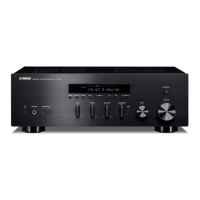
Yamaha R S300 - User Manual

Yamaha R S300
42 pages
Print Icon
To Next Page IconTo Next Page
Loading...
Receiver
OWNER’S MANUAL
UA

Other manuals for Yamaha R S300

Questions and Answers

  • M
    Meredith CunninghamSep 8, 2025
    Why is my iPhone/iPod not charging when connected to the Universal Dock for iPod with my Yamaha Receiver?
    • S
      Stephen MoodySep 8, 2025
      Ensure that the Yamaha Receiver unit is turned on or set to standby mode. Also, verify that the iPhone/iPod is securely connected to the Universal Dock for iPod.
  • T
    Thomas KlineAug 25, 2025
    What to do if my Yamaha Receiver has no sound?
    • B
      Brian HumphreyAug 25, 2025
      If there's no sound from your Yamaha Receiver, ensure the cables are connected properly and that none are defective. Select the correct input source using the INPUT selector on the front panel or the remote control. Verify that the SPEAKERS A/B switches are correctly set. Check that speaker connections are secure and that the output is not muted. Also, ensure that the MaxVol or IniVol setting is not too low. Finally, confirm that the component corresponding to the selected input source is turned on and playing.
  • S
    scottpetersAug 25, 2025
    Why Yamaha Receiver remote control does not work?
    • J
      Jamie BranchAug 26, 2025
      If the remote control of your Yamaha Receiver does not work, make sure you are within 6 m (20 ft) and no more than 30 degrees off-axis from the front panel. Also, reposition the unit if direct sunlight or lighting is striking the remote control sensor. If the problem persists, replace all the batteries, as they may be weak.
  • A
    Ashley RobertsonSep 22, 2025
    Why are there continuous crackling and hissing noises on my Yamaha Tuner?
    • N
      Nicholas PierceSep 22, 2025
      The noises may result from lightning, fluorescent lamps, motors, thermostats or other electrical equipment. Try using an outdoor antenna and a earth ground. This will help somewhat, but it is difficult to eliminate all noise.
  • C
    Christine ValenciaSep 9, 2025
    Why is my iPhone/iPod not charging when using the Wireless System for iPod with my Yamaha Receiver?
    • J
      Joseph PriceSep 9, 2025
      Ensure that the Yamaha Receiver unit is turned on or set to standby mode. Also, verify that the YID-W10 transmitter is securely stationed in the YID-W10 receiver.
  • S
    Shirley SolisSep 14, 2025
    What to do if the automatic station preset does not work on my Yamaha Tuner?
    • B
      Betty CarterSep 14, 2025
      Automatic station preset is not available for AM stations on the Yamaha Tuner. Use manual station preset.
  • T
    Thomas MendozaSep 3, 2025
    Why isn't my iPhone/iPod charging on my Yamaha Receiver?
    • A
      adamskristenSep 3, 2025
      If your iPhone/iPod is not charging when connected to the Universal Dock for iPod, turn on the Yamaha Receiver or set it to standby mode. Also, ensure the iPhone/iPod is securely connected to the Universal Dock for iPod.
  • R
    Rebecca SchneiderSep 4, 2025
    Why isn't my iPhone/iPod charging with Yamaha Receiver Wireless System for iPod?
    • J
      Jonathan GardnerSep 4, 2025
      If your iPhone/iPod is not charging when using the Wireless System for iPod, turn on the Yamaha Receiver or set it to standby mode. Also, ensure the YID-W10 transmitter is securely stationed in the YID-W10 receiver.
  • J
    Jacob GonzalezSep 23, 2025
    Why is my iPhone/iPod not charging when using the Wireless System for iPod on my Yamaha Tuner?
    • B
      Bradley KellySep 23, 2025
      If your iPhone/iPod is not charging when using the Wireless System for iPod on your Yamaha Tuner, make sure the unit is turned on or in standby mode. Also, ensure the YID-W10 transmitter connected to your iPhone/iPod is securely stationed in the YID-W10 receiver.
  • M
    Michael PachecoAug 29, 2025
    What to do if my Yamaha Receiver fails to turn on?
    • R
      Robert McdonaldAug 29, 2025
      First, ensure the power cable is firmly connected. If that doesn't work, check that the impedance setting matches your speakers. Also, inspect the speaker wires to ensure they are not touching each other, as this can activate the protection circuitry. If the IMPEDANCE SELECTOR switch on the rear panel is not set correctly, set it to either end while the unit is off. Finally, if the unit has been exposed to a strong electric shock, turn it off, disconnect the power cable for 30 seconds, and then plug it back in.

Summary

Important Safety Instructions

Precautions Before Operation

Controls and Functions

Front Panel Controls

Explanation of buttons and indicators on the front panel.

Rear Panel Connections

Details the various input/output jacks and switches on the rear panel.

Remote Control Functions

Describes the operation of each button on the remote control.

Connections

Connecting Speakers and Source Components

Guide for wiring speakers and connecting audio source devices.

Basic Operation

Playing a Source

Steps to select an input source and play audio.

Playing Back Tunes from iPhone;iPod;Bluetooth Component

Using a Universal Dock for iPod

Connecting and controlling an iPod via a dock.

Using a Wireless System for iPod

Wireless playback and control of an iPod.

Using a Bluetooth Wireless Audio Receiver and Pairing

Connecting and pairing Bluetooth devices.

Setting the Option Menu for Each Input Source

Option Menu Items

Lists configurable settings for different input sources.

Troubleshooting

General Troubleshooting

Common issues and their solutions related to power, sound, and connections.

Yamaha R S300 Specifications

General IconGeneral
Impedance8 Ω
Receiver type-
Frequency range10 - 100000 Hz
RMS rated power100 W
Maximum input power25 W
Audio output channels- channels
Signal-to-Noise Ratio (SNR)100 dB
Total Harmonic Distortion (THD)0.04 %
Power output per channel (20-20KHz@8 Ohm)50 W
Connectivity technologyWired
Line-inYes
AirPlayNo
Product colorSilver
Apple docking compatibilityNot supported
Power consumption (standby)0.5 W
Supported radio bandsFM
Weight and Dimensions IconWeight and Dimensions
Depth387 mm
Width435 mm
Height151 mm
Weight8800 g

Related product manuals