RM-CG Reference Manual
4
Use the Web GUI “RM-CG Device Manager” to check/change the settings of this unit.
IMPORTANT: Check/change the settings after the installation of this unit is completed. For details on installing this unit, refer to the
RM-CG Installation Manual.
Starting RM-CG Device Manager
Prepare the following.
• Computer
• LAN cable
1. Connect the computer to the network switch (where this unit is connected) with a LAN cable.
2. Download the application “RM Device Finder” from the Yamaha website (U.S.A. and Canada: https://
uc.yamaha.com/support/, Other countries: https://download.yamaha.com/), and then start it.
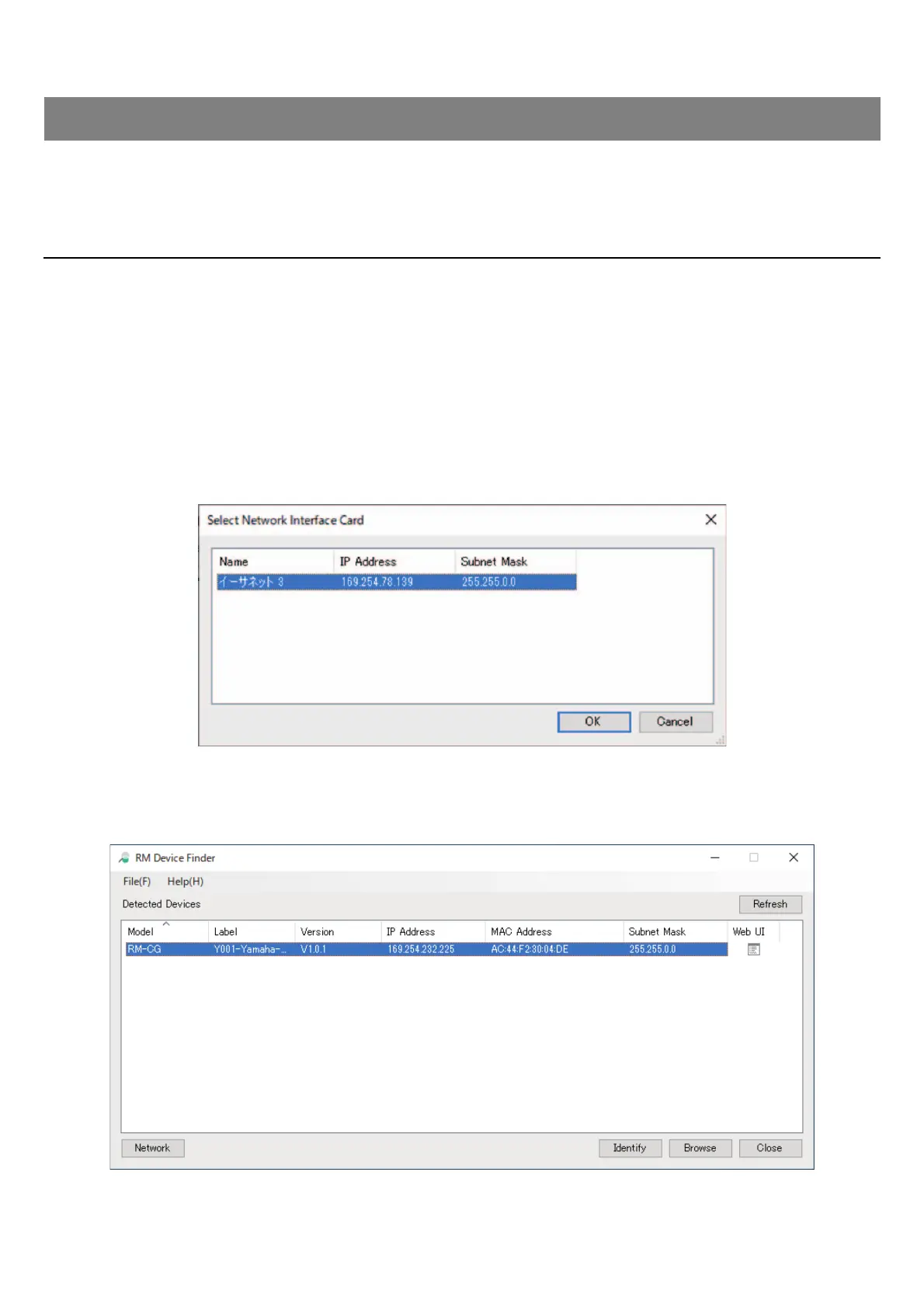
3. Select a network in the [Select Network Interface Card] window, and then click [OK].
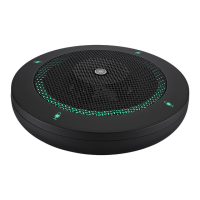
4. Select this unit in the [Detected Devices] window, and then click [Browse].
The first login window of RM-CG Device Manager appears.
WEB GUI


 To Next Page