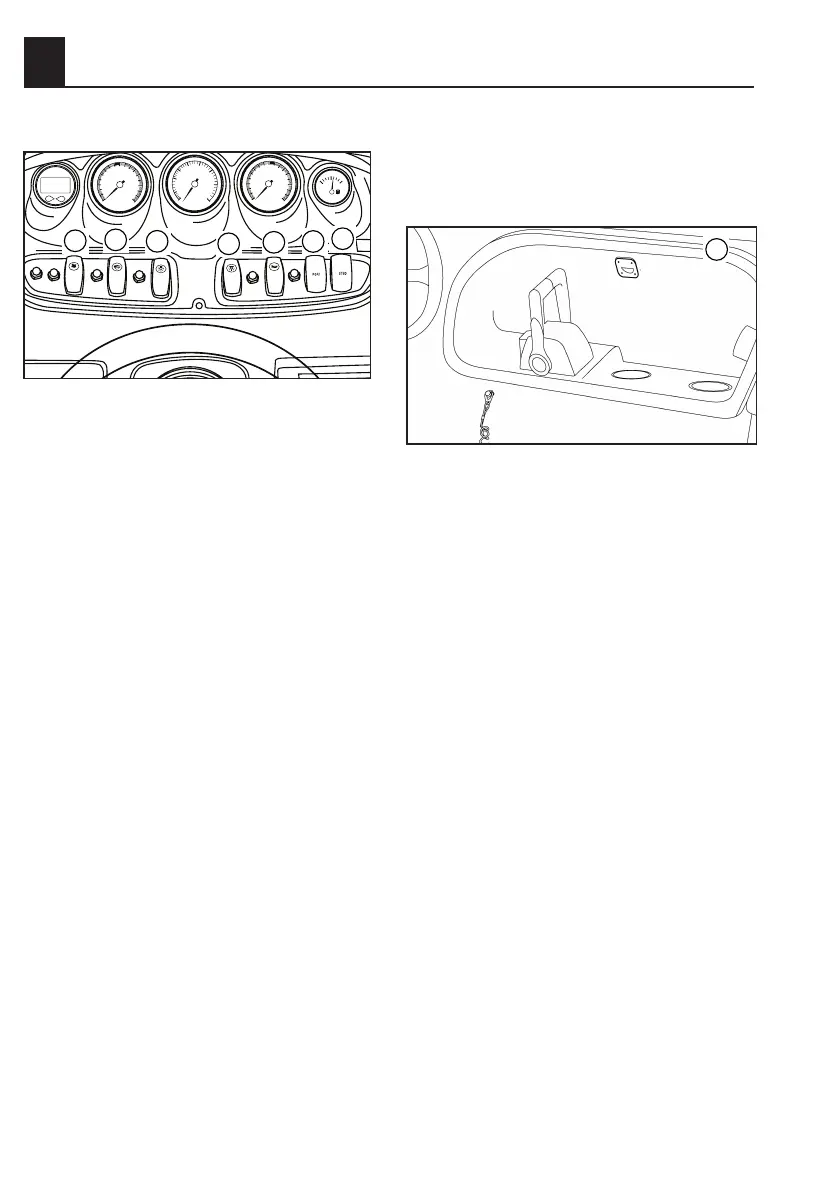
SWITCHES
1 Blower
2 Bilge Pump
3 Courtesy Lights
4 Lights
5 Horn
6 No-Wake Mode (Port)
7 No-Wake Mode (Starboard)
Blower
Press this switch to turn on the blower
to ventilate the engine compartment.
See page 3-9 for more information.
Bilge Pump
Press this switch to activate the bilge
pump. See page 3-8.
Courtesy Lights
This switch turns on the lights 8 locat-
ed in the recess on each side of the
gunwale.
Lights
This toggle switch controls the required
on-board lighting. Press the top of the
switch to turn on both the bow light and
stern light for night running. Press the
bottom of the switch to operate the
stern light alone when anchored at
night. Put the switch in the middle posi-
tion to turn off all lights (see page 3-9).
Horn
Pressing this switch activates the horn.
The horn can be used to signal other
boats as required by the “Rules of the
Road” (see page 1-15).
NOTE: The helm switches will not work
if the battery switch in the battery com-
partment is turned to the off position.
See page 4-3 for more information.
No Wake Mode
The No-Wake Mode System is useful
for operating the boat at a steady
speed with a minimal wake. This is
especially convienient when traveling
in harbors, channels, or other areas
posted with low speed limits as “no-
wake zones.”
2 FEATURES & FUNCTIONS
2-14



 To Next Page