EasyManua.ls Logo

Yamaha TX-550 - AM Tuner Calibration

Yamaha TX-550
25 pages
Print Icon
To Next Page IconTo Next Page
To Previous Page IconTo Previous Page
Loading...
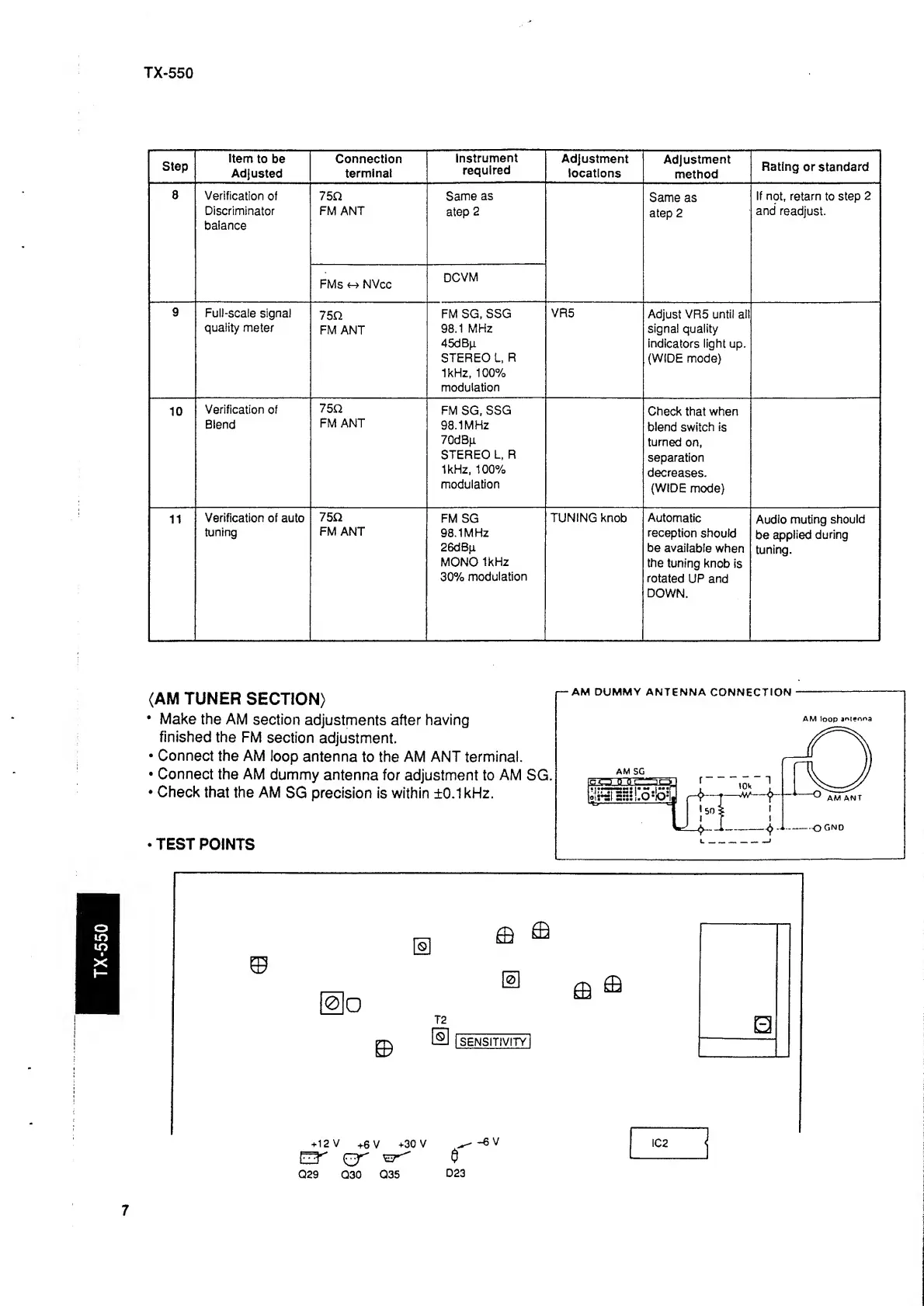
TX-550
TX-550
Step
Item
to be
Adjusted
Connection
terminal
Instrument
required
Adjustment
locations
Adjustment
method
Rating
or standard
8
Verification
of
Discriminator
balance
75n
FM
ANT
Same
as
atep
2
Same
as
atep 2
If
not,
retarn
to
step
2
and
readjust.
FMs
NVcc
DCVM
9
Full-scale
signal
quality
meter
75U
FM
ANT
FM SG,
SSG
98,1
MHz
45dBp
STEREO L,
R
1kHz, 100%
modulation
VR5
Adjust VR5
until all
signal
quality
indicators
light up.
(WIDE mode)
10
Verification
of
Blend
75Q
FM ANT
FM
SG,
SSG
98.1MHz
70dB^i
STEREO
L, R
1kHz, 100%
modulation
Check
that
when
blend
switch is
turned
on,
separation
decreases.
(WIDE
mode)
j
11
Verification of
auto
tuning
75Q
FM ANT
FM
SG
98.1MHz
26dBp
MONO
1kHz
30%
modulation
TUNING
knob
;
Automatic
reception
should
be
available
when
the
tuning
knob
is
rotated
UP and
DOWN.
Audio
muting
should
be
applied
during
tuning.
(AM TUNER
SECTION)
Make
the
AM
section
adjustments
after having
finished
the
FM
section
adjustment.
Connect
the AM
loop
antenna
to
the AM ANT terminal.
Connect
the AM
dummy
antenna for
adjustment to
AM
SG.
Check
that the AM
SG
precision
is
within
±0.1
kHz.
AM DUMMY
ANTENNA
CONNECTION
AM loop
ar»t?o
R 1 .
1
1
50
>
1
J
TEST
POINTS
IBIBSHnSial
7

Other manuals for Yamaha TX-550

Related product manuals