Periodic maintenance and adjustment
8-7
1
2
3
4
5
6
7
8
9
10
11
12
13
14
EAU18773
Removing and installing
panels
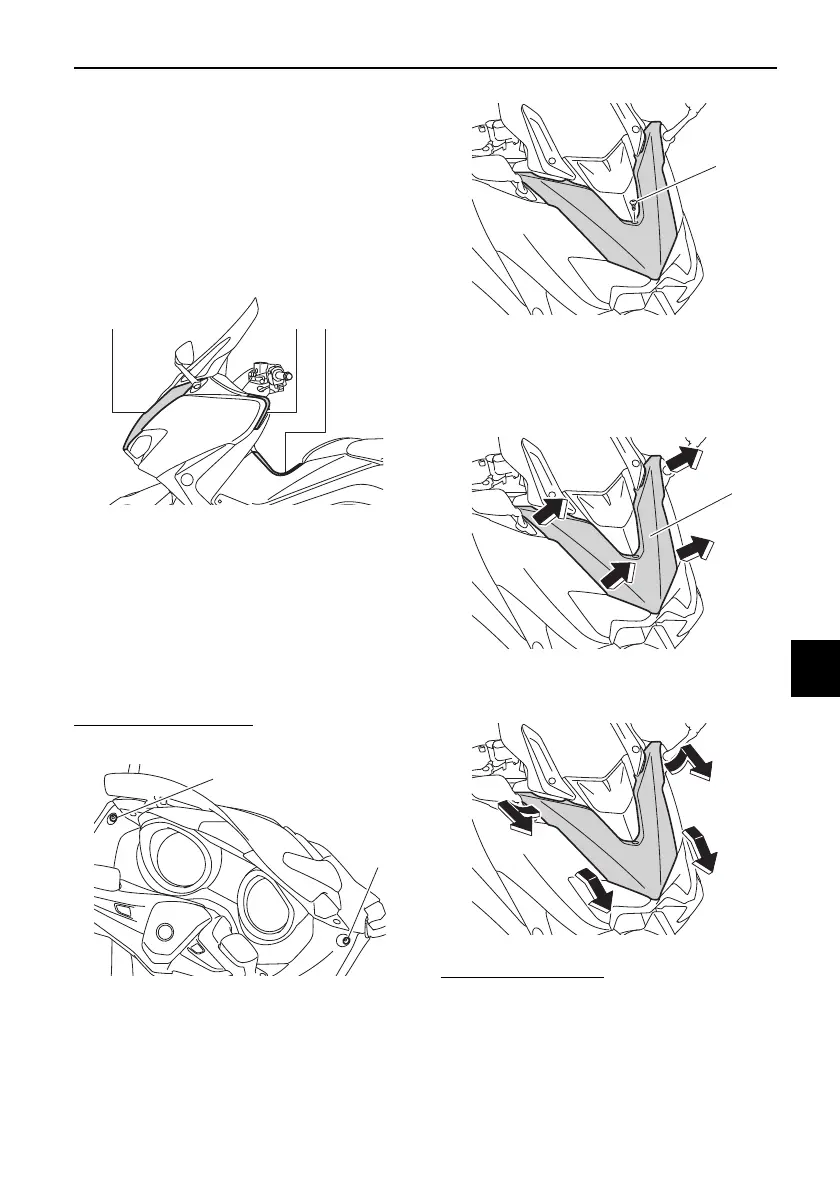
The panels shown need to be removed
to perform some of the maintenance
jobs described in this chapter. Refer to
this section each time a panel needs to
be removed and installed.
EAU77481
Panel A
To remove the panel
1. Remove the screws.
2. Release the sides of the panel by
pulling its upper left and right sides
to unhook them as shown.
3. Remove the panel as shown.
To install the panel
1. Insert the tabs on the upper left
and right sides of the panel.
2. Align the center and lower projec-
tions and then push the panel into
its original position.
1. Panel A
2. Panel B
3. Panel C
1. Screw
123
1
1
1. Screw
1. Panel A
BV1-28199-E0.book 7 ページ 2016年12月19日 月曜日 午前11時25分









 To Next Page