Instrument and control functions
5-12
5
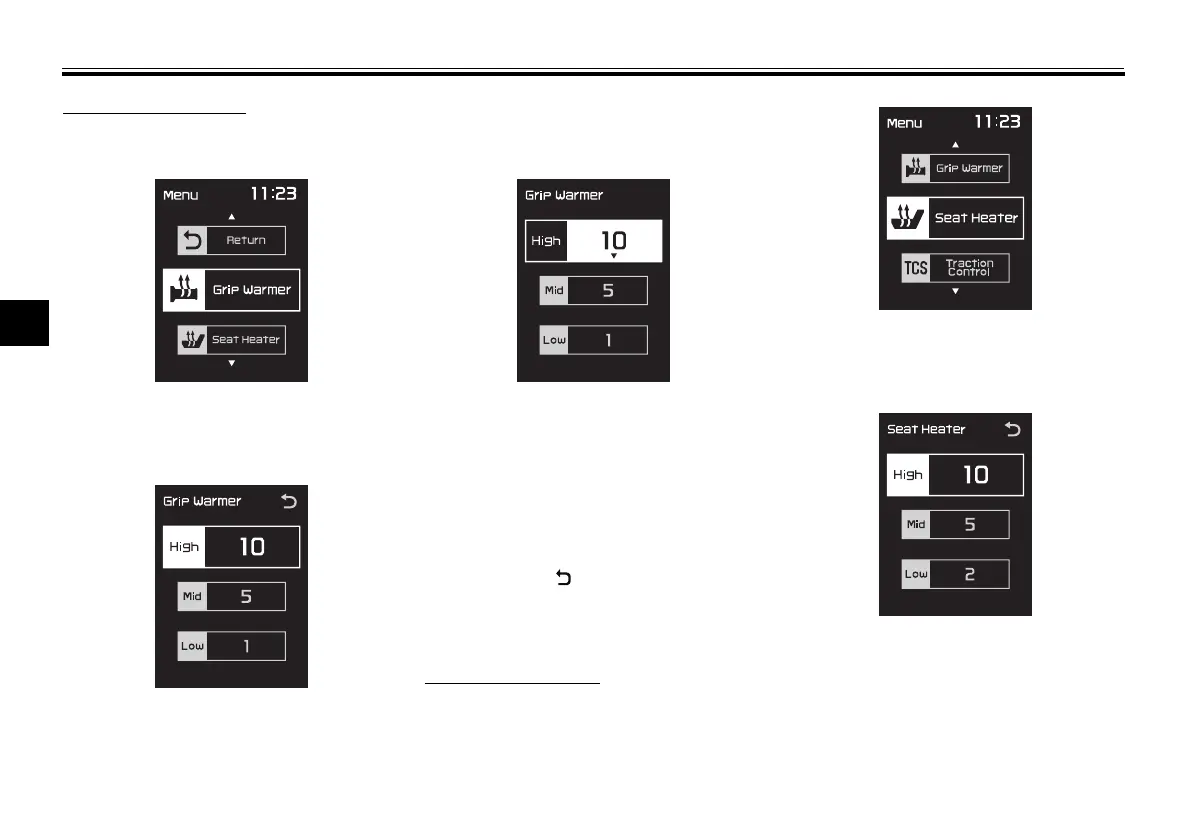
Grip warmer settings
1. Use the select switch to highlight
“Grip Warmer”.
2. Push the “MENU” switch. The grip
warmer setting display will be
shown.
3. Push the “MENU” switch. The
temperature level for the high set-
ting will be highlighted.
Use the select switch to set the
temperature level, and then push
the “MENU” switch.
4. Use the select switch to highlight
“Mid” or “Low”, and then change
the setting using the same proce-
dure that was used for the high
setting.
5. When you finished changing the
settings, use the select switch to
highlight “ ”, and then push the
“MENU” switch to return to the
menu screen.
Seat heater settings
1. Use the select switch to highlight
“Seat Heater”.
2. Push the “MENU” switch. The
seat heater setting display will be
shown.
3. Push the “MENU” switch. The
temperature level for the high set-
ting will be highlighted.
Use the select switch to set the
temperature level, and then push
the “MENU” switch.
UB3TE0E0.book Page 12 Tuesday, September 17, 2019 9:35 AM



 To Next Page