INSTRUMENT AND CONTROL FUNCTIONS
4-4
4
● two tripmeters (which show the
distance traveled since they were
last set to zero)
● a fuel reserve tripmeter (which
shows the distance traveled on the
fuel reserve)
● a clock
● a self-diagnosis device
● a brightness control mode
TIP
Be sure to turn the key to “ON” before
using the “SELECT” and “RESET”
switches, except for setting the bright-
ness control mode.
Speedometer
When the key is turned to “ON”, the
speedometer needle will sweep once
across the speed range and then return
to zero in order to test the electrical cir-
cuit.
Odometer, tripmeters, fuel reserve
tripmeter and clock
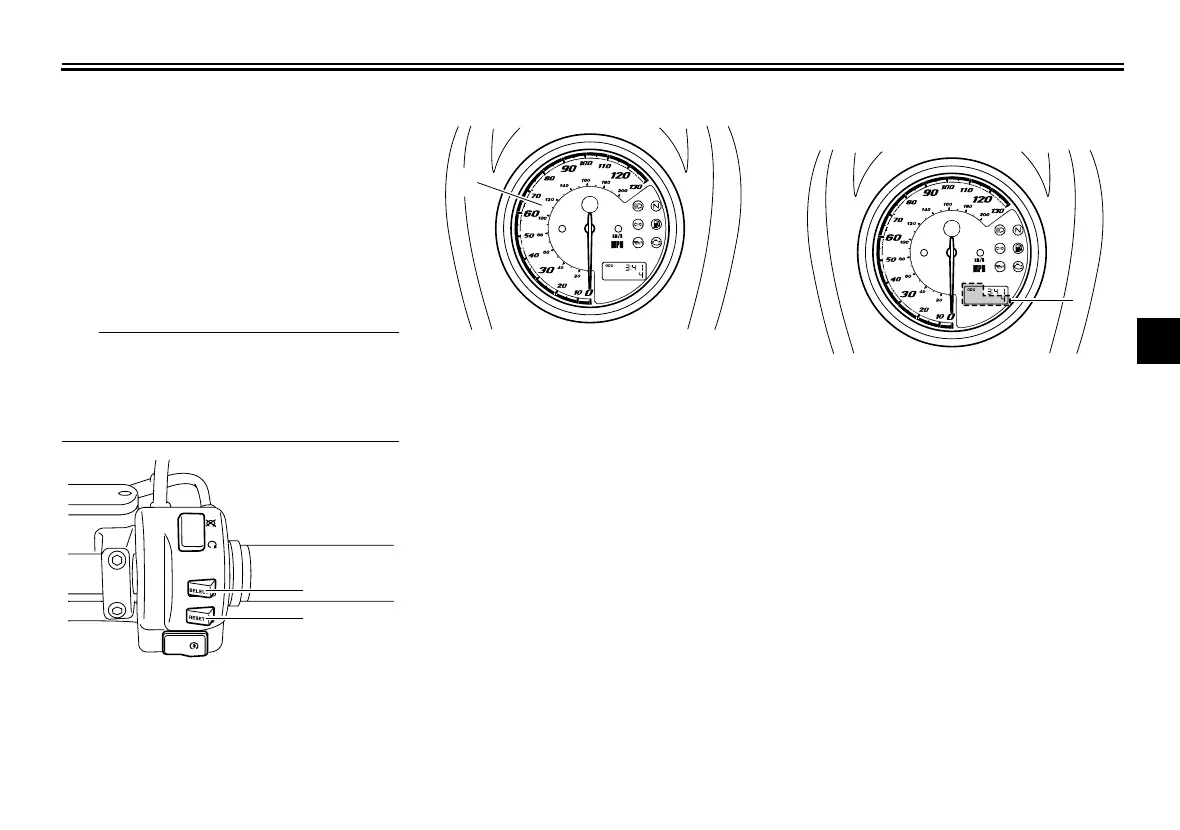
Push the “SELECT” switch to change
the display between the odometer
mode “ODO”, the tripmeter modes
“TRIP A” and “TRIP B” in the following
order:
ODO → TRIP A → TRIP B → ODO
If the fuel level warning light comes on
(see page 4-2), the odometer display
will automatically change to the fuel re-
serve tripmeter mode “TRIP F” and
start counting the distance traveled
from that point. In that case, push the
“SELECT” switch to change the display
between the various tripmeter and
odometer modes in the following order:
1. “SELECT” switch
2. “RESET” switch
1
2
1. Speedometer
1
1. Odometer/tripmeter/fuel reserve tripmeter
1
U26S13E0.book Page 4 Tuesday, May 17, 2011 10:56 AM



 To Next Page