INSTRUMENT AND CONTROL FUNCTIONS
4-6
4
To set the brightness
1. Turn the key to “OFF”.
2. Push and hold the “SELECT”
switch.
3. Turn the key to “ON”, and then re-
lease the “SELECT” switch after
five seconds.
4. Adjust the multi-function meter unit
panel brightness level by pushing
the “SELECT” switch.
5. Push the “RESET” switch.
The odometer/tripmeter/clock dis-
play will return to the prior mode.
EAU12348
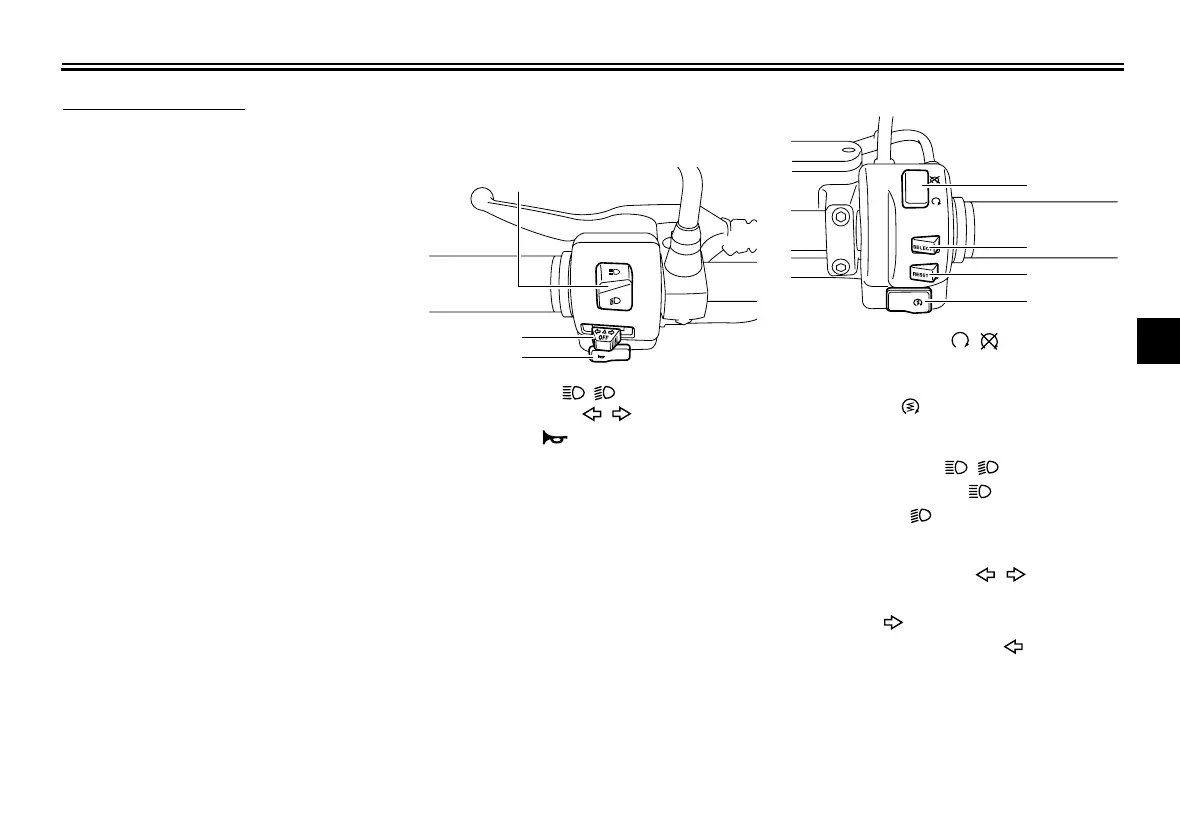
Handlebar switches
Left
Right
EAU12400
Dimmer switch “ / ”
Set this switch to “” for the high
beam and to “” for the low beam.
EAU12430
Turn signal switch “ / ”
To signal a right-hand turn, push this
switch to “”. To signal a left-hand
turn, push this switch to “”. When re-
leased, the switch returns to the center
position.
Since this model is equipped with a
self-canceling system, the turn signal
lights will self-cancel after the vehicle
1. Dimmer switch “ / ”
2. Turn signal switch “ / ”
3. Horn switch “”
2
3
1
1. Engine stop switch “ / ”
2. “SELECT” switch
3. “RESET” switch
4. Start switch “”
1
2
3
4
U26S13E0.book Page 6 Tuesday, May 17, 2011 10:56 AM











 To Next Page