EasyManua.ls Logo

Yamaha YST-SW325 - User Manual

Yamaha YST-SW325
20 pages
Print Icon
To Next Page IconTo Next Page
Loading...
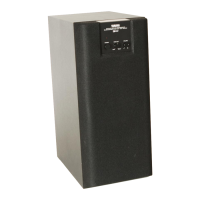
YST-SW325
Subwoofer System
UB
OWNER’S MANUAL

Other manuals for Yamaha YST-SW325

Questions and Answers

  • L
    Lori WeaverJul 29, 2025
    What to do if my Yamaha YST-SW325 has no sound?
    • L
      Lisa BradleyJul 29, 2025
      If your Yamaha Subwoofer isn't producing any sound, there are a couple of things to check. First, make sure the volume isn't set to the minimum; try raising it. Also, ensure that the speaker cables are securely connected.
  • R
    rwarrenAug 2, 2025
    Why Yamaha Subwoofer does not turn on automatically?
    • S
      Sandra WatsonAug 2, 2025
      If your Yamaha Subwoofer isn't turning on automatically, verify a few settings. First, check that the POWER switch is in the ON position. Next, ensure the STANDBY/ON button is set to ON, and the AUTO STANDBY switch is set to either "HIGH" or "LOW". If the input signal is too low, set the AUTO STANDBY switch to "HIGH".
  • L
    Lori GambleAug 6, 2025
    How to fix Yamaha Subwoofer when power is not supplied?
    • D
      David HughesAug 6, 2025
      If your Yamaha Subwoofer isn't receiving power, even when the STANDBY/ON button is in the ON position, check that the power plug is securely connected. Also, ensure the POWER switch is set to the ON position.
  • S
    Stacey PaceAug 10, 2025
    Why Yamaha YST-SW325 turns into standby mode unexpectedly?
    • W
      wanda46Aug 11, 2025
      If your Yamaha Subwoofer turns into standby mode unexpectedly, the level of input signal may be too low. Try increasing the volume of the amplifier and setting the AUTO STANDBY switch to the "HIGH" position.
  • T
    Timothy PruittAug 15, 2025
    What to do if Yamaha YST-SW325 Subwoofer sound level is too low?
    • K
      kristy40Aug 15, 2025
      If your Yamaha Subwoofer sound level is too low, ensure that the speaker cables are connected correctly (L to L, R to R, “+” to “+” and “–” to “–”). Also, the PHASE switch setting may not be proper, try setting it to the other position. If you are playing a source sound with few bass frequencies, play a source sound with bass frequencies and set the HIGH CUT control to a higher position. Finally, reposition the subwoofer or break up the parallel surface by placing bookshelves etc. along the walls, as it may be influenced by standing waves.
  • A
    Alex GibsonAug 19, 2025
    Why Yamaha Subwoofer turns on unexpectedly?
    • C
      coreymillerAug 19, 2025
      If your Yamaha Subwoofer is turning on unexpectedly, it might be due to noise from external appliances. Try moving the subwoofer farther away from such appliances and/or repositioning the connected speaker cables. Alternatively, set the AUTO STANDBY switch to the "OFF" position.
  • A
    Anthony RichardsonAug 23, 2025
    Why Yamaha YST-SW325 does not turn into standby mode automatically?
    • B
      burgessgeoffreyAug 23, 2025
      If your Yamaha Subwoofer isn't automatically entering standby mode, it could be due to noise from external appliances. Try moving the subwoofer away from these appliances or repositioning the speaker cables. Alternatively, ensure the AUTO STANDBY switch is set to the "HIGH" or "LOW" position; if the issue persists, set it to "OFF".

Summary

Important Safety Instructions

Graphical Symbols Explanation

Explains the meaning of graphical symbols used in the manual for safety alerts.

Fire and Electric Shock Warnings

Warns against exposing the appliance to rain or moisture to prevent fire or shock.

Serial Number Recording

Instruction to record the system's serial number for future reference.

FCC Information and Compliance

Modification Warning

Warns against modifying the unit, which could void FCC authority.

Cable Connection Requirements

Advises using only high-quality shielded cables for connections.

FCC Part 15 Compliance

States the product complies with FCC Part 15 for Class "B" digital devices.

Hearing Protection Advice

Operating and Safety Precautions

General Operating Guidelines

Lists essential precautions for installation, usage, and maintenance.

Specific Placement Risks

Details warnings about placing objects on the unit and potential hazards.

Environmental and Usage Hazards

Covers risks from humidity, high volume, and improper cleaning methods.

Voltage Selector for Specific Models

Standby Mode Explanation

Special UK Model Instructions

Canadian Customer Notice

Product Features Overview

Advanced Yamaha Active Servo Technology II

Explains the technology for reproducing high-quality super-bass sound.

QD-Bass Technology Description

Describes Yamaha's unique technology for efficient sound radiation.

Supplied Accessories List

Subwoofer Placement Guide

Optimal Subwoofer Positioning

Provides recommendations for optimal subwoofer placement for sound quality.

Standing Waves Mitigation

Explains "standing waves" and how to mitigate them for better bass.

Using Non-Skid Pads

Instructs how to use the provided non-skid pads for stability.

Audio Connections: Line Output

Connecting to Amplifier Line Output

Explains how to connect using the amplifier's line output terminals.

Line Output Connection Notes

Provides notes on connecting to PRE OUT, mono output, and preventing sound issues.

Audio Connections: Speaker Output

Connecting to Amplifier Speaker Outputs

Explains how to connect using the amplifier's speaker output terminals.

Speaker Output Connections (Two Sets)

Connecting via Speaker Cables (Two Terminals)

Details connecting using speaker cables when the amplifier has two sets of terminals.

Speaker Output Connections (One Set)

Connecting via Speaker Cables (One Terminal)

Details connecting using speaker cables when the amplifier has one set of terminals.

Terminal Connections and Power-Up

Connecting to Subwoofer Terminals

Explains how to connect speaker cables to the subwoofer's terminals.

Plugging into AC Outlet

Instructs to plug the subwoofer into the AC outlet after all connections are made.

Controls and Functions: Panel Overview

Front and Top Panel Controls

Identifies and describes controls on the front and top panels.

Control Panel Buttons

Explains the function of buttons like STANDBY/ON, B.A.S.S., and HIGH CUT FILTER.

Rear Panel Controls

Identifies and describes controls on the rear panel.

Controls and Functions: Detailed Explanations

HIGH CUT, VOLUME, and PHASE Controls

Details the function of HIGH CUT, VOLUME, and PHASE controls.

POWER and AUTO STANDBY Switches

Explains the POWER switch and the AUTO STANDBY function switch.

Terminal Descriptions and VOLTAGE Selector

Describes input/output terminals and the VOLTAGE SELECTOR.

AUTO STANDBY FUNCTION Operation

Adjusting Subwoofer for Optimal Sound

Initial Setup and Volume Balancing

Guides through initial setup, volume balance, and phase adjustment.

Tuning HIGH CUT and Sound Modes

Details HIGH CUT adjustment and MUSIC/MOVIE mode selection.

Subwoofer Frequency Characteristics

Frequency Response Graph

Shows the subwoofer's frequency response characteristics.

Example Adjustment (4-5 Speakers)

Provides an example adjustment for 4" or 5" front speakers.

Example Adjustment (8-10 Speakers)

Provides an example adjustment for 8" or 10" front speakers.

Advanced Yamaha Active Servo Technology II

Troubleshooting Common Problems

Power Supply and Sound Issues

Addresses problems with power supply and sound output levels.

Automatic Operation and Unexpected Behavior

Covers issues with auto standby, turn-on, and unexpected behavior.

Technical Specifications

Yamaha YST-SW325 Specifications

General IconGeneral
Subwoofer frequency range25 - 180 Hz
Product colorBlack
Power consumption (standby)0.5 W
Weight and Dimensions IconWeight and Dimensions
Subwoofer depth374 mm
Subwoofer width315 mm
Subwoofer height380 mm
Subwoofer weight13000 g

Related product manuals