11
CLOUDHAWK
GB
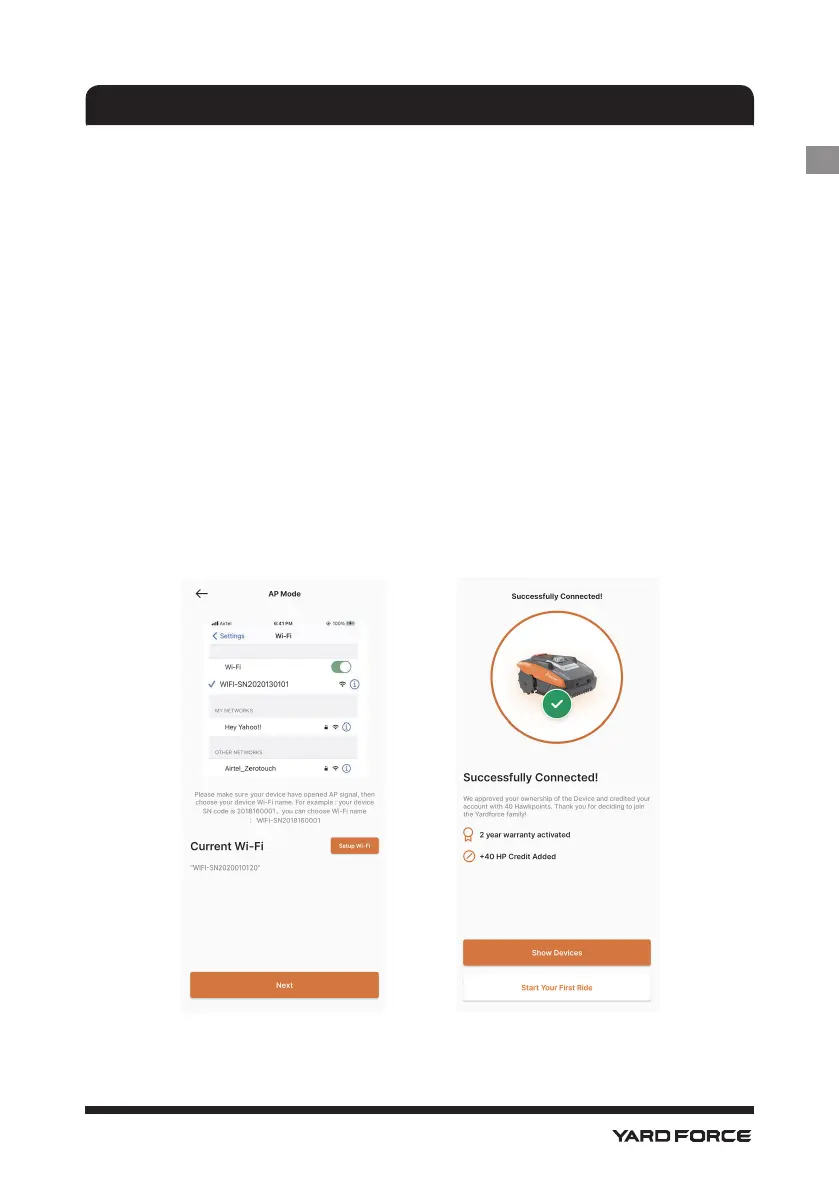
4. After you select and connect to the hotspot which created by your
mower, please click the return button and back to our App page
(G), you will nd that currently your mobile phone is connected to
WIFISNxxxxxxxxxx, and then please click "Next" button.
5. Then the mobile phone will share your house router SSID and
password to your mower by local network, once the mower can
receive this le, it will try to connect to the internet, nally you will see
the page (H), means your mower now is nally connected with internet.
NOTE:
in most cases, the users do not need do such setting as you
already complete the configuration with smart configure. and "Assistant
conguration with AP mode" is our additional setting for the situation when
you are failed to connect the mower to internet within smart congure. If
you still failed to connect the mower, we suggest to repower the device
and do the whole conguration process again.
G H






 To Next Page