model no. 060-2342-0 | contact us: 1.866.523.5218 model no. 060-2342-0 | contact us: 1.866.523.5218
15
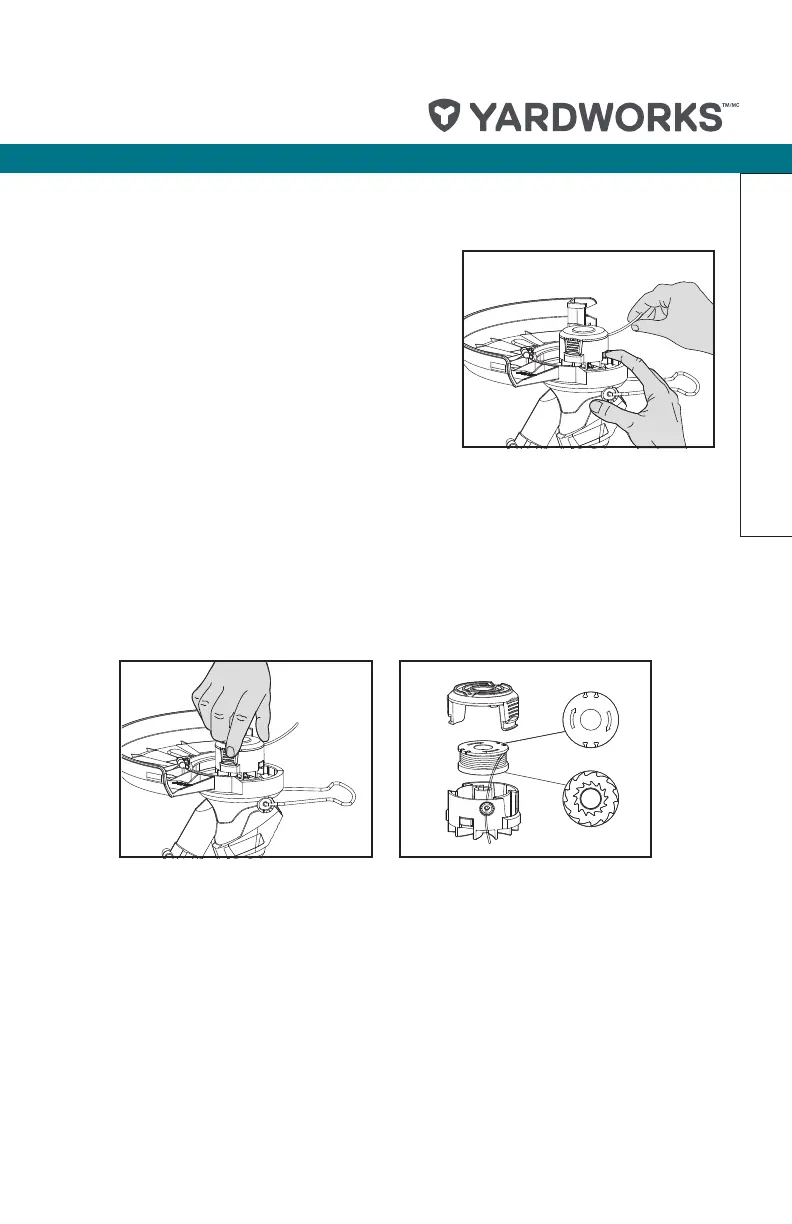
TO MANUALLY FEED THE LINE (SEE FIG. I)
If required, line can be fed out manually. Before
manually feed, remove the battery rst. To operate,
press and release manual line feed button (a), while
gently pulling out the lines until the lines reach the
line cutter. If the line extends past the line cutter, too
much line has been fed out. If too much line is fed out,
remove the spool cap and turn spool counter-clockwise
until the line is at the desired length.
Operation
TO REMOVE THE CAP
Press and hold in the two latches (See Fig. J). Pull cap away from the spool holder. When
retting the spool cap. Keep all areas of the cap and spool holder clean. Replace the cap,
pressing rmly down towards the spool holder to ensure cap is fully located. Check that
the cap is correctly tted by trying to remove it without depressing the two latches.
TO CHANGING THE SPOOL (SEE FIG. K)
Note: For your convenience it is recommended you buy replacement spools with the
trimmer line preinstalled.
Remove Spool Cap Cover. Remove the old Spool from Spool Holder. Clear any broken
line or cutting debris from the spool area. Pull the line from the new replacement Spool
through the eyelet of the Spool Holder. Place new Spool into the holder with the cut
out areas of the Spool facing inward or down. When installed into the Spool Holder, the
smooth side of the Spool should be visible. Release line from cleat on the Spool. Ret the
Spool Cap Cover.
J
K
I


 To Next Page
 Loading...