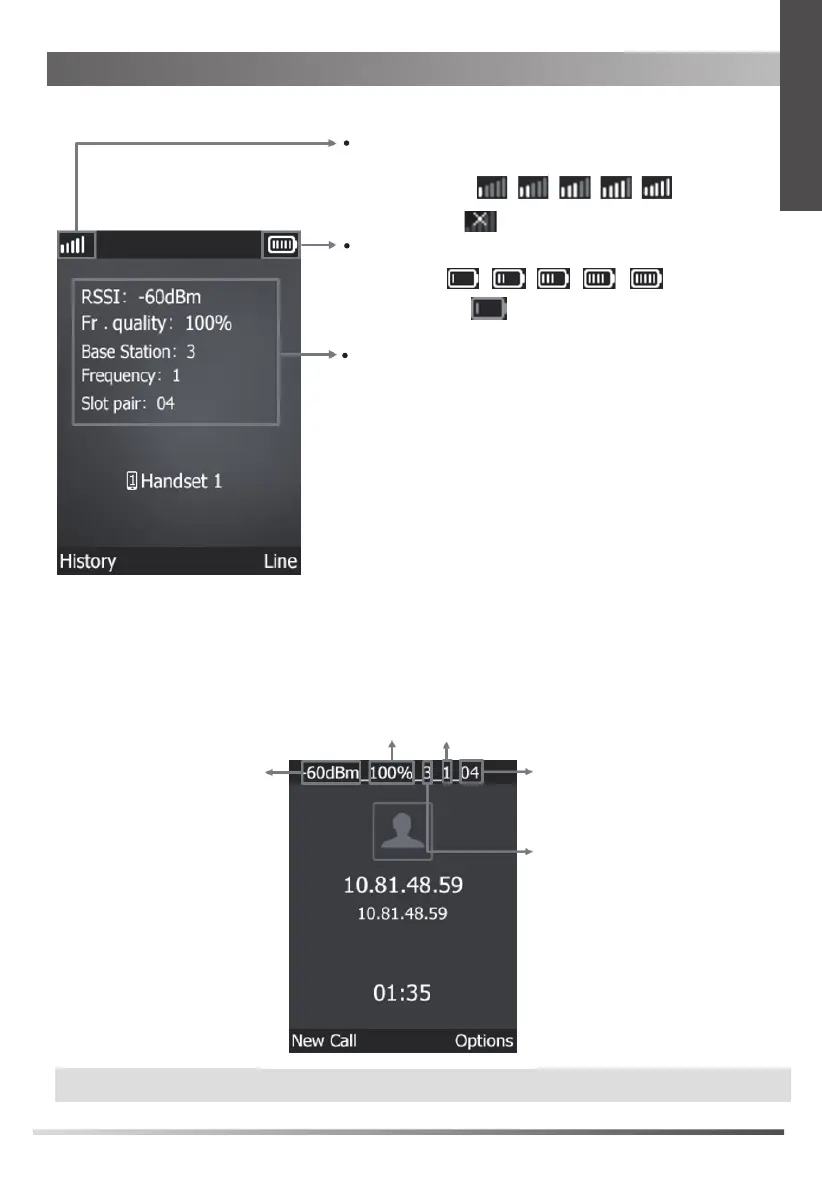
Indicates the signal strength between the base station and
registered handset.
Weak to strong:
No reception:
The talking screen
Using the Measuring Handset
The idle screen
Values for determining the connection quality:
RSSI: Base station signal reception strength with the best
reception in dBm.
Recommended value: -28 to -70 dBm.
Note: The RSSI value is displayed in dBm as standard, you
can change it into a percentage value.
Fr. quality: Frame quality. Percentage rate of the packages
received without error in the last measuring interval.
Recommended value: 100%.
Base Station: RPN (Radio Fixed Part Number) of the base station.
Identifier for the base station to which the handset
is connected.
Frequency: Carrier frequency of the signal received.
Value range: 0-30.
Slot pair: Time slot for the reception channel on which the
measurement was performed.
Duplex Slot pair used (0-11).
If the handset is in the talking screen, it shows the measurement data at the top edge.
Note:
If one handset is used, you can enter #*9 on the handset to perform an analog call.
Low to full:
Indicates the current battery status.
Need charging: (red)
The LCD screen shows the following information in the idle screen:
RSSI
Fr. quality
Base Station
Frequency
Slot pair
5
E
N
G
L
I
S
H


 To Next Page