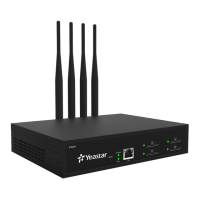
The Yeastar TG Series VoIP GSM/3G/4G Gateway is a device designed to facilitate communication between a Voice over IP (VoIP) system and a GSM/3G/4G mobile network. It acts as a bridge, allowing calls to be routed between these two different communication infrastructures. The user guide covers models TG200, TG400, TG800, and TG1600, indicating a range of capacities for mobile modules.
Function Description:
The primary function of the TG Series gateway is to connect a Private Branch Exchange (PBX) or other VoIP systems to GSM/3G/4G mobile networks. This enables users on the VoIP system to make and receive calls to and from mobile phones, and vice versa, through the installed SIM cards in the gateway. It supports various modes for connecting to a PBX, including Account Mode, Register Trunk Mode, and Peer Trunk Mode, offering flexibility in integration. Beyond basic call routing, the gateway also supports SMS messaging, USSD messages, and provides an API for third-party software integration. It can manage mobile modules, including configuring profiles, rebooting, enabling/disabling, and adjusting call volume. Call control features allow for routing based on caller ID or destination numbers, blocking incoming/outgoing numbers, and callback functionality.
Important Technical Specifications:
While specific detailed technical specifications for each model (TG200, TG400, TG800, TG1600) are not fully enumerated in the provided excerpts, the manual does highlight some key aspects:
- Ethernet Ports: The TG200, TG400, TG800, and TG1600 models feature 10/100 adaptive RJ45 Ethernet ports. The TG800 and TG1600 models also include a WAN port in addition to the LAN port.
- Antenna Connectors: All models have antenna connectors for GSM/3G/4G antennas. The TG200 has 2, TG400 has 4 (or 1 antenna splitter), TG800 has 8 (or 2 antenna splitters), and TG1600 has 16 (or 4 antenna splitters), indicating the number of mobile modules supported by each model.
- SIM Card Slots: Each model has SIM card slots corresponding to the number of mobile modules.
- Power: The devices connect to an AC 100-240V, 50/60Hz power supply.
- Operating Temperature: The recommended operating temperature should be kept below 104°F (40°C).
- Audio File Format for Prompts: Supports .WAV, .wav, and .gsm audio files, with a maximum size of 8 MB. Supported WAV formats include PCM 8K 16bit mono (128kbps), law(g.711) 8k 8bit (64kbps), u-law(g.711) 8k 8bit (64kbps), and gsm 6.10 8k (13kbps).
- Log File Sizes: Hardware log files are stored up to 4 files. Normal log files are stored up to 16 files, with a maximum size of 1MB each. Debug log files are stored up to 2 files, with a maximum size of 10MB each. Web operation logs are stored up to 2 files, with a maximum size of 1MB each.
- VoIP Protocols: Supports SIP and IAX2. Default UDP/TCP/TLS ports for SIP are 5060/5060/5061 respectively. Default UDP port for IAX2 is 4569.
- DDNS Services: Supports dyndns.org, freedns.afraid.org, www.no-ip.com, and www.zoneedit.com.
Usage Features:
- Web-based Configuration: The gateway provides a user-friendly web-based interface for all configurations and management tasks, accessible via a default IP address (http://192.168.5.150) with default credentials (admin/password).
- Hot-Plugging SIM Cards: SIM cards can be inserted and removed without powering off the device, ensuring continuous operation.
- Mobile Module Management: Users can configure individual mobile module profiles, including trunk names and mobile numbers. They can reboot, enable, or disable modules, and adjust Rx/Tx call volumes.
- Call Duration Limits: Ability to set single call maximum duration and monthly talk plans for mobile trunks, with options for alarm notifications (phone calls or email) when talk time is running out.
- Network Type and Band Configuration: Allows manual selection of network type (e.g., LTE Only) and band if automatic detection is not suitable.
- VoLTE Support: Can enable Voice over LTE for high-quality audio calls on 4G networks, provided the module and SIM card support it and the environment is 4G.
- SIM Card PIN Unlock: Users can unlock SIM cards with PIN lock directly from the gateway's web interface.
- Call Forwarding and CLIR: Supports configuring call forwarding and Calling Line Identification Restriction (CLIR) for SIM cards, dependent on carrier support.
- Mobile Trunk Grouping: Mobile trunks can be grouped for efficient management and routing, with different outgoing strategies (e.g., Balance).
- VoIP Trunk Configuration: Supports creating VoIP trunks in Account, Register Trunk, or Service Provider (Peer Trunk) modes, with options for SIP and IAX2 protocols.
- Call Routing: Flexible call routing based on caller ID, destination numbers, and two-stage dialing for IP to Mobile routes.
- Blacklisting: Ability to block specific incoming and outgoing numbers.
- Callback Feature: Allows callers to hang up and be called back by the gateway, potentially reducing costs. This can be enabled for specific numbers or all numbers, with callback rules for digit manipulation.
- AutoCLIP Route: Automatically stores records of failed outgoing calls and routes subsequent incoming calls from the called party directly to the original caller's extension.
- SMS Messaging: Send SMS messages through selected GSM/3G/4G ports, manage SMS contacts, and view/manage sent/received messages.
- SMS to Email/Email to SMS: Configure the gateway to send received SMS messages to email addresses and convert emails into SMS messages to be sent via mobile trunks.
- USSD Messages: Send Unstructured Supplementary Service Data (USSD) messages to carriers for service subscriptions or other interactions, individually or in bulk.
- TG Gateway API: Enable an API for third-party software to send and receive SMS messages, with user authentication and IP address restrictions for security.
Maintenance Features:
- System Status Monitoring: Provides detailed status information for system, ports, trunks (mobile and VoIP), and network.
- System Information: Displays hardware version, firmware version, disk usage, and memory usage.
- Firmware Update: Supports updating firmware via HTTP server or TFTP server, with an option to reset configurations to factory defaults during the update.
- Backup and Restore: Allows users to create backup files of system configurations and restore them from local PCs, ensuring system recovery.
- System Reboot: Provides options for immediate system reboot and scheduling automatic reboots.
- Factory Reset: Ability to reset the system to factory defaults, erasing all configuration data.
- Network Configuration: Configure LAN settings, including static IP address, VLAN, OpenVPN, and DDNS for remote access.
- Static Routes: Configure static routing rules for specific network destinations.
- Security Center: Centralized management for security settings, including service port information (SIP, HTTP, SSH, FTP, TCP, TLS).
- Alert Settings: Configure email and phone call notifications for IP attack and user lockout events.
- Certificate Management: Upload trusted certificates and gateway certificates for TLS VoIP trunks and accounts.
- Firewall Rules: Configure firewall rules to protect the system from attacks, including blocking pings and blocking all packets/connections (with prior setup for essential access).
- IP Blocklist: Automatically adds IP addresses to a blocklist if they exceed configured packet thresholds, with options to delete blocked IPs.
- Call Logs and System Logs: View, search, download, and delete call logs and various system logs (hardware, normal, debug, web operation) for troubleshooting and auditing.
- Ethernet Packet Capture: Integrated tool to capture Ethernet packets on the web user interface for efficient system debugging, with the ability to download captured files for analysis with tools like Wireshark.

 Need help?
 General












 To Next Page