EasyManua.ls Logo

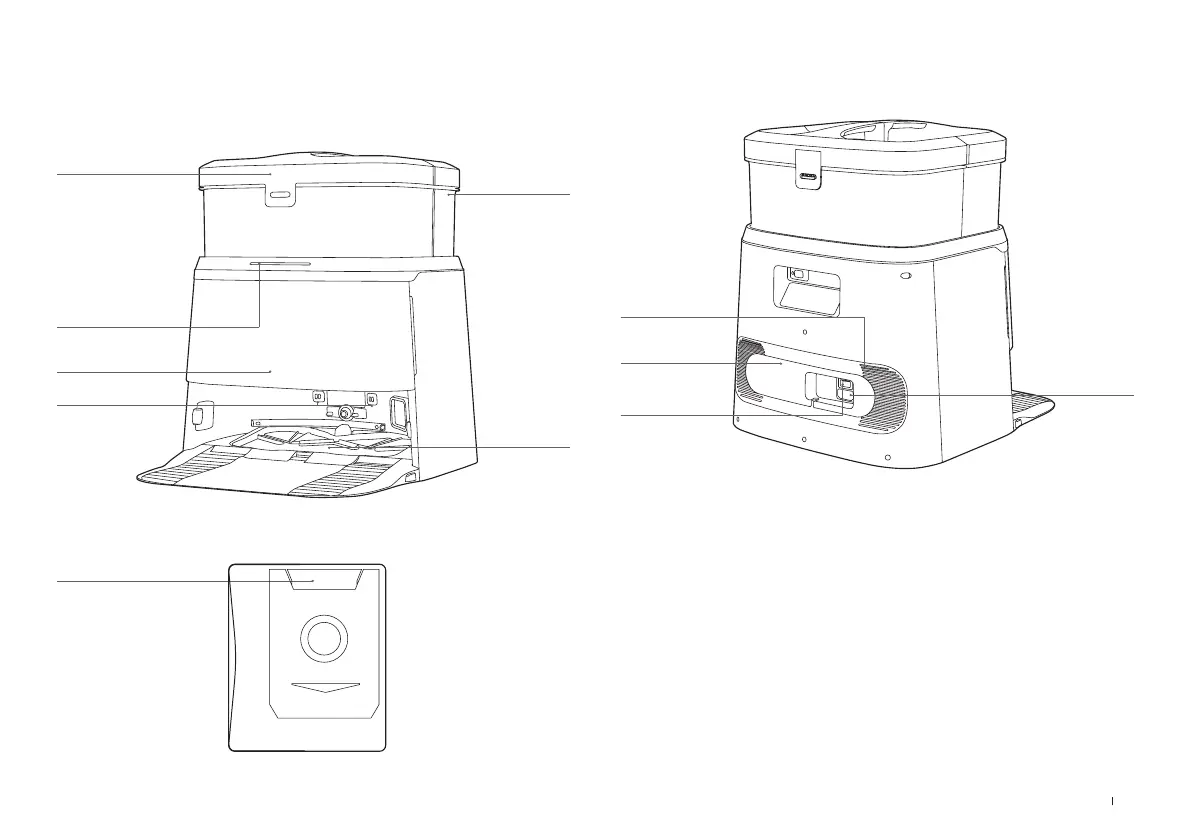
yeedi M12 PRO + - OMNI Station Details; OMNI Station Front View; OMNI Station Back View; Dust Bag Information

yeedi M12 PRO +
48 pages
Print Icon
To Next Page IconTo Next Page
To Previous Page IconTo Previous Page
Loading...
11 EN
OMNI Station
Dust Collection
Cabin
Clean Water Tank
Dirty Water
Tank
Light Strip
Glowing White(Low brightness):
Standby
Glowing White:
Running/Self-clean
Flashing Red:
Malfunction
Goes out:
Power Outage/
Deep Sleep Mode
Cleaning
Sink
Charging Contacts
OMNI Station(Back)
Dust Bag
Dust Bag Handle
Note:
* If the Light Strip is ashing red, please check the reason in YEEDI App�
* If robot fails to charge, please wipe Charging Contacts with a clean and dry cloth�
Note: Please turn on the Rocker Switch before charging�
Air Vent
Cable Trunking
Rocker Switch
"I"=ON "O"=OFF
Power Socket

Related product manuals