EasyManua.ls Logo

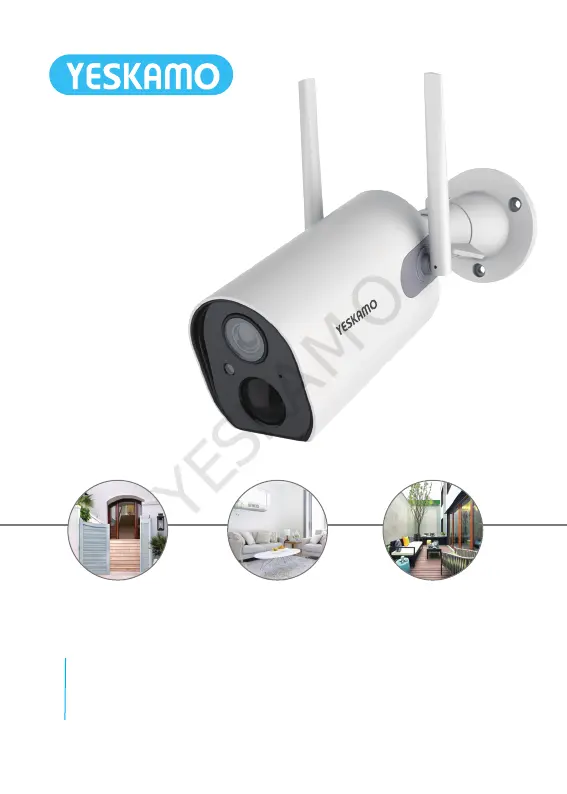
YESKAMO Z6 - User Manual

YESKAMO Z6
32 pages
Print Icon
To Next Page IconTo Next Page
Loading...
Smart Battery Powered IP Camera
User Manual
YESKAMO

Questions and Answers

  • K
    Kristi EvansAug 19, 2025
    How to fix YESKAMO IP Camera connection issues?
    • J
      James MillsAug 19, 2025
      If you're having trouble connecting your YESKAMO IP Camera, check the following: * Verify your Wi-Fi name and password are correct. * Ensure your Wi-Fi network is 2.4G, as 5G is not supported. * Position your camera and mobile phone closer to the router.
  • K
    Kirk WilliamsAug 21, 2025
    What to do if my YESKAMO IP Camera has frequent alarms?
    • R
      Rose WeaverAug 21, 2025
      If your YESKAMO IP Camera is sending frequent alarms, it might be due to the environment or the number of vehicles triggering the cameras often. Try changing the installation angle or adjusting the camera's alarm sensitivity to 'low'. Also, check if the network works well; the camera might be too far from the router.
  • C
    Crystal WrightAug 23, 2025
    Why is my YESKAMO IP Camera showing as offline?
    • C
      colemarkAug 23, 2025
      If your YESKAMO IP Camera is offline, check if the network is working properly. It's also possible that the camera is too far from the router, causing the Wi-Fi signal to be weak.
  • M
    Michael GonzalezAug 26, 2025
    How to reduce video delay on YESKAMO IP Camera?
    • N
      ncooperAug 26, 2025
      To reduce video delay on your YESKAMO IP Camera, check your WIFI network connection. Also, make sure the distance between the camera and the router isn't too far.
  • W
    William TrevinoAug 27, 2025
    How to enable alarm push notifications for YESKAMO IP Camera?
    • P
      Paul MartinezAug 27, 2025
      To receive alarm push notifications from your YESKAMO IP Camera, enable notifications for the CloudEdge app in your mobile device's settings.
  • A
    Adriana ZunigaAug 30, 2025
    How to connect YESKAMO IP Camera to a new WiFi network?
    • T
      teresadaltonAug 30, 2025
      To connect your YESKAMO IP Camera to a new WiFi network: * Press the reset button to restore the camera to its factory settings. * Remove the camera from the CloudEdge App. * Reconnect the camera to the new network.
  • M
    Mrs. Martha StokesSep 1, 2025
    Why does my YESKAMO IP Camera have short battery life?
    • S
      Sara DouglasSep 1, 2025
      A short battery life in your YESKAMO IP Camera may be because the camera is being awakened too often. Avoid placing it on the roadside or in direct sunlight.
  • L
    Laurie AdkinsSep 3, 2025
    What to do if my YESKAMO IP Camera is not recording alarm videos?
    • K
      Kathy NobleSep 3, 2025
      If your YESKAMO IP Camera isn't recording alarm videos, insert a TF card or turn on cloud storage.
  • A
    Andrew BlevinsSep 5, 2025
    Why does my YESKAMO IP Camera take alarm pictures without people?
    • N
      Nicole MichaelSep 5, 2025
      If your YESKAMO IP Camera is capturing alarm pictures without people, it could be because the camera needs time to wake up, and people are moving too fast. Alternatively, objects with dissipative heat might be triggering the PIR sensor. It is recommended to lower the sensitivity of the PIR alarm.
  • A
    Anthony WrightSep 7, 2025
    Why is my YESKAMO IP Camera unable to charge?
    • K
      klopezSep 7, 2025
      If your YESKAMO IP Camera is not charging, use a 5V 1A/2A power adapter to charge the camera correctly. When charging normally, the charging indicator will light up red. If the charging indicator does not light up, check if the power adapter and charging cable are working.

Summary

Safety Caution

Product Details

Specification

Technical specifications of the IP camera, covering image sensor, resolution, connectivity, and battery.

Configuration on Phone App

Download Cloudedge App

Instructions for downloading and installing the Cloudedge mobile application from app stores.

Create Account and Login

Step-by-step guide for creating a user account and logging into the Cloudedge app.

Add Device to Phone App

Process for connecting and adding the smart camera to the Cloudedge mobile application.

Share the Camera with Family

More Features About Battery Camera

Motion Detection Alarm

Information on the camera's PIR sensor and how it triggers motion detection alarms.

Installation

Troubleshooting

YESKAMO Z6 Specifications

General IconGeneral
Two-Way AudioYes
Weather ResistanceIP65
PIR DetectionYes
Motion DetectionYes
Resolution1920x1080 (Full HD)
Wi-Fi Connectivity2.4GHz Wi-Fi
StorageMicroSD card (up to 128GB)
Power SupplyDC 5V/1A
Operating Temperature-20°C to 50°C (-4°F to 122°F)

Related product manuals