3 4
20
21
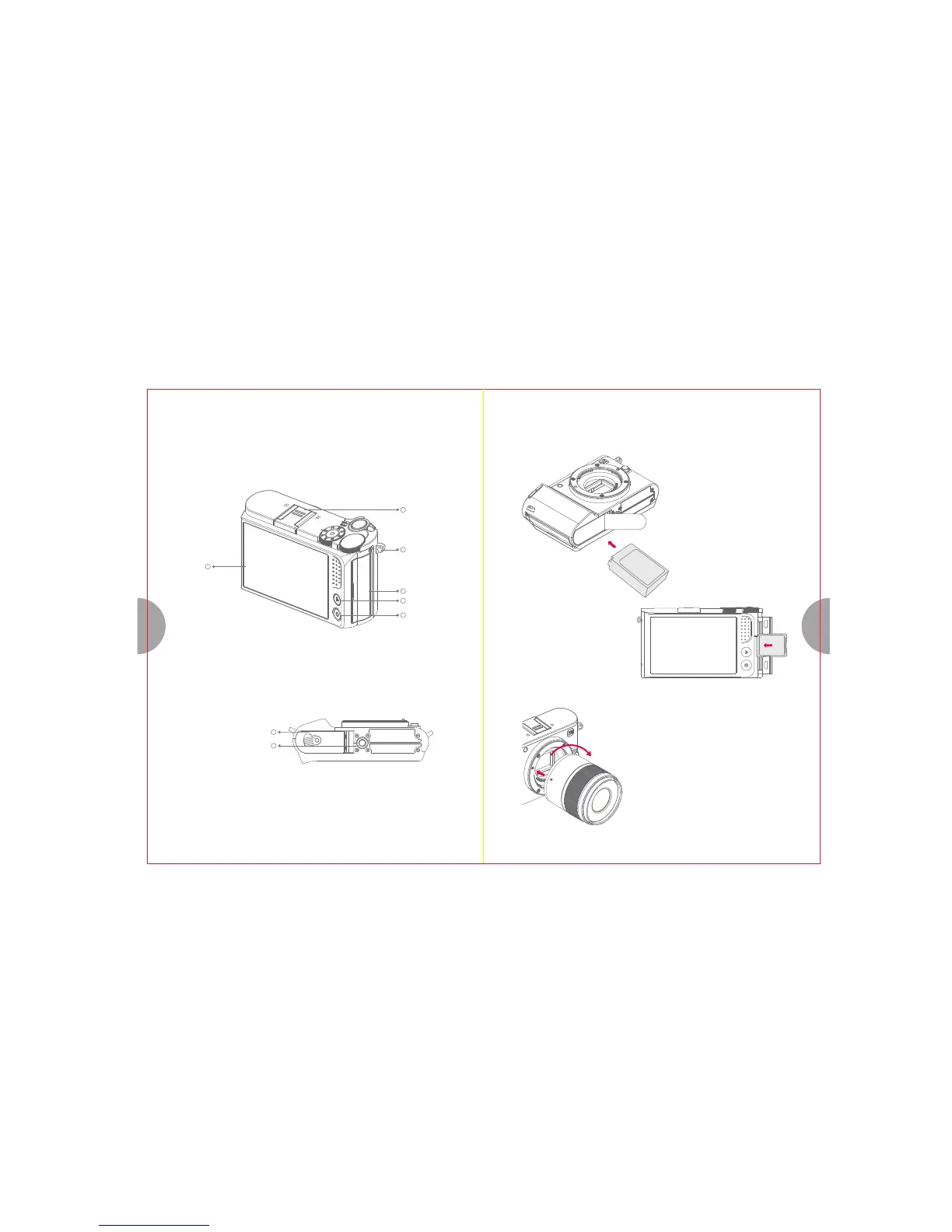
Battery-Chamber Latch
15
16
17
18
19
10
1. Inserting the Battery
USB
LCD Monitor
Strap eyelet
USB card Solt Cover
Playback button
Function button
(Q button)
Tripod Mount
3. Getting Started
Gently slide the battery-chamber latch to open.
Insert the battery contacts first in the direction
shown by the arrow. Close the cover and latch
the chamber.
2. Inserting the Memory Card
Turn the camera off and open the memory
card slot cover. Align the memory card with
the label to LCD monitor, then slide it in until
it clicks into place at the back of the slot. To
remove: press the card in until it unlocks and
release it slowly.
3. Attaching / Removing the lens
1) Attaching the lens
Align the lens attachment indicator (red) on the body with
the alignment indicator (red) on the lens, then insert the lens
into the camera's body.
Rotate the lens clockwise until you hear it click (direction
indicated by arrow).
Hot shoe


 To Next Page