87
Date 2016 2
6
2015
2017
1
3
5
7
15: 35
14 33:
16 35:
1. Powering on
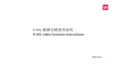
Menu display
Basic settings
A
< >Simplified Chinese
< ON >
< ON >
< ON >
< sRGB >
< +2 >
RGB
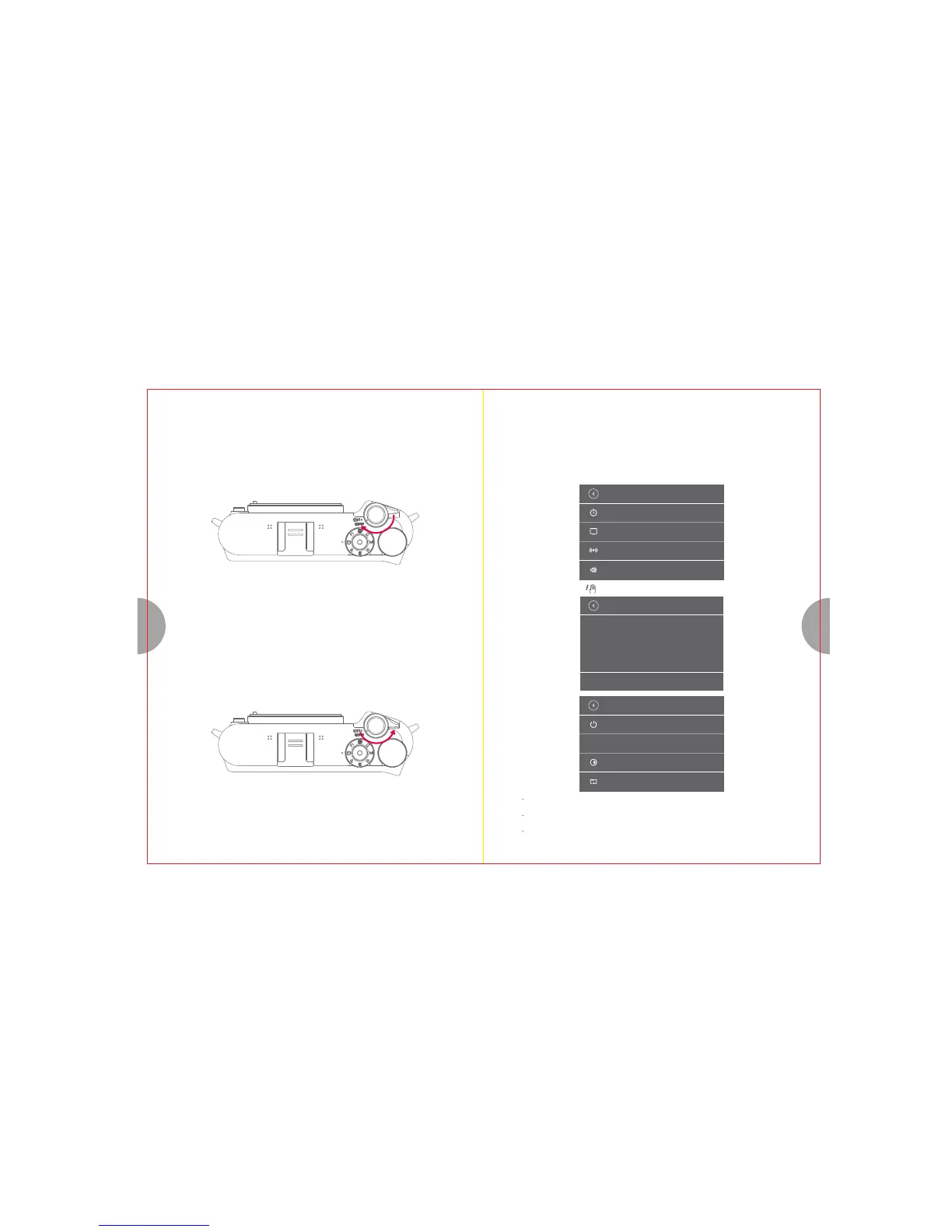
4. Powering the camera on and off
Turn On/Off dial Clockwise.
2. Powering off
Turn On/Off dial counter-clockwise.
5. Setting the Date and Time
[Basic settings] [ Date and time]
- Swipe right on the LCD monitor - Find [Basic settings]
- Select [Basic settings] - Select [Date and time] sub-menu
Date and time
language
Shutter sound
System operation sound
Date and time
Time
Month Day
Basic settings
Auto power off: ON
Color space
Brightness adjustment
Restore default settings
You can adjust color space, screen brightness, or restore to default settings by configuring settings under
[Basic settings] menu.
Tap "Back" button on the upper-left hand corner of the LCD Monitor or half push the shutter to go back to
Live View screen.
You can also press the Q button to return to Live View screen.
Slide the screen up or down to adjust options.
Add date watermark
< OFF >



 To Next Page