EasyManua.ls Logo

York Millennium YCAJ150 - User Manual

York Millennium YCAJ150
116 pages
Print Icon
To Next Page IconTo Next Page
Loading...
INSTALL., OPER., MAINT. Supersedes: See Back Page
Form 150.65-NM4 (198)
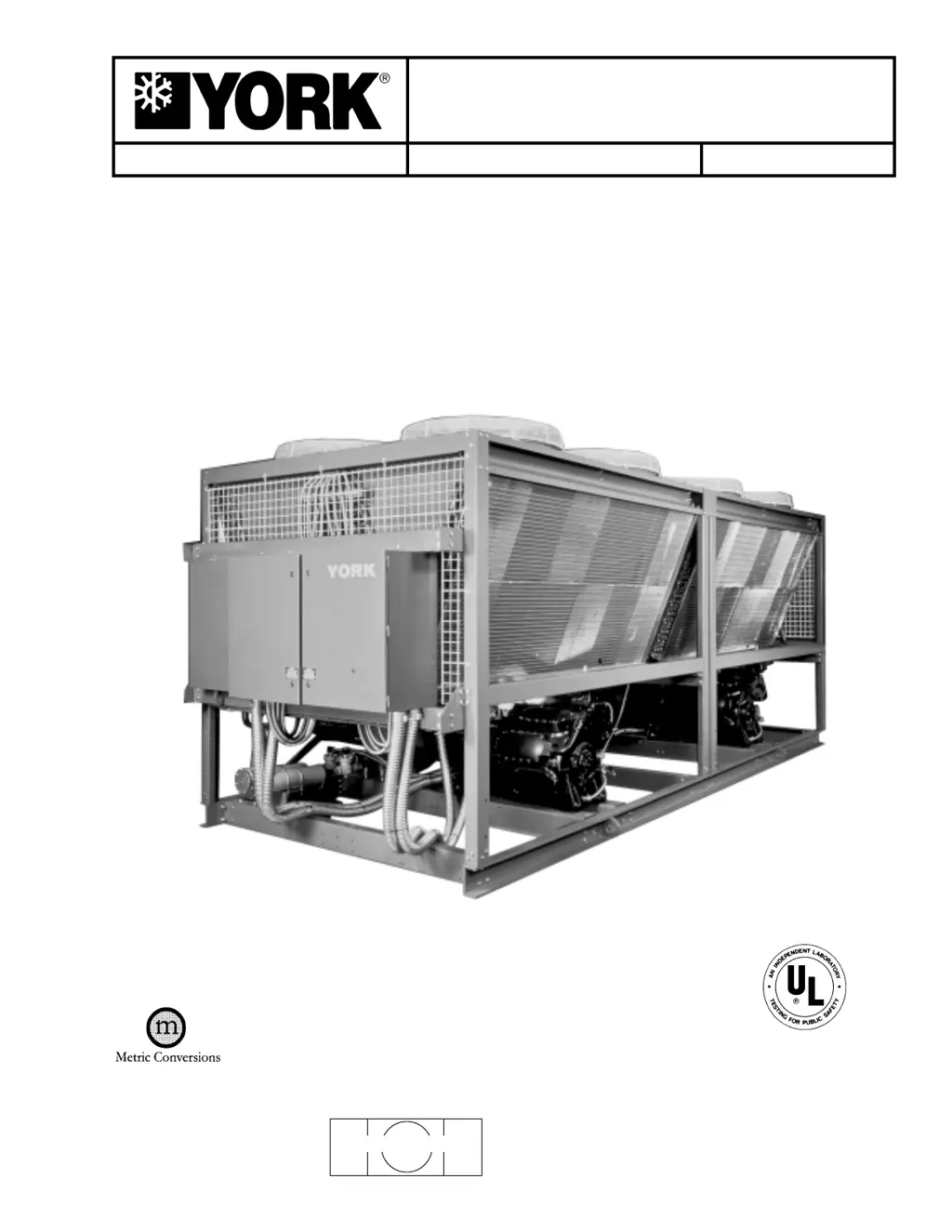
Millennium
TM
LIQUID CHILLERS
AIR-COOLED – RECIPROCATING HERMETIC
60 HZ MODELS
YCAJ150 - 230
200, 230, 460-3-60
26810A
* With EPROM 031-01652-001 (Standard, Brine & Metric Models, Combined)

Questions and Answers

  • S
    Samantha AshleyAug 4, 2025
    Why does my York Millennium YCAJ150 show a 'MOTOR CURRENT' fault?
    • M
      Michael RogersAug 4, 2025
      A 'MOTOR CURRENT' fault on your York Chiller can stem from several causes. The external high-pressure switch might have tripped, so check the switch, fan operation, and discharge pressure. An external motor protector might have tripped; inspect the protector, wiring, and motor. Also, a defective relay output board, improper system high voltage, defective contactor contacts, faulty high voltage wiring, or high motor current stored in memory could be the cause. Check the system's high voltage supply, contactors and wiring. Loose calibration resistors in J9 (SYS 1) or J10 (SYS 2) of the power supply board or a defective current transformer (CT) can also trigger this fault.
  • C
    Chris SchwartzAug 20, 2025
    Why is my York Millennium YCAJ150 Chiller showing a 'LOW OIL PRESS' fault?
    • A
      andrea00Aug 20, 2025
      A 'LOW OIL PRESS' fault on your York Chiller can be due to several reasons. Start by checking the oil charge; the oil level should be visible in either sight glass at all times, and add YORK “C” oil if necessary. Too much refrigerant in the oil, especially during start-up, can also cause this, so check the crankcase oil heater operation (it should be on when the unit is off, with a minimum of 2 amps). Other potential causes include a Liquid Line Solenoid Valve (LLSV) not operating (check wiring and LLSV), a defective Suction Pressure Transducer or wiring (compare display to a gauge), or a defective Oil Pressure Transducer or wiring (compare suction and oil gauges to display). Replace defective components as needed.
  • K
    Kaitlyn DelgadoAug 27, 2025
    What to do if there is no display on my York Chiller panel?
    • H
      Heidi BaileyAug 27, 2025
      If there is no display on your York Chiller panel and the unit won't operate, the issue might stem from several power-related problems. Start by checking the wiring and fuses (1 FU and 2 FU) for 115VAC to 2T, and also check emergency stop contacts 5 to 1. Next, verify that 24VAC is reaching the Power Supply Board by checking the wiring from 2T to the Power Supply Board. If 2T is defective and has no 24VAC output, it will need to be replaced. Finally, if there is no +12V output from the Power Supply, consider replacing the Power Supply Board or isolating any excessive load on the board.
  • J
    Joshua RoseNov 11, 2025
    What to do if my York Millennium YCAJ150 Chiller has a 'High Dsch' fault?
    • B
      Brittany JohnsonNov 11, 2025
      If your York Chiller displays a 'High Dsch' fault, it indicates the unit is cutting out due to high discharge pressure. First, check if the condenser fans are operating correctly and rotating in the right direction, inspecting the fans, fuses, and contactors. If fans are OK, then there might be too much refrigerant in the system, requiring some to be removed. Air in the refrigerant system can also cause this; in that case, evacuate and recharge the system. Other potential causes include a defective discharge pressure transducer (replace if necessary) or incorrect settings on the programmable high-pressure cut-out (adjust per recommended settings). Finally, ensure the OAT sensor is reading properly by comparing its reading to a thermometer (operation should not suffer if within +/– 10°F (5....

Summary

General Information

General Description

Describes the chiller units, their self-contained nature, and typical applications.

Unit Nomenclature

Compressor Nomenclature

Explains the coding system used for identifying compressor models and features.

Operational Limitations (English)

Voltage Limitations

Specifies the absolute voltage limits for safe and proper compressor operation.

Physical Data (English)

Dimensions (English)

Weight Distribution (LBS.)

Details the weight distribution of the chiller across various points for installation planning.

Electrical Data

Dual Compressor Power Supply Wiring (Standard)

Outlines the standard wiring requirements for dual compressor power supply.

Installation

Installation Checklist

Lists essential checks to be performed before placing units into operation.

Location and Clearances

Chilled Liquid Piping

General

Provides guidelines for connecting the chilled liquid piping system for optimal efficiency.

Wiring Diagrams

Elementary Diagram

Presents the basic electrical schematic illustrating component connections and logic.

Unit Controls and Operation

York Millennium Control Center

Overview of the chiller's main control interface, its display, and keypad functions.

Display Key Functions

Chilled Liquid Temps Display

Explains how to access and interpret chilled liquid temperature readings from the control panel.

Options

Table 1 - Switch Position and Display

Switch 1: Comfort Cooling;Brine Duty

Switch 2: Ambient Control

Switch 3: Local;Remote Control Mode

Switch 4: Return;Leaving Water Control

Switch 5: English;Metric Units Readout

Switch 6: Standard;Shared Condenser Fan Control

Switch 7: Manual;Automatic Lead;Lag

Switch 8: Fan Control Strategy

Status Key Overview

General Status Message

Explains common general status messages displayed by the system indicating operational conditions.

Fault Status Messages

System Faults

Entry Key Functions

Numerical Keypad

Explains the use of the numerical keypad for data entry and programming setpoints.

Program Key Functions

Discharge Cut-Out

Details programming the microprocessor backup for high pressure cut-out limits.

Outside Air Temperature Cut-Outs

Low Ambient Cut-Out

Explains programming the low ambient temperature cutout point for chiller protection.

Compressor Control Parameters

Average Current Unload

Explains the function of average current unload for motor cooling and preventing faults.

Suction Pressure Cut-Out

Programming the System Clock and Daily Start;Stop Schedule

Programming the Day, Time and Date

Provides steps to set the system clock, date, and time for scheduling operations.

Programming the Daily Start;Stop and Holiday Schedule

Selection of Return or Leaving Chilled Liquid Control

General

Explains how to choose between Return or Leaving Water Temperature Control methods.

Programming Chilled Liquid Setpoints and Remote Reset Temp Range

Programming Return Water Control

Provides steps for programming setpoints and control parameters for Return Water Control.

Rate Control Temp

Programming Leaving Water Control

Chilled Liquid Temp;Range

Steps for programming leaving water temperature and the associated control range.

Loading and Unloading

Return Water Temperature Control

Describes the loading and unloading sequences for Return Water Temperature Control.

System Safeties

Motor Current

Details motor current safety monitoring and protective actions to ensure motor longevity.

Suction Pressure Safety

High Motor Current Safety

Individual Start Inhibit Safeties

Details safety measures for high motor current conditions to protect the motor from damage.

Anticipation Safety Controls

Low Water Temperature Safety

Explains the safety function to prevent evaporator damage from freezing due to improper settings.

Pumpdown Controls

Anti-Recycle Timer

Explains the function and programming of the anti-recycle timer to protect compressors.

Remote Printout

Oper Data

How to obtain a printout of current system operating parameters via a remote printer.

History

Unit On;Off Switch

EMS;BAS Controls

Remote Setpoint Reset (Remote Reset Temp Range)

How to remotely adjust the water temperature setpoint using various input signals.

Remote Unloading

Fan Control Strategy

Above 25°F (-3.9°C) Ambient

Describes the fan control strategy based on ambient temperature above 25°F.

Compressor Capacity Control

Unloading

Explains the process of compressor unloading to regulate system capacity.

System Start-Up Checklist

Checking the System 24 Hours Prior to Initial Start-Up (No Power)

Lists essential pre-startup checks to be performed before applying power to the unit.

Operating Sequence Utilizing Return Water Control

Operating Sequence Utilizing Leaving Water Control

Preventative Maintenance

Daily Maintenance

Recommended daily checks for system upkeep, including oil level and pressure.

Annual Maintenance

Options

Condenser Water Pump Contact;Run Status Option

Details the option for controlling the condenser water pump based on compressor status.

0°F Low Ambient Option

Programming

Steps to program the low ambient option settings for operation in cold environments.

Fan Control Strategy

Ambient and Pressure Fan Control 45°F (7.2°C) and Higher

Fan control strategy based on ambient temperature above 45°F, with pressure override.

Hot Gas Bypass (Loadminder) Option

General

Overview of the hot gas bypass option for capacity reduction and preventing cycling.

Discharge Pressure Readout Option

Local Printer Option

Fig. 33 - Printout

Example of a printout showing system status and parameters from the local printer.

Printer Configuration

Optional Tamperproof Enclosure (Wire Grille)

Installation

Steps for installing the wire grille tamperproof enclosure to deter unauthorized access.

Optional Decorative Tamperproof Enclosure (Louvered)

Installation

Steps for installing the louvered enclosure to enhance chiller appearance and deter access.

Optional Decorative Tamperproof Enclosure (Louvered)

Installation

Steps for installing the louvered enclosure for aesthetic appeal and component protection.

Optional Tamperproof Condenser Coil Enclosure (Louvered)

Installation

Steps for installing the louvered enclosure to protect condenser coils from tampering.

Remote Reset Option

0 - 10 VDC

Details for connecting a 0-10VDC input signal for remote temperature offset adjustment.

Troubleshooting Chart

Low Oil Press Fault

Troubleshooting steps for identifying and resolving low oil pressure faults in the system.

Chiller Fault: High Ambient Temp

Chiller Fault: Low Water Temp (Cont’d)

Lack of Cooling Effect

Temperature Conversion Tables

York Millennium YCAJ150 Specifications

General IconGeneral
Cooling Capacity150 tons
Compressor TypeScrew
RefrigerantR-134a
Voltage460V
Phase3

Related product manuals