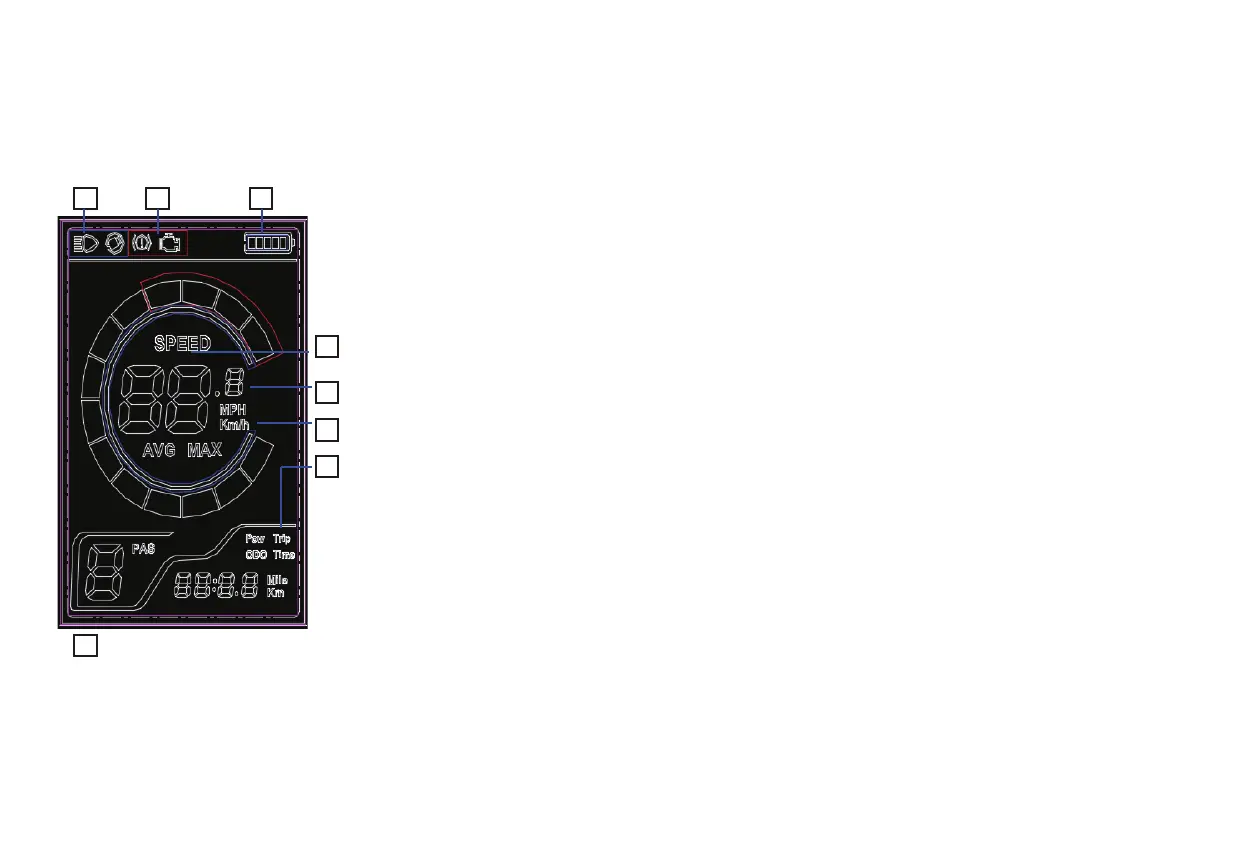
LCD Display Functions Overview
20
1. Battery Level Display: Shows the current battery charge.
2. Backlight and Headlight Control: Press the ON/OFF button to activate both the control unit's
backlight and the Yoto Leopard’s headlight.
3. Unit Selection: Choose between (MPH)or (KM/H) for speed measurements.
4. Speed Visualization: Real-time speed is presented graphically as a progress bar.
5. Current Speed Display: Numerically displays the current speed.
6. Trip Information Display Section:
Trip: Shows the distance covered in a single trip.
ODO: Records the total accumulated distance since the device's first use; this value is non-resettable.
Time: Displays the duration of the current trip.
7. Gear Indicator: Reflects the current gear selection.
8. Settings and Diagnostics: Allows for parameter adjustments and shows fault indications when issues
are detected.
12
4
3
6
5
7
8



 To Next Page