Page 3
09101-90(I)
*Max set screw torque 80 oz-in
address are ignored. Properly addressed but otherwise invalid
commands are responded to as follows:
&aaNUc<EOT> Undened command
&aaNCc<EOT> Bad checksum
&aaNOc<EOT> Other error
Where “aa” is the 09101 address in hex, 00-FF; “c” is a single
cha rac te r pse ud o -c he c ks um ; a nd <E OT> i s the en d- of -
transmission character (ASCII 4).
In interactive mode, invalid commands produce this response:
NAK<CR/LF>
NCAR PAM III (SUBSET) COMMAND SUMMARY
Upper and lower ca s e text must be ob s e rved with thes e
commands.
CMD DESCRIPTION RESPONSE
BDddd Boom direction offset none
"ddd" is degrees
CD Continuous output, overrides J1 data
FC Use calibrated speed units &aaFC
FR Use raw speed pulse count &aaFR
MR Manual reset reset
OD Output data data
OS Output status status
PH Print help (abbreviated command list) command list
PM Polled mode, overrides J1 none
PO Print operating parameters parameter list
SAaa Set address, “aa” is new hex address &aa
ZN Set zero direction reference none
calib Enter calibrate mode* none
ratexx Set serial output rate none
"xx" is the delay between each output
in continuous mode. Delay equals the
xx value times 32.77 mS. Examples:
rate02 is about 16/second
rate30 is about once per second
propxxx Set prop pitch none
"xxx" is prop pitch in mm/rev
Example:
Use prop294 for model 08234 propeller,
29.4 cm/rev pitch
NMEA PROTOCOL
Generally used for marine applications, this protocol produces a
standard NMEA output sentence for wind speed and direction at
4800 baud. The sentence is as follows:
$WIMWV,ddd,R,sss.s,U,A*hh<CR/LF>
“ddd” is wind direction in degrees.
“sss.s” is wind speed.
"U" is wind speed units. N = knots, K = km/h, M = m/s, S = mph
"A" is Status
"*hh" is the hex checksum value of output string
This mode may be used for sending NMEA data to the YOUNG
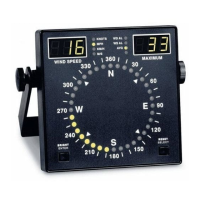
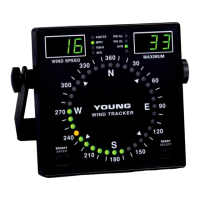
Model 06206 Marine Wind Tracker.
RMYT PROTOCOL
This is a protocol for sending serial wind data directly to a YOUNG
Model 06201 Wind Tracker. The output is a special binary format
sent 16 times per second at 9600 baud.
VOLTAGE OUTPUTS
Voltage output mode is selected with jumper J3 in the left position.
Jumper J1 must be set for RMY, NCAR, or NMEA protocol. Wind
direction voltage output calibration is 0-5 VDC for 0-540° range.
Wind speed voltage output is 0-5 VDC for 0-100 meters per
second.
In applications where long connection cables or small wire gauge
is used, measure the 09101 voltage outputs differentially to
overcome error-inducing voltage drops in the cable or consider
using the serial RS-485 signal which is more tolerant of this effect.
INSTALLATION
Proper placement of the instrument is very important. Eddies from
trees, buildings, or other structures can greatly influence wind
speed and wind direction observations. To get meaningful data,
locate the instrument well away from obstructions. As a general
rule, the air ow around a structure is disturbed to twice the height
of the structure upwind, six times the height downwind, and up to
twice the height of the structure above ground.
FAILURE TO PROPERLY GROUND THE WIND MONITOR-SE
MAY RESULT IN ERRONEOUS SIGNALS
OR DAMAGE TO THE UNIT.
Grounding the Wind Monitor is vitally important. Without proper
grounding, static electrical charge can build up during certain
atmospheric conditions and discharge through the transducers.
This discharge can cause erroneous signals or transducer failure.
To direct the discharge away from the transducers, it is very
important that the sensor be connected to a good earth ground.
Inside the junction box connect the terminal labeled EARTH to a
good earth ground.
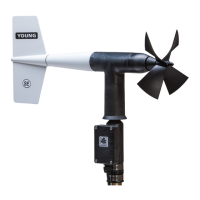
Initial installation is most easily done with two people: one to adjust
the instrument position and the other to observe the indicating
device. After initial installation, the instrument can be removed
and returned to its mounting without realigning the vane since the
orientation ring preserves the wind direction reference. Install the
Wind Monitor following these steps:
1. MOUNT WIND MONITOR
a) Place orientation ring on mounting post. Do Not tighten band
clamp yet.
b) Place Wind Monitor on mounting post. Do Not tighten band
clamp yet.
2. CONNECT SENSOR CABLE
a) Remove junction box cover.
b) Route cable thru strain relief opening at bottom of junction
box. Secure cable by tightening packing nut.
c) Connect sensor cable to terminals. See wiring diagram.
Terminals A and B are used for either serial (RS-485) or
voltage outputs depending on the position of jumper J3.
Use a small screwdriver to make connections. Be sure to
securely tighten each terminal.
d) Replace junction box cover.


 To Next Page
 Loading...