NOTICE:
The battery level must be above 30% to start the update process.
NOTICE:
It requires a SD card in the camera when updating the gimbal camera.
After the above steps, wait for a few minutes until the aircraft, the gimbal, the camera and the remote control give
the following hints in turn: you will hear the aircraft emit the acknowledgement tone, the same one you hear
when you switch the system on; the gimbal completes its initialization; the LED indicator status of C23 camera
changes from blinking purple slowly to being solid green; the remote control restarts and automatically returns
back to its main interface, which indicates that the updating process is completed and successful.
20
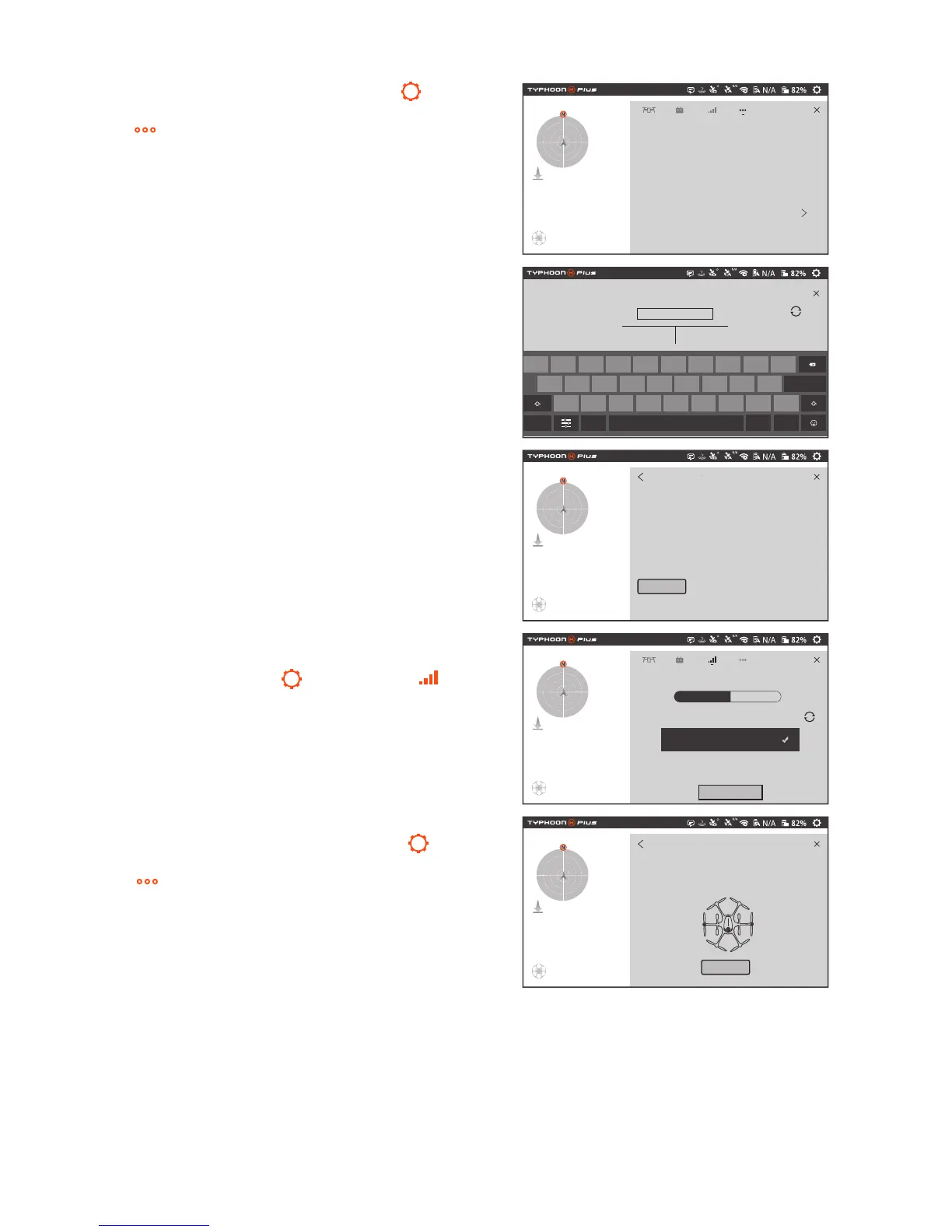
STEP 1:
Tap the system settings icon[ ] on the
right top of the screen, and then select the icon
( ). Scroll down and tap Check for updates.
STEP 2:
Choose an available WiFi, input the pass-
word and tap OK.
STEP 3:
When Available Updates displayed on the
screen, tap the Download icon. Wait for a few min-
utes till a 100% completed circle is displayed, which
means the download completes.
STEP 4:
Switch on the aircraft first, and then return
back to the main interface of the screen. Find
system settings icon [ ], tap the icon [ ], and
then choose the C23 gimbal camera.
STEP 5:
Return back to the main interface, repeat
the step 1 (tap the system settings icon[ ]on the
right top of the screen, and then select the icon
( ). Scroll down and tap Check for updates.) ,
and tap Update icon to upgrade the gimbal camera.
Drone
AutoPilot:
Camera:
RealSense:
Remote Controllre
Check for updates
Produce ID
Systen:
App:
N/A
N/A
N/A
N/A
CONTROLLER_1.0.06_BUILD613_20180414
APP_1.0.06_BUILD613_20180414
Home WiFi
password
Cancel OK
q
w e r t y u i o
a s q f g h j k
l
Done
z
x
?123
/
c v b n m ! ?
, .
p
Available Updates:
Drone: TYPHOONHPLUS_C23_C_1.0.06_BUILD614_20180416.yuneec
TYPHOONHPLUS_C23_E_1.0.06_BUILD614_20180416.yuneec
System: TYPHOONHPLUS_CONTROLLER_C_1.0.06_BUILD614_20180416.yuneec
Downloaded Versions:
Drone: N/A
System:N/A
App: N/A
- Test Firmware set, generated by Automation scripts.
Download
Blind
Searching...
Camera Drone
C23_B2025C
Reset
1. The update process takes a few minutes. Do not power off the aircraft!
2. The battery level must be above 30% to start the update Process.
Update Required: Drone System App
Update
Update



 To Next Page