EasyManua.ls Logo

YUNEEC TYPHOON Wizard - Wizard Calibration Procedure; Entering Calibration Mode; Performing Wizard Calibration; Calibration Failure Guidance

YUNEEC TYPHOON Wizard
19 pages
Print Icon
To Next Page IconTo Next Page
To Previous Page IconTo Previous Page
Loading...
CALIBRATION
When
the
'
Point
to
fly
'
function
does
not
work
properly,
please
calibrate
the
TYPHOON
Wizard
as
follows:
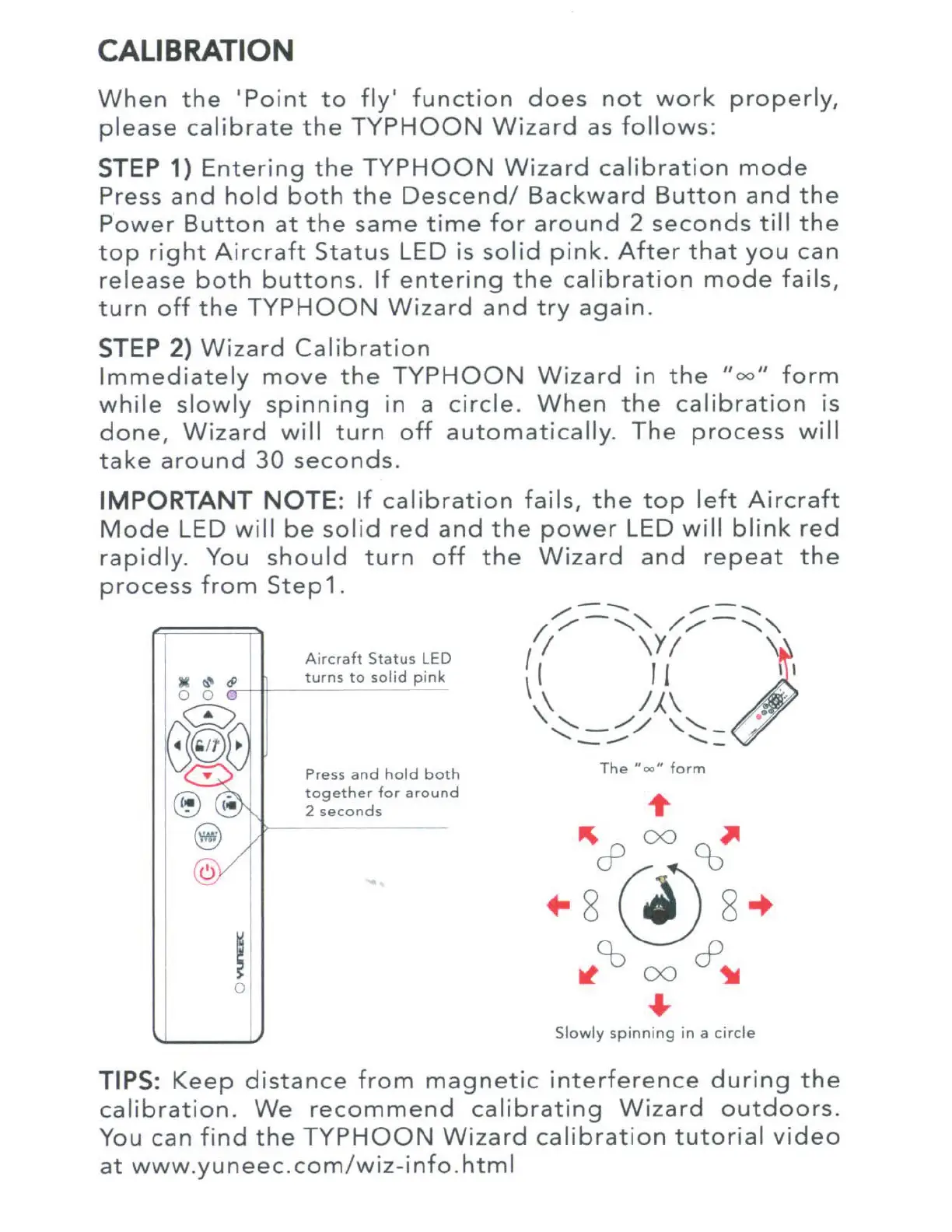
STEP 1)
Entering
the
TYPHOON
Wizard
calibration
mode
Press
and
hold
both
the
Descend/
Backward
Button
and
the
Power
Button
at
the
same
time
for
around
2
seconds
till
the
top
right
Aircraft
Status
LED is
solid
pink.
After
that
you
can
release
both
buttons.
If
entering
the
calibration
mode
fails
,
t
urn
off
the
TYPHOON
Wizard
and
try
again.
STEP 2)
Wizard
Cal
i
bration
I
mmediately
move
the
TYPHOON
Wizard
in
the
"
oo
"
form
while
slowly
spinning
in
a
circle
.
When
the
calibration
is
done,
Wizard
will
turn
off
automatically
.
The
process
will
take
around
30
seconds
.
IMPORTANT
NOTE:
If
cal
i
bration
fails,
the
top
left
Aircraft
Mode
LED
will
be
sol
id
red
and
the
power
LED w ill
blink
red
rapidly
. You
should
turn
off
the
Wizard
and
repeat
the
process
from
Step
1.
I
0
Aircraft
Status
LED
turns
to
solid
pink
Press
and
hold
both
together
for
around
2
seconds
The
"oo"
form
Slowly
spinning
in a
circle
TIPS:
Keep
distance
from
magnetic
interference
during
the
calibration.
We
recommend
calibrating
Wizard
outdoors.
You can
find
the
TYPHOON
Wizard
calibration
tutorial
video
at
www
.
yuneec.com
/
wiz
-
info
.
html

Other manuals for YUNEEC TYPHOON Wizard