EasyManua.ls Logo

YUNEEC TYPHOON Wizard - Flight Modes Explained; Smart Mode and Watch Me; Smart Mode Geo-fence; Camera Control via Apps

YUNEEC TYPHOON Wizard
19 pages
Print Icon
To Next Page IconTo Next Page
To Previous Page IconTo Previous Page
Loading...
FLIGHT MODES
SMART
MODE
When
the
Flight
Mode
Selection
Switch
is
in
the
top
position,
the
aircraft
will
be
in
the
Smart
Mode.
The
Aircraft
Mode
LED
will
glow
solid
green.
1) Watch
Me
Function
Under
Smart
Mode
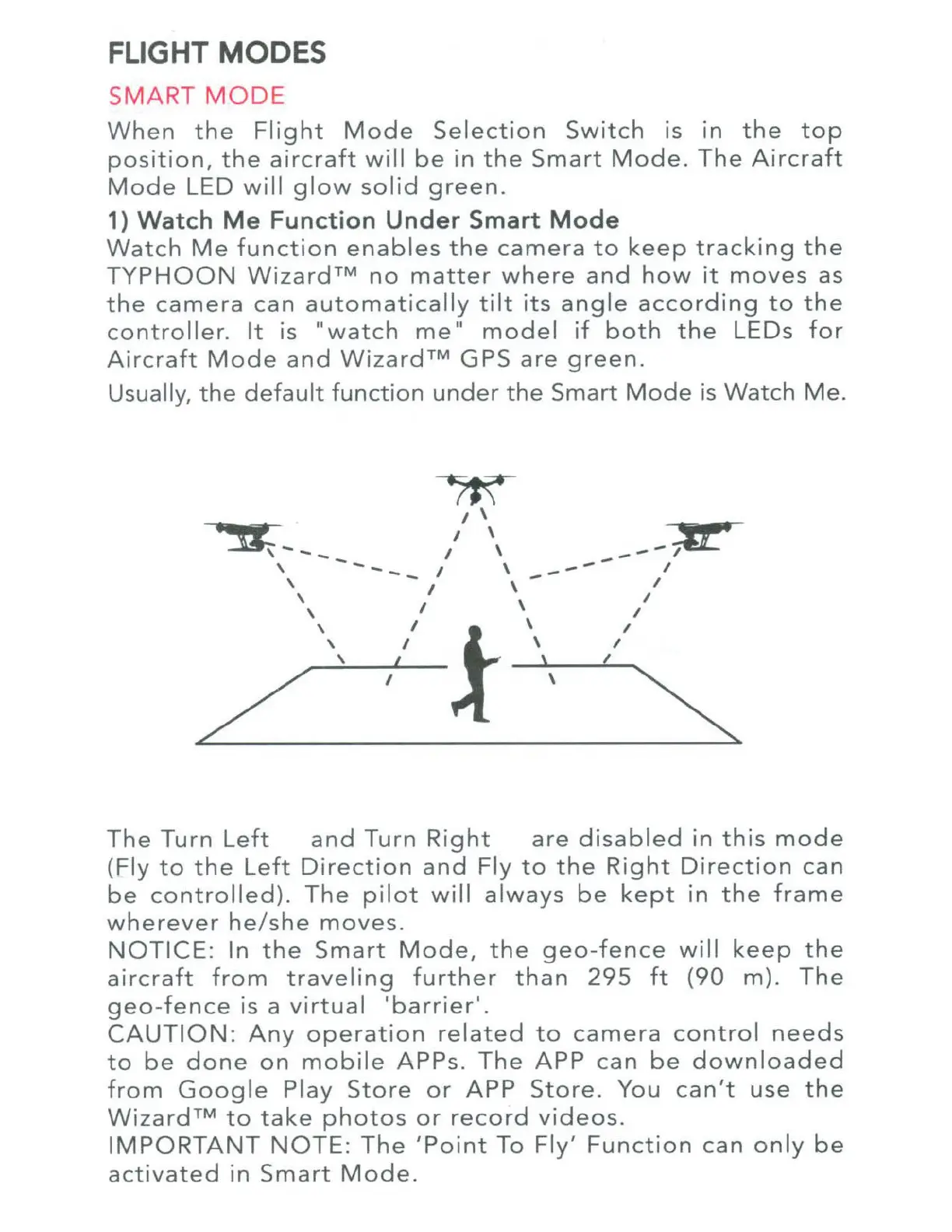
Watch
Me
function
enables
the
camera
to
keep
tracking
the
TYPHOON
Wizard™
no
matter
where
and
how
it
moves
as
the
camera
can
automatically
tilt
its
angle
according
to
the
controller.
It
is
..
watch
me
..
model
if
both
the
LEOs
for
Aircraft
Mode
and
Wizard™
GPS
are
green
.
Usually,
the
default
function
under
the
Smart
Mode
is
Watch
Me.
~
I \
·~
---
/ \
__
;&£.
~~
~~
'
---
I \
----
I
\ I \ I
',
I \
II
\ I \ I
\ I \ I
\ I \ I
I \
The
Turn
Left
and
Turn
Right
are
disabled
in
this
mode
(Fly
to
the
Left
Direction
and
Fly
to
the
Right
Direction
can
be
controlled).
The
pilot
will
always
be
kept
in
the
frame
wherever
he
/
she
moves.
NOTICE:
In
the
Smart
Mode,
the
geo-fence
will
keep
the
aircraft
from
traveling
further
than
295
ft
(90
m).
The
geo
-
fence
is a
virtual
'barrier'.
CAUTION:
Any
operation
related
to
camera
control
needs
to
be
done
on
mobile
APPs.
The
APP
can
be
downloaded
from
Google
Play
Store
or
APP
Store.
You
can't
use
the
Wizard™
to
take
photos
or
record
videos.
IMPORTANT
NOTE:
The
'Point
To
Fly'
Function
can
only
be
activated
in
Smart
Mode.

Other manuals for YUNEEC TYPHOON Wizard