Need help?
Do you have a question about the Z-Line Designs ZLD0001-2DU and is the answer not in the manual?
Two people are necessary for assembly; follow all instructions carefully.
Warning regarding product abuse, mistreatment, and installation.
Details and quantities of all screws, bolts, and tools included.
Assemble the main frame structure, do not fully tighten bolts.
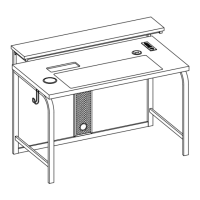
This document outlines the assembly, usage, and maintenance of the Z-Line Designs Series 1.2 Performance Desk, identified by ZLN # ZLD0001-2DU. This desk is designed to provide a functional and aesthetically pleasing workspace with integrated modern features.
The Z-Line Designs Series 1.2 Performance Desk serves as a versatile workstation, incorporating a main desktop surface, an elevated top shelf, and various integrated functionalities to enhance user experience. Its primary function is to provide a stable and organized area for work, study, or other activities requiring a desk. The desk is constructed with multiple frame components, crossbars, and a desktop, all designed for structural integrity and ease of assembly.
A key feature of this performance desk is its integrated wireless charging capability. This allows users to conveniently charge compatible devices by simply placing them on the designated charging surface, eliminating the need for cables. Additionally, the desk includes a USB charge port, offering an alternative wired charging option for devices that may not support wireless charging or for those with cases that interfere with wireless functionality.
Another modern integration is the LED light strip with customizable RGB LED lights. These lights can be controlled via an included remote, allowing users to personalize their workspace ambiance. The LED lights offer various preset colors, multi-color effects, and programmable DIY color options, catering to different preferences and moods.
The desk also features practical accessories such as an accessory hook and a cup holder, contributing to a clutter-free and organized desktop. Wire management covers are included to help maintain a tidy appearance by concealing cables. Floor levelers are provided to ensure stability on uneven surfaces, preventing wobbling and enhancing the overall user experience.
The design emphasizes a clean and contemporary aesthetic, suitable for various home or office environments. The assembly process is designed to be straightforward, though it requires two people for optimal setup. The desk's robust construction ensures it can support significant weight, with specific maximum weight capacities for different sections to ensure safety and longevity.
The Z-Line Designs Series 1.2 Performance Desk offers several features designed to enhance its usability and adaptability to individual needs.
The assembly process is detailed in the instruction manual, requiring a Phillips head screwdriver and the included Allen wrench. It is crucial to lay out all parts on a non-abrasive surface before assembly to identify and count them. The manual emphasizes that two people are necessary for assembly, particularly for handling larger components like the desktop and frames. During initial steps, Allen bolts should not be fully tightened until specified, allowing for adjustments and proper alignment of parts. The desk includes pre-assembled parts like wire management covers, end caps, and floor levelers, simplifying the setup.
A notable usage feature is the adjustable top shelf. The manual illustrates three different positions for the add-on shelves, allowing users to select their preferred height. This adjustability provides flexibility for accommodating different monitor sizes, accessories, or personal ergonomic preferences, making the workspace more customizable.
The integrated wireless charger is a prominent convenience feature. To use it, compatible devices are simply placed centered on the charging surface. The manual advises users to consult their device's OEM instruction manual for proper wireless charging use and safety warnings. It also highlights important safety precautions, such as avoiding metallic foreign objects or liquids on the charging surface and removing thick cases, rings, kickstands, or metallic attachments from devices that may interfere with wireless charging. The USB port on the wireless charger lights up red when powered on, indicating readiness.
For devices not compatible with wireless charging, or when wireless charging is hindered by accessories, the desk provides a USB charge port. Users can plug their device's USB charging cord into this port for a wired charging solution. The wireless charger unit itself is powered by plugging its USB cable into any powered USB 2.0 port or a 5V power adapter.
The desk's LED lighting system offers extensive customization. The included remote control allows users to:
The desk includes an accessory hook for hanging items like headphones or bags, and a cup holder to keep beverages secure and prevent spills on the desktop. Wire management covers help route and conceal cables, contributing to a neat and organized appearance.
Floor levelers are integrated into the desk's design. These can be adjusted to compensate for uneven floor surfaces, ensuring the desk remains stable and level, which is crucial for a comfortable and safe workspace.
The Z-Line Designs Series 1.2 Performance Desk is designed for durability, and proper maintenance will ensure its longevity and appearance. The manual provides specific care instructions to help users maintain the quality of their furniture.
It is recommended to keep the furniture in a climate-controlled environment. Extreme temperature and humidity changes can lead to common issues such as fading, warping, shrinking, and splitting of wood. Maintaining a stable environment helps preserve the desk's structural integrity and finish.
Users are advised to keep the furniture away from direct sunlight. Prolonged exposure to sun can damage the finish, leading to discoloration or degradation of the material over time. Positioning the desk in a shaded area or using window coverings can help mitigate this risk.
Proper care and cleaning practices are essential for extending the life of the desk. While specific cleaning agents are not detailed, the general advice suggests that regular cleaning will enhance the furniture's appearance as it ages. It is generally recommended to use soft, non-abrasive cloths and appropriate cleaning solutions for the desk's materials to avoid scratching or damaging the finish.
A practical maintenance feature included with the desk is a touch-up pen. This pen is provided to repair any small nicks or scratches that may occur during the assembly process or during shipping. This allows users to quickly address minor cosmetic imperfections, helping to maintain the desk's pristine look.
The manual includes a troubleshooting FAQ for the LED lighting system:
By following these usage and maintenance guidelines, users can ensure the Z-Line Designs Series 1.2 Performance Desk remains a functional and attractive part of their environment for many years.
 General
| Brand | Z-Line Designs |
|---|---|
| Model | ZLD0001-2DU |
| Category | Indoor Furnishing |
| Language | English |


 To Next Page