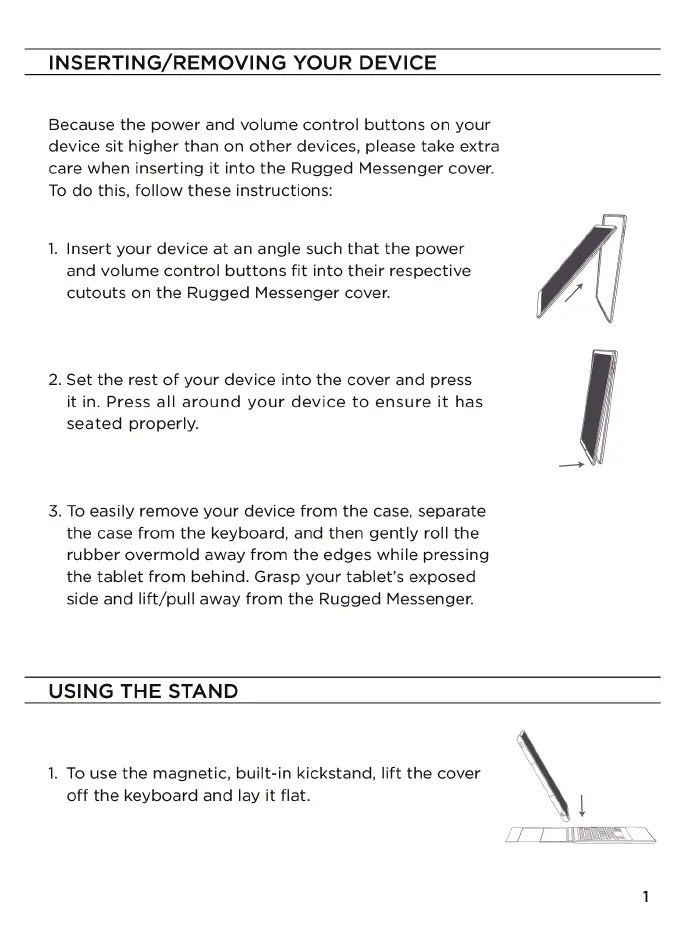
INSERTING/REMOVING YOUR DEVICE
Because the power and volume control buttons on your
device sit higher than on other devices, please take extra
care when inserting it into the Rugged Messenger cover.
To do this, follow these instructions:
1. Insert your device at an angle such that the power
and volume control buttons fit into their respective
cutouts on the Rugged Messenger cover.
2. Set the rest of your device into the cover and press
it in. Press all around your device to ensure it has
seated properly.
3. To easily remove your device from the case, separate
the case from the keyboard, and then gently roll the
rubber overmold away from the edges while pressing
the tablet from behind. Grasp your tablet's exposed
side and lift/pull away from the Rugged Messenger.
USING THE STAND
1. To use the magnetic, built-in kickstand, lift the cover
off the keyboard and lay it flat.











 To Next Page