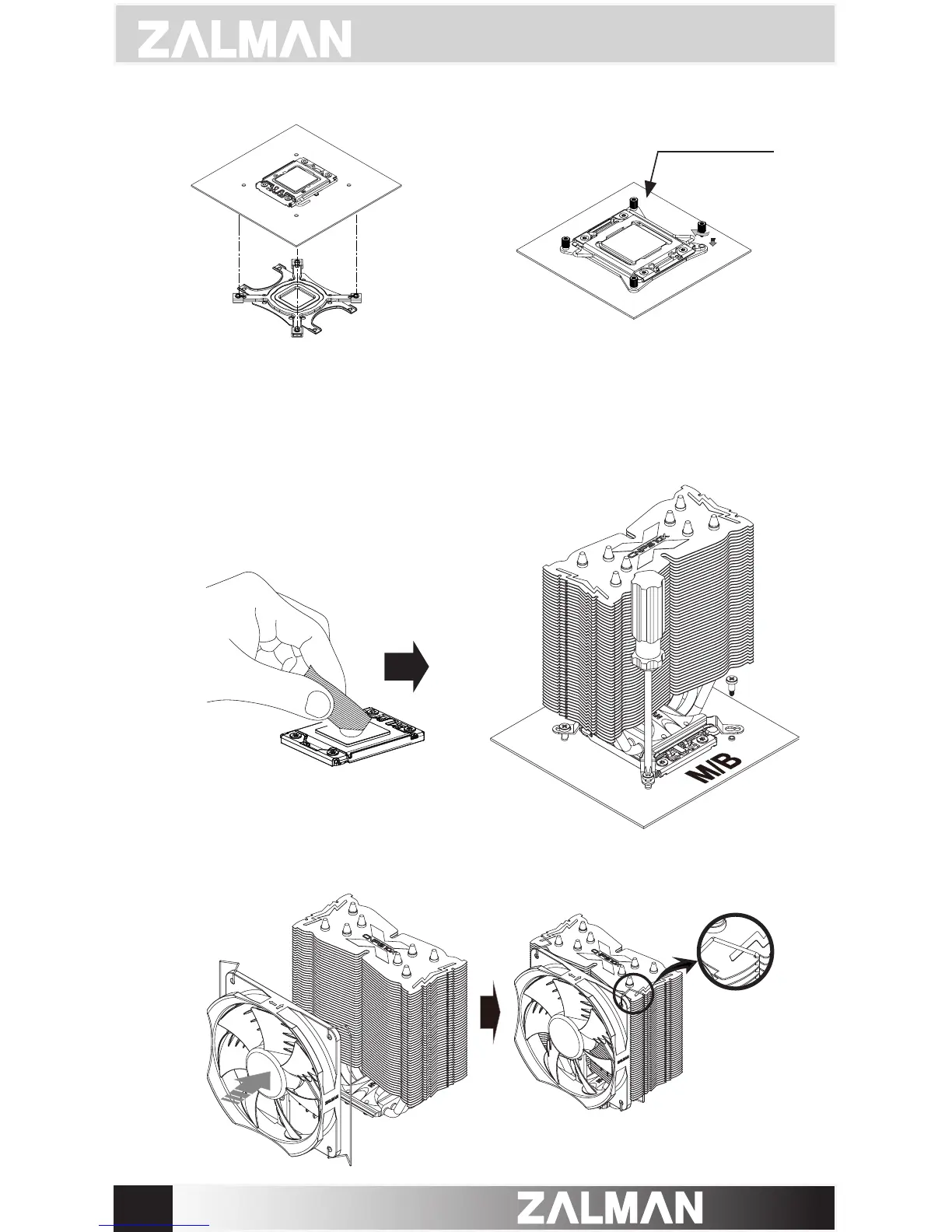
Attach the Backplate assembly to the back side of the
motherboard by aligning the Nuts to the motherboard
mounting holes. If you were unsuccessful at rst attempt,
you may continue with the installation without
the Double-sided Tape as it is not a necessary component.
Fasten the four Stand-offs to the
motherboard. Backplate is not
needed.
⑤
Apply thermal grease just enough to thinly cover the CPU surface, then
fasten the Bolts to isntall the cooler.
④ - ⓐ
Socket 1366 / 1156 / 1155 / 1151 / 1150 / 775 Use
r
④ - ⓑ
Socket 2011 V3 / 2011 Use
r
⑥
Latch the Fan Fixing Clips to the notches located on the sides of the heatsink.
Note: It is often easier to latch the Fan Fixing Clips one at a time.



 To Next Page