5. Installation
A
. LGA Intel Socket Installation
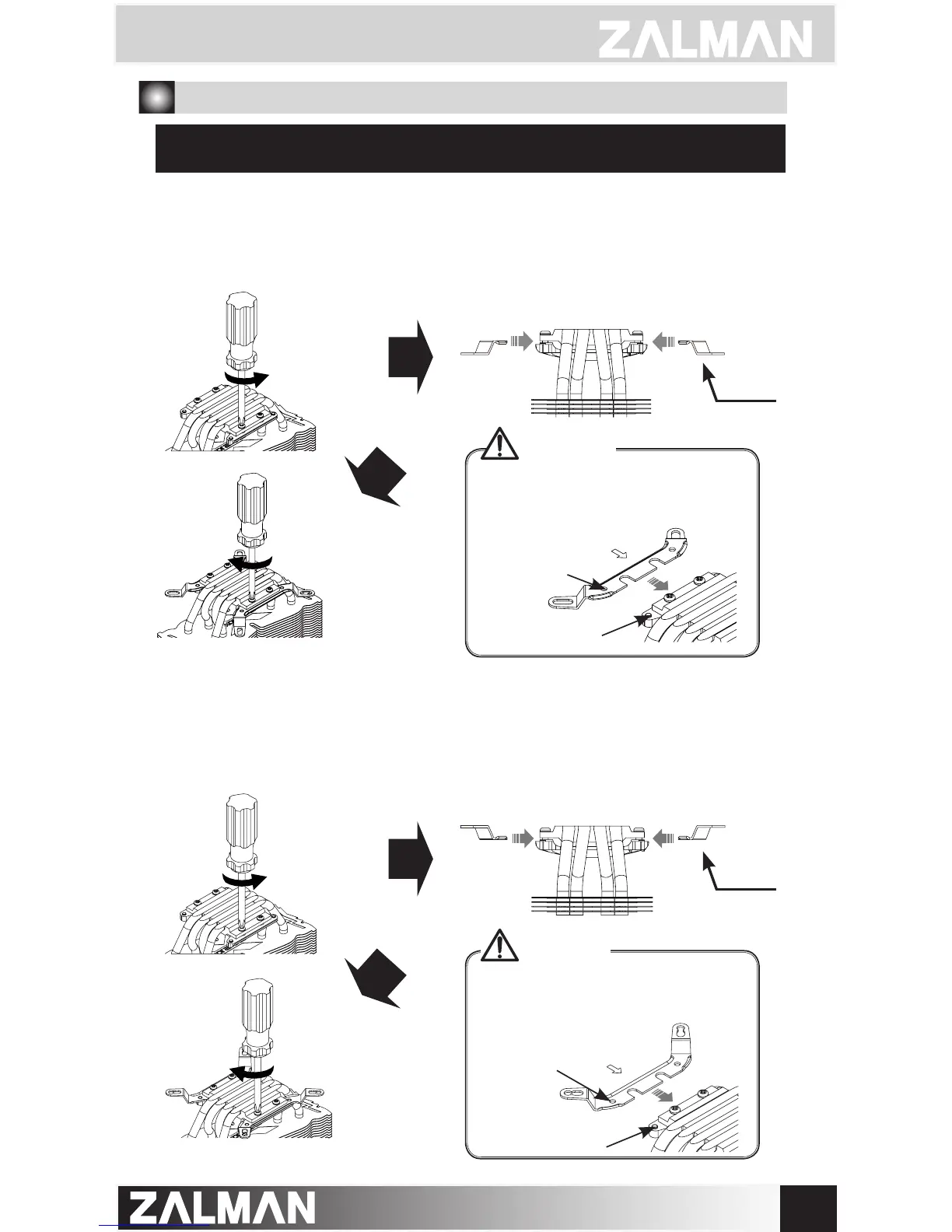
Lastly, fasten the four screws to secure the clips (Please go to Page 8 for further instructions)
Partially unscrew the four bolts located on the base of the CPU cooler. Then,
insert the Intel Clips between the base and the heatpipe cover, with
the clips bent away from the heatsink.
Partially unscrew the four bolts located on the base of the CPU cooler. Then,
insert the Intel Clips between the base and the heatpipe cover, with
the clips bent away from the heatsink.
① - ⓐ
Intel Socket 2011 V3 / 2011 User
① - ⓑ
Intel Socket 1366 / 1156 / 1155 / 1151 / 1150 / 775 User
The holes in the Clip (as shown
below) are matched to the “keys” on
the heatpipe cover for secure Clip
installation.
The holes in the Clip (as shown
below) are matched to the “keys” on
the heatpipe cover for secure Clip
installation.
Caution
Caution
Insert
Key
Intel Clip
Intel Clip
Insert
Key



 To Next Page