10s 10s 10s
10s10s
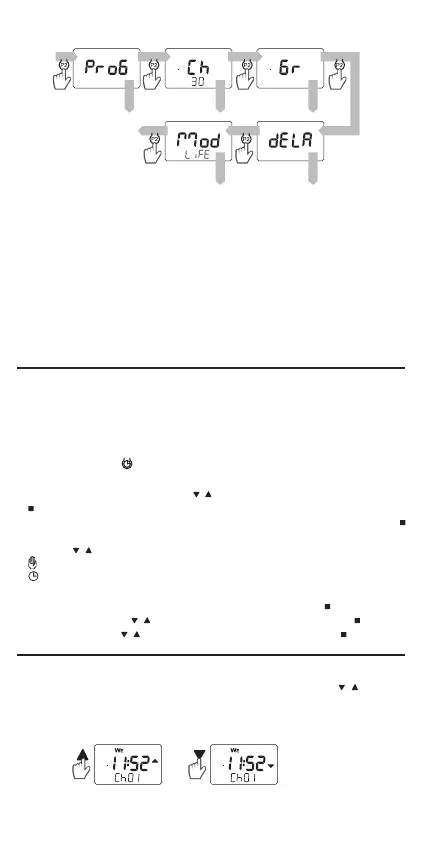
MAIN MENU
Entering the menu and switching between the screens is made by press-
ing the P2 button for a short time (0.5 s). To leave the menu, move through
all screens or wait 10s.
Screens visible in the remote control menu:
● PROG – setting of programmes executed in the automatic mode
(AUTO).
● Ch – dening the number of channels needed for control (Ch1... Ch30).
● Gr – dening the number of groups needed for control and creating
groups based on channels.
● dELA – setting delays in group control.
● Mod – EXTA LIFE / EXTA FREE system selection.
TIME AND DATE SETTING
● The time is set only in the 24h format.
● The remote control automatically calculates the day of the week based
on the entered date.
● The summer/winter time can be changed manually or automatically
1. Press the button
for a short time (0.5s); the button is located under
the battery cover.
2. Set value for minutes using the
, buttons - conrm the setting with the
button.
3. Set value for hours using the , buttons - conrm the setting with the
button.
4. Use the
, buttons to select how to change the summer / winter time:
manual change by the user,
automatic change (the last Saturday in March/the last Saturday in
October).
5. Set the day with , buttons - conrm the setting with the
button.
6. Set the month with
, buttons - conrm the setting with the button.
7. Set the year with
, buttons - conrm the setting with the button.
After selecting the active channel or group by pressing the
, buttons,
the remote control sends the required codes by radio. Code sending is
conrmed by the activation of the corresponding pictogram on the LCD.
Groups can be selected only after they have been dened (see GROUP
PROGRAMMING).
OPERATION


 To Next Page