10s
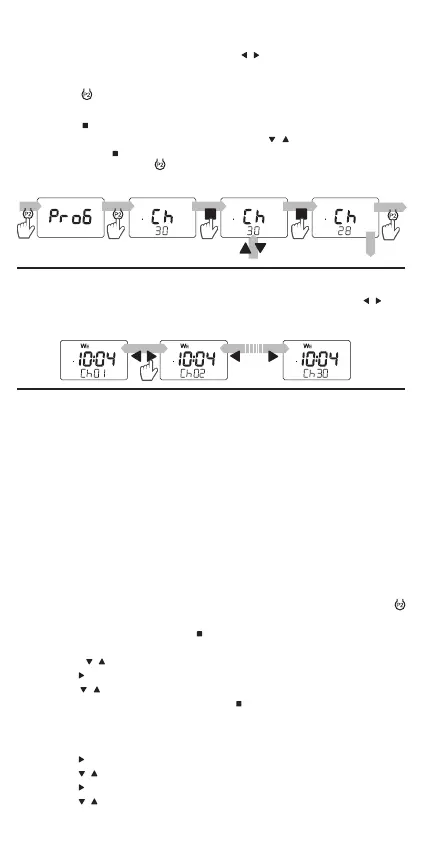
The maximum (default) number of channels in the P-521/L remote control
is 30. Select the active channel using the
, buttons. If the remote con-
trol user does not use all available channels, then it is possible to limit the
number to the required channels.
1. Press the
button shortly (0.5s) under the battery cover to go to the Ch
screen.
2. Press the
button for a short time (0.5s).
3. Set the number of active channels with the
, buttons. Conrm the
setting with the
button.
4. Press shortly (0.5s) the
button to leave the menu (or wait 10 seconds
to leave it automatically).
SETTING THE NUMBER OF ACTIVE CHANNELS
Active channels/groups are switched during normal use with the , but-
tons. The groups are only visible after they have been dened.
CHANNEL / GROUP SWITCHING
The remote control allows the user to programme up to 100 programmes.
The programme can be assigned to the given channel, several channels,
or to a group.
By setting the program, you dene:
● programme number,
● channel(s) or group number,
● execution time,
● day of the week,
● command: open, close,
● programme status: activation, deactivation.
Programmes are set using the remote control menu – ProG’ screen
1. Go to the ProG screen in the remote control menu by pressing the
button.
2. Conrm the selection with the
button.
3. Select the number of the programme to be edited (from 001 to 100)
using the
, buttons.
4. Use the
button to go to the channel(s) or group selection.
5. Use the
, buttons to select channels / groups. The channel/group
can be activated/deactivated with the
button.
● channel / group number ashes - channel / group disabled,
● The channel / group number lights up continuously - channel / group
enabled.
6. Use the
button to set the hour of the programme execution.
7. Use the
, buttons to set the time.
8. Use the
button to set the minutes of the programme execution.
9. Use the
, buttons to set the minutes.
10. Use the button to set the day of the week.
PROGRAMME SETTING


 To Next Page