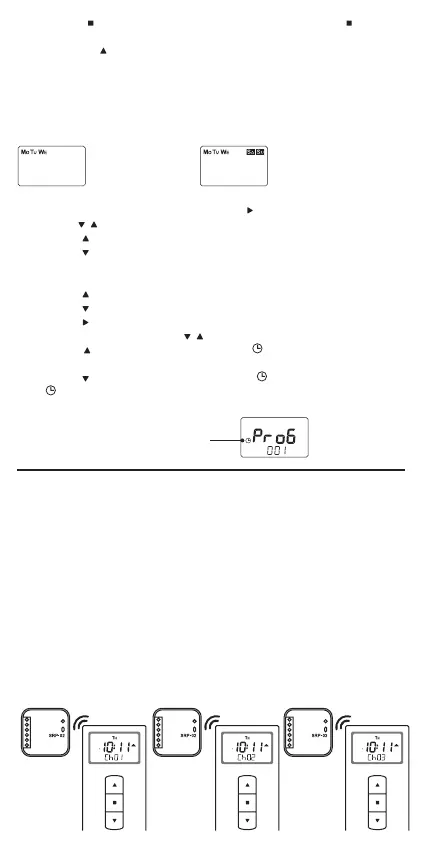
Programme executed
from Monday to
Wednesday and on
Saturday and Sunday
Programme
executed
from Monday to
Wednesday
The program is active
● Groups allow you to control more devices at the same time. They are
particularly useful in the case of shutter control, where we divide indi-
vidual roller shutters into zones or implement central control.
● The P-521/L remote control allows you to create up to 10 groups.
● Max. 30 receivers (only from the dened channels) can be assigned to
each group.
● Physical control consists in sending the "n" sequence of commands
for each channel forming a group. The commands are sent beginning
from the rst channel in the group and ending on the last channel in the
group.
● You can dene delays (from 0 to 60 s) between sending the chan-
nel-related commands when using group control. To do so, use the
"dELA"screen in the main remote control menu.
12. Go to the command selection using the
button
13. Use the
, buttons to set the command. For the controllers, it will be:
● button
- opening shutters,
● button
- closing shutters.
For other receivers, it will be a function assigned to the given button.
For example, when controlling the lights:
● button
- turning on the lights,
● button
- turning off the lights.
14. Use the
button to go to programme 15 status settings. The pro-
gramme status is set by the
, buttons.
● button
- programme activation (the symbol lights up continu-
ously),
● button
- programme deactivation (the symbol blinks).
If the
symbol is activated while browsing programmes, it means that the
programme is activated.
11. Press the
button to select the day of the week. Press the button to
switch between the days. Selection of the day is conrmed by a short
press of the
button.
● The symbol corresponding to the selected day lights up continu-
ously - active day ,
● the symbol corresponding to the selected day ashes - the inactive
day.
Days of the week when the programme is executed can be set in any
conguration, from Monday to Sunday.
GROUP DEFINING
Shutter 1
Local
control of
shutter 1
(Ch01)
Local
control of
shutter 2
(Ch02)
Local
control of
shutter 3
(Ch03)
Shutter 2 Shutter 3


 To Next Page