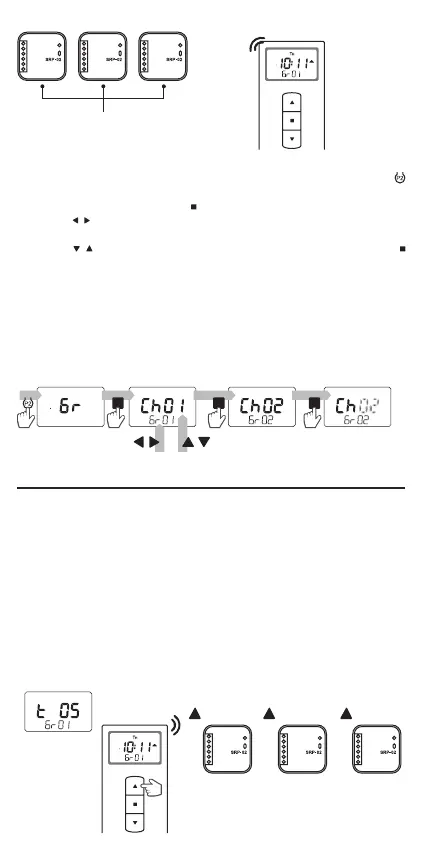
Shutter 1
Controlling
a group of
shutters
(Gr01)
Shutter 2
Channels:
Ch01, Ch02, Ch03
added to group 1 (Gr01)
Shutter 3
group
selection
adding a channel
to the group
deleting a channel
from the group
channel
selection
To dene a group, you have to:
1. Go to the "Gr" screen in the remote control menu by pressing the
button
2. Conrm the selection with the
button.
3. Use the
, buttons to select the group number to be edited (from 01 to
10).
4. Use the
, buttons to select the channel number. Each press of the
button adds the channel to the group or removes the channel from the
group:
● channel number ashes - channel has not been added to the group,
● channel number lights up continuously - channel has been added
to the group.
5. Edited group number can be changed with the , buttons. To return to the
main remote control menu, wait for t=10s.
● Group control consists in sending the "n" sequence of commands for
each channel forming a group. The commands are sent beginning from
the rst channel in the group and ending on the last channel in the
group.
● As a standard, the commands are sent immediately one after another
(without any delays). The user can enter his/her own delay between
the successive commands in the group - adjustable from 0 to 60s in 1s
increments (0s means no delay).
● One delay is dened for the entire group.
Example: 5s delay dened for group 1 (Gr01)
DEFINING THE DELAYS BETWEEN CHANNELS
IN A GROUP
5s
. . .
5s
. . .
Shutter 1 Shutter 2 Shutter 3
Manual
control using
the remote
control


 To Next Page