10s
The mode is selected with the button located under the battery cover.
Automatic operation (AUTO)
The automatic mode allows you to control devices with
, buttons de-
pending on the currently selected channel or group (Ch1…Ch30 / Gr1…
Gr10). Moreover, if there are active programmes (for individual channels
or groups), they are executed according to a xed schedule.
Manual operation (MANUAL)
The manual mode allows you to control devices with
, buttons de-
pending on the currently selected channel or group (Ch1…Ch30 / Gr1…
Gr10). All programmes set in the remote control are inactive (but they are
not deleted from the remote control memory). Programmes are activated
after switching the remote control to automatic mode.
on
automatic mode
on
automatic mode
on
manual mode
OPERATING MODE SELECTION
The remote control can work with wireless elements of the EXTA LIFE
or EXTA FREE system offered by Zamel. The remote control allows you
to control:
● only EXTA FREE receivers (FrEE)
● only EXTA LIFE receivers (LiFE)
● both EXTA FREE and EXTA LIFE (USEr) receivers
When conguring the remote control, the user must select the system to
be used (the default system is EXTA LIFE). For mixed control (USEr), you
should also dene the channels to be assigned to EXTA FREE and EXTA
LIFE systems. All settings are made in the "Mod" menu.
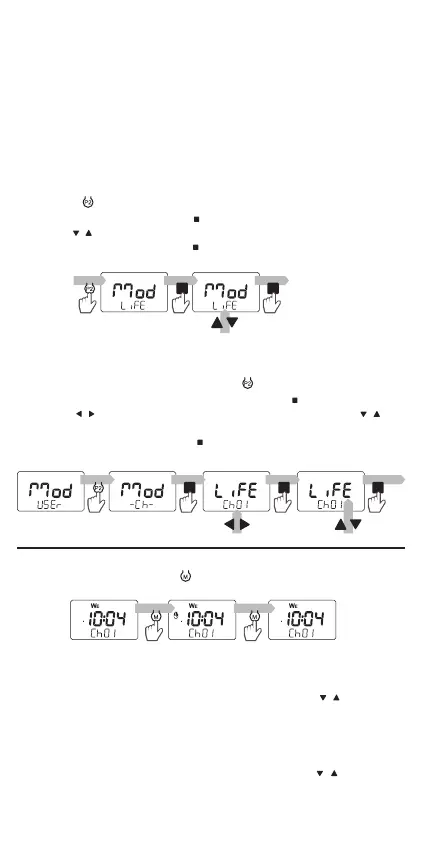
To do so, you should:
1. Press the
button to go to the "Mod" screen.
2. In the "Mod" screen, press the
button.
3. Use the
, buttons to select the system.
5. Conrm the selection with the
button.
For mixed control (USEr), you should also dene the channels to
be assigned to EXTA FREE and EXTA LIFE systems. To do so, you
should:
1. In the "Mod - USEr" screen, press the
button.
2. After entering the "Mod-Ch-" screen, press the
button.
3. Use the
, buttons to select the channel number and the , but-
tons to select the system (LiFE/ FrEE)
4. Conrm the selection with the
button.
5. To leave the menu, wait for t=10s.
SELECTING THE SYSTEM


 To Next Page