8
English
Zaptec Pro
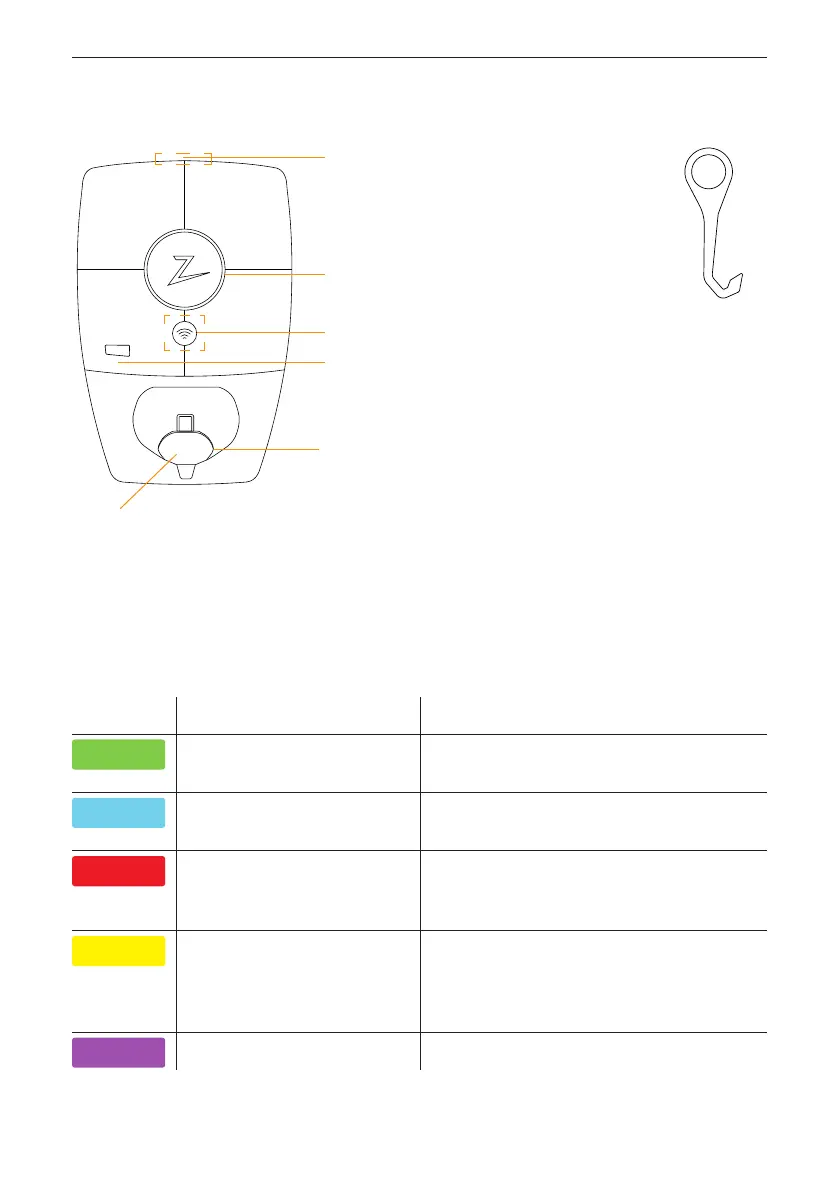
Status Indicators on the Charging Station
The status of the charging station is shown by the status indicator (Z)
usingthefollowing colours:
Colour Continuous Flashing
GREEN
Ready to charge
Charging complete
Authentication OK
BLUE
Connected to a vehicle and
ready to charge
Charging
RED
Error (see the
Troubleshooting section for
further details)
Authentication failed (see the
Troubleshooting section for further
details)
YELLOW
System starting up
Awaiting authentication
Awaiting Zaptec Portal
Vehicle added to queue
PURPLE
Firmware updating
Status indicator (Z)
RFID zone
Electrical outlet
EN 62196-1/2, Mode 3 Type 2
Self-closing protective cover
Open the front cover here
SmartKey
MID model only: display showing
total energy (kWh)



 To Next Page