4
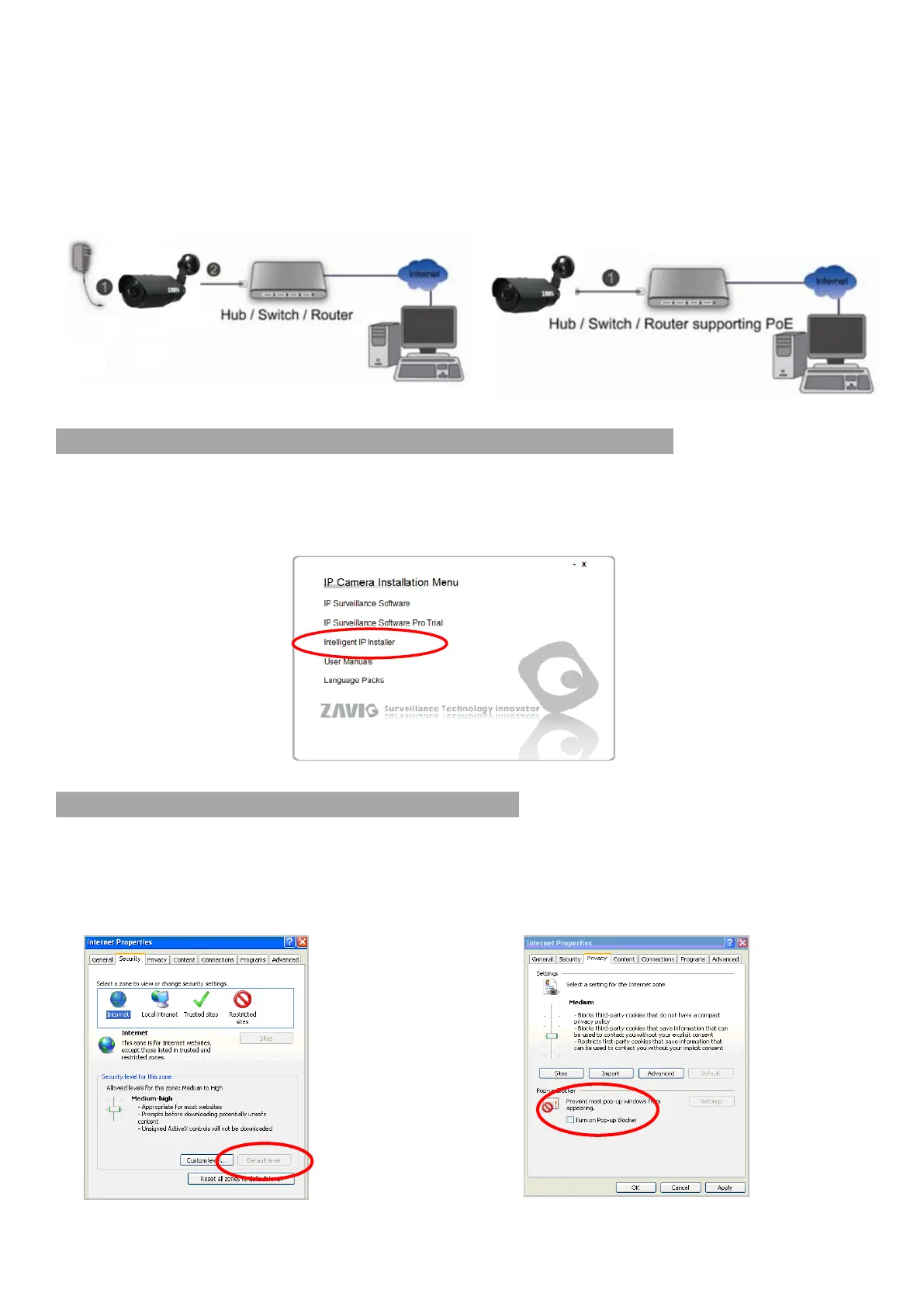
b. Connet all cables
Microsoft OS: Use the software CD to install Intelligent IP Installer
Power on your PC and insert the CD-ROM. The setup page will show up automatically. Please
follow these steps to install the firmware.
Selet “Intelligent IP Installer” and follow the installation process to complete the installation.
Access the IP Camera using Intelligent IP Installer
1. Please check two settings before using Intelligent IP Installer.
b1. Without Power over Ethernet (PoE) connection
1. Connect the 12V power adaptor to the IP Camera.
2. Using a standard RJ-45 network cable, connect
the IP Camera to a normal Hub/ Switch/
Router.
b2. Power over Ethernet (PoE)
Using a standard RJ-45 network cable,
connect the IP Camera to a PoE-enabled
Hub/ Switch/ Router.
a. Browser’s Internet Properties
Security
Default Level
b. Browser’s Internet Properties
Privacy
Uncheck Pop-up Blocker



 To Next Page