The ZEB-COMPANION 110 is a wireless keyboard and mouse combo designed for versatile connectivity and compact use. It supports both Bluetooth (BT) and 2.4GHz RF wireless modes, allowing users to connect to multiple devices simultaneously and switch between them seamlessly. The combo is built with a focus on portability and user convenience, featuring a sleek design and integrated multimedia controls.
Keyboard Features and Specifications:
The keyboard component of the ZEB-COMPANION 110 offers a range of features aimed at enhancing productivity and user experience. It supports both Bluetooth and 2.4GHz wireless connectivity, providing flexibility for various setups.
- Connectivity: Wireless BT & 2.4GHz.
- Smartphone / Tablet Holder: An integrated slot allows for convenient placement of smartphones or tablets, making it ideal for multi-device workflows.
- Integrated Multimedia Keys: Dedicated keys for controlling media playback, volume, and other functions, streamlining entertainment and productivity tasks.
- Compact Design: The keyboard's compact form factor makes it easy to carry and use in various environments, from office desks to on-the-go setups.
- UV Printed Keycaps: The keycaps are UV printed, which typically enhances durability and prevents fading of characters over time.
- LED Indicators: Provides visual feedback for various functions, such as charging status and connectivity mode.
- Built-In Rechargeable Battery: Eliminates the need for disposable batteries, offering a more eco-friendly and convenient power solution.
- Interface: BT / 2.4 GHz.
- Total No. of Keys: 86 keys, providing a full range of essential functions in a compact layout.
- Total No. of Hotkeys: 12 integrated hotkeys for quick access to common functions.
- Charging Time: 6-8 hours for a full charge.
- Back-up Time: Approximately 60 hours of usage on a single charge, ensuring extended use between recharges.
- Keystrokes Life: Rated for 10 million cycles, indicating a high level of durability and longevity for the keys.
- Wireless Range: Up to 10 meters without obstacles, offering ample freedom of movement.
- Product Dimension: 345 x 160 x 25 mm (Width x Depth x Height), highlighting its compact size.
- Net Weight: 429g, making it lightweight and portable.
Keyboard Usage Instructions:
RF 2.4GHz mode connection with USB Nano receiver:
- Power On: Turn on the keyboard using the slide switch located at the bottom.
- Enter Discover Mode: Press and hold the 'FN' key and the '2.4G' (number 4) key simultaneously. The keyboard's LEDs will blink rapidly for 5 seconds, indicating it's in discover mode.
- Plug in Receiver: Insert the USB Nano receiver into an available USB port on your PC or laptop.
- Connection: Once connected, the keyboard will automatically start working in 2.4GHz RF mode (plug and play).
BT mode connectivity:
- Enter Discover Mode: Press and hold the 'FN' key and either 'BT1', 'BT2', or 'BT3' key simultaneously. The LED will blink rapidly, signifying BT discover mode.
- Scan and Pair: Open the Bluetooth menu on your smartphone, laptop, or other device. Scan for "BT Keyboard" and select it to pair.
- Connection Confirmation: The LED blinking will stop once the connection is established.
BT connection and switching between connections:
- The keyboard supports up to three Bluetooth connections, allowing you to connect to multiple devices (e.g., smartphone, laptop, tablet) simultaneously.
- To switch between connected devices, short press the 'FN' key and the corresponding 'BT1', 'BT2', or 'BT3' key. This feature allows for seamless switching between devices without re-pairing.
Mouse Features and Specifications:
The mouse component of the ZEB-COMPANION 110 is designed for high precision and ergonomic comfort, complementing the keyboard's versatile connectivity.
- Connectivity: Wireless BT & 2.4GHz (Nano Receiver).
- High Precision: Offers accurate tracking for various tasks.
- Compact & Ergonomic Design: Designed for comfortable use over extended periods and easy portability.
- Advanced Optical Sensor Technology: Ensures smooth and responsive cursor control.
- LED Indicators: Provides visual cues for status and connectivity.
- Power On/Off switch: Helps conserve battery life when the mouse is not in use.
- Resolution: Adjustable DPI settings: 800/1000/1200/1600 DPI, allowing users to customize cursor speed and sensitivity.
- No. of Button: 4 buttons, including the standard left/right click, scroll wheel, and an additional function button.
- Charging Time: Approximately 1.5 hours for a full charge.
- Back-up Time: Approximately 2 months of usage on a single charge, offering excellent battery longevity.
- Button Life: Rated for 3 million cycles, ensuring durability for frequent use.
- Wireless Range: Up to 10 meters without obstacles, providing reliable wireless performance.
- Product Dimension: 65 x 110 x 35 mm (Width x Depth x Height), indicating its compact and ergonomic size.
- Dongle Dimension: 14 x 20 x 7 mm (Width x Depth x Height).
- Dongle Weight: 2g.
- Net Weight: 59g, making it very lightweight and easy to handle.
Mouse Usage Instructions:
RF 2.4GHz mode connection with USB Nano receiver:
- Power On: Turn on the mouse using the slide switch at the bottom.
- Enter Discover Mode: Short press the 'Mode switch' button located at the bottom of the mouse.
- Plug in Receiver: Insert the USB Nano receiver into an available USB port on your PC or laptop.
- Connection Confirmation: The green LED will blink rapidly for 2 seconds and then turn off, indicating a successful connection.
- Functionality: The mouse will then start working in 2.4GHz RF mode (plug and play).
BT mode connectivity:
- Enter Discover Mode: Short press the 'Mode switch' button at the bottom of the mouse.
- Connection Confirmation: The blue LED will blink rapidly for 2 seconds, indicating BT discover mode.
- Scan and Pair: Open the Bluetooth menu on your smartphone, laptop, or other device. Scan for "BT5.1Mouse" and select it to pair.
- Functionality: The mouse will then start working in BT mode.
Maintenance Features:
- Rechargeable Batteries: Both the keyboard and mouse feature built-in rechargeable batteries, reducing the environmental impact of disposable batteries and offering long-term cost savings.
- Type-C Charging: The devices use a Type-C cable for charging, which is a modern and convenient standard.
- LED Indicators for Charging: A RED LED light indicates when the keyboard and mouse are charging, providing clear status feedback.
- Durable Construction: UV printed keycaps and high keystroke/button life ratings suggest a durable design intended for long-term use.
Important Notes:
- Charging: It is recommended to charge both the keyboard and mouse before initial use. Use a 5VDC adapter for charging.
- Service and Support: Avoid self-disassembly of the keyboard or mouse. For any issues, contact the Zebronics service team via their website: https://zebronics.com/pages/service-centres.
The ZEB-COMPANION 110 is a comprehensive wireless solution for users seeking flexibility, portability, and reliable performance across multiple devices. Its dual-mode connectivity, integrated features, and durable design make it suitable for a wide range of applications, from professional work to casual use.

 Need help?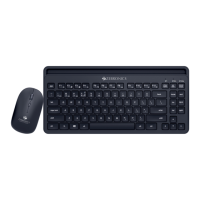

 To Next Page
 General