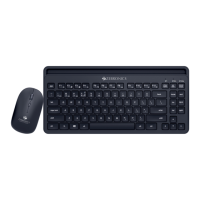
MOUSE
Advanced Optical Sensor Technology
Wireless BT & 2.4GHz
High Precision
Features
Compact & Ergonomic Design
Power On/Off switch
Specification
LED Indicators
Product Dimension : 65 x 110 x 35 mm(W x D x H)
RF 2.4GHz mode connection with USB Nano receiver:
Button Life : 3 Million cycles
Dongle Weight : 2g
• Once connected, the keyboard will start working in
2.4GHz RF mode (plug and play)
Net Weight : 59g
Instructions for use Keyboard:
• To enter to 2.4GHz RF discover mode,press the 'FN' key
and '2.4G'(num 4) key together (long press) mode.
• Power on the keyboard by using slide switch at bottom of
the keyboard.
• Now plug the USB Nano receiver to your PC/ Laptop USB
port.
Wireless Range : 10 meter (without obstacles)
Dongle Dimension : 14 x 20 x 7 mm(W x D x H)
• All LED's indication of keyboard blinks rapidly for 5secs.
Charging Time : 1.5H
Back-up Time : *2Months
Resolution : 800/1000/1200/1600 DPI
No. of Button : 4
Interface : Wireless BT & 2.4GHz
(Nano Receiver)


 To Next Page