70 GW29-016_v05
Menu Number of pressings Weight Display
A-5
Pasta
5
50 g
100 g
A-6
Potato
6
200 g
400 g
600 g
A-7
Pizza
7
200 g
400 g
A-8
Soup
8
200 ml
400 ml
Checking the mode
While cooking using the Microwave/Grill/Combi. mode, press the Microwave/Grill/
Combi. button, the current microwave power will appear on the display for 4 seconds. After
4 seconds the indicators will return to the previous state.
Setting the program at a given time
1
Set the clock (see Setting the clock.)
2
Enter a cooking program (see: Microwave cooking).
You can set up to 3 stages. The defrosting program should always be set as the fi rst one.
3
Press the Clock/Pre-Set button, the digits of the hour will start
to fl ash and the clock control lamp will appear on the display.
4
Press or to set the hour. You can select digits from
0 to 23.
5
Press the Clock/Pre-Set button, the digits will start to fl ash.
6
Press or to set the minutes. You can select digits from
0 to 59.
7
Press Start to fi nish setting. The clock control lamp will
start to fl ash. If the door is closed, after the set time is reached,
you will hear two beeps, the cooking will start automatically, the
clock control lamp will light out and the cooking control lamps
will light: and e.g. .
Multi stage cooking
You can set up to 3 cooking stages. In case of multi stage cooking, if defrosting is one of
the cooking stages, the defrosting program will be automatically turned on as the fi rst one.
After a stage is fi nished, you will hear a beep and the next stage will start.
Automatic cooking cannot be one of the programs of multi stage cooking.
EXAMPLE: To set the cooking for 10 minutes at 100% microwave power and for 15
minutes at 80% microwave power do the following:
1
Press the Microwave/Grill /Combi. button to select 100% microwave power – P100.
2
Press or to set the cooking time for 10 minutes.
3
Press the Microwave/Grill /Combi. button twice to set the microwave power at 80% –
P80. The display will show P80 and the symbols and .
4
Press or to set the cooking time for 12 minutes.
5
Press Start to start cooking.
Each time a mode ends you will hear a beep which indicates the end of
operation.
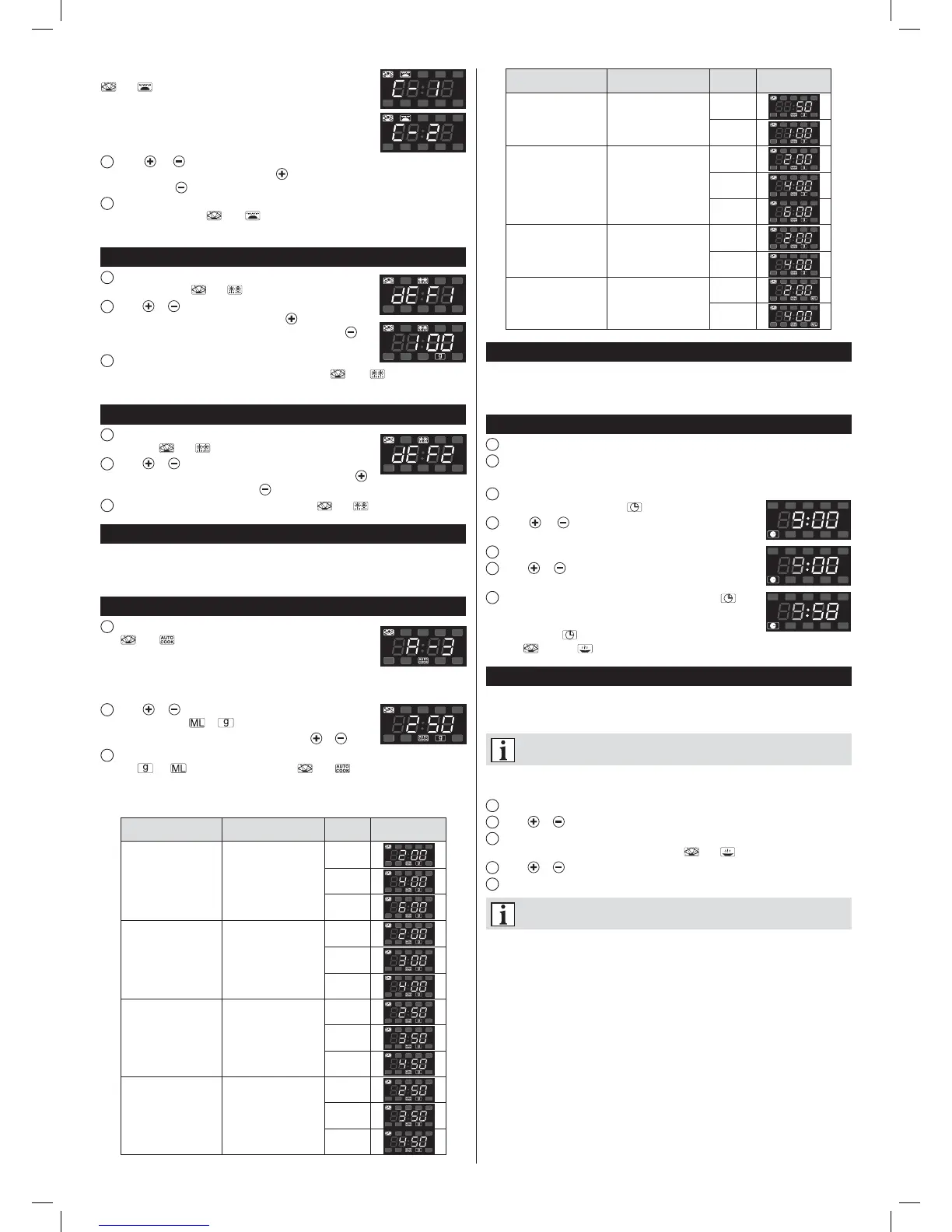
Keep pressing until the display will show C-1, or C-2. The symbols
and will appear.
C-1 = 55% of the time – microwave cooking,
45% of the time – grilling
C-2 = 36% of the time – microwave cooking,
64% of the time – grilling
2
Press or , to set the cooking time. The cooking time can be set from 0:05
seconds, it can be increased by pressing . The cooking time can be decreased from
95:00 by pressing . The maximum cooking time is 95 minutes.
2
Press Start to start cooking. You will hear a beep and the cooking program will start
to operate. The symbols and and the remaining cooking time will fl ash on the
display.
Defrosting by weight
1
Press the Defrost By W.T. button. The display will show dEF1
and the control lamps and will light.
2
Press or , to set the weight of the food to be defrosted.
The display will show the letter “g”. Press , the display will
show the numbers: 100 – 200 –300...1900 – 2000 or press, to
display them in reverse order.
3
Press Start to start defrosting. You will hear a beep and the
defrosting program will start to operate. The symbols and and the remaining
defrosting time will fl ash on the display.
Defrosting by time
1
Press the Defrost By Time button. The display will show
dEF2 and the and control lamps will light.
2
Press or to set the defrosting time. The defrosting time
can be set from 0:05. seconds. It can be increased by pressing
and decreased from 95:00 by pressing . The maximum defrosting time is 95 minutes.
3
Press Start to start defrosting. The control lamps and will light.
Quick start
If the oven is in the stand-by mode, press Start to start cooking for 1 minute at full
power. Each time you press the button the cooking time will be prolonged for one minute.
The maximum cooking time is 95 minutes.
Automatic menu
1
Press Auto menu several times to select the cooking menu.
The and control lamps will appear on the display. The
menu can be selected according to the table below in the following
way:
Auto reheat – Vegetables – Fish – Meat – Pasta – Potato –Pizza – Soup/Coffee, the
display will show A-1, ..., A-8.
2
Press or to select the weight of the food to be cooked.
The display will show or .
The weight or capacity can be increased by pressing
or .
3
Press Start to start cooking. You will hear a beep and the cooking program will start to
operate. , or will light and the symbols and together with the remaining
cooking time will fl ash.
Automatic menu table
Menu Number of pressings Weight Display
A-1
Automatic
reheat
1
200 g
400 g
600 g
A-2
Vegetables
2
200 g
300 g
400 g
A-3
Fish
3
250 g
350 g
450 g
A-4
Meat
4
250 g
350 g
450 g
instrukcja 29Z012 i 013.indb 70instrukcja 29Z012 i 013.indb 70 2015-05-28 13:56:172015-05-28 13:56:17


 To Next Page
 Loading...