Time exposures are obtained by first cocking the shutter: setting the dial to 'B'; then, by pressing the
release button until locked by rotating it .
It is released by turning the release button to its former position.
NOTE:
1. The exposure duration can be set both with the shutter cocked and released.
2. Use a tripod for slow shutter speeds on 'bulb' exposure.
3. When photographing without flash bulbs the synchro setting lever can be set at X.
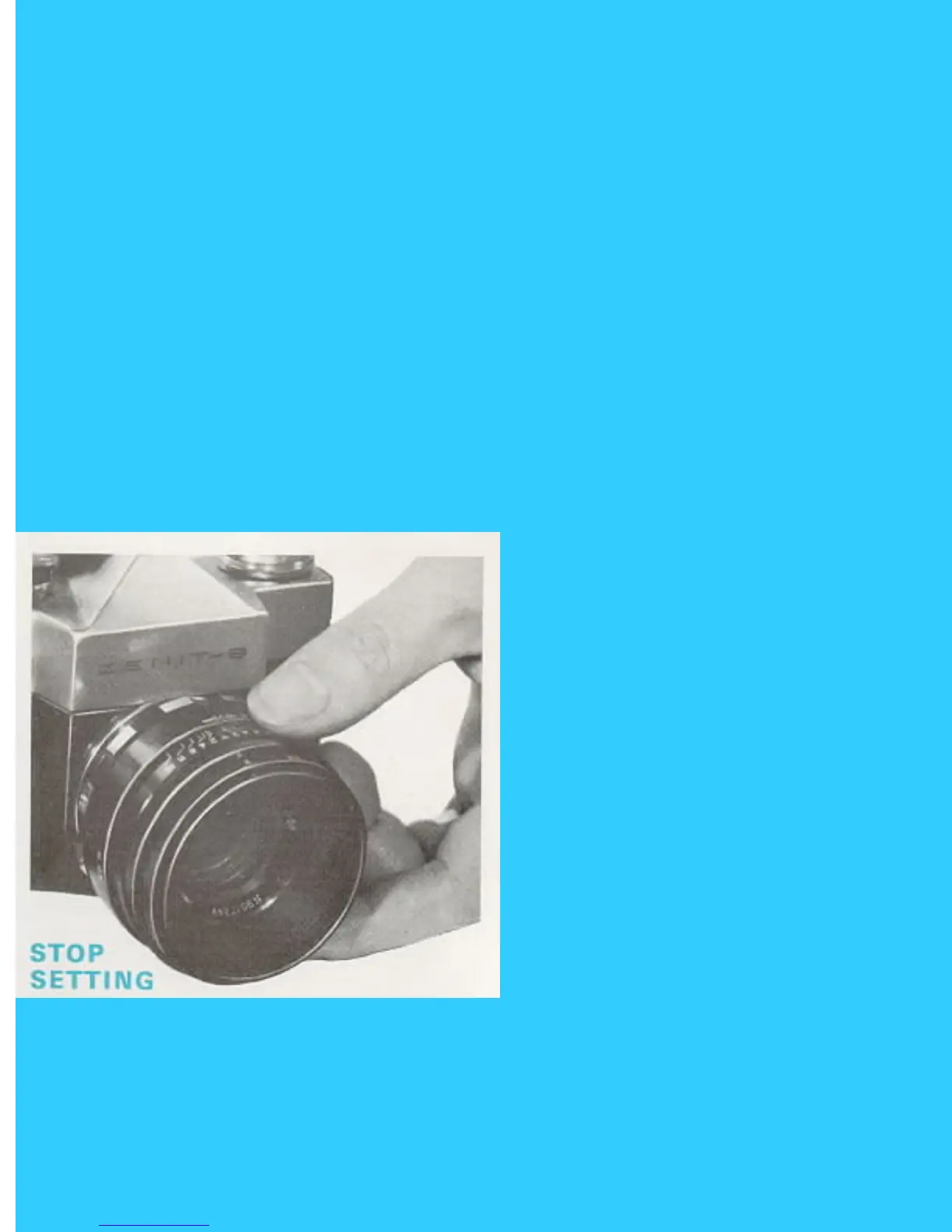
STOP SETTING
To set apertures on the 58mm HELIOS lens: set the index mark to align the selected aperture figure
engraved on the aperture-setting ring of the lens. Each setting is click-stopped at each aperture setting.
The same procedure applies to the INDUSTAR-50 lens except that with this lens there are no click
stops: the lens aperture is set only after focusing.
FOCUSING THE LENS FOR IMAGE SHARPNESS
58mm HELIOS: Focusing should be done with the diaphragm aperture opened at maximum. For this
purpose the diaphragm ring of the 58mm Hellos should be turned counter-clockwise to its full extent.
Aim the lens at the photographed object Observe through the viewfinder eye-piece: turn the lens



 To Next Page