PAGE10IO'ERA*'O"I .UT,O.FUNCT.O.S
Aq_ckUst
of artthe
buttons on
your remote
and what
theydo.
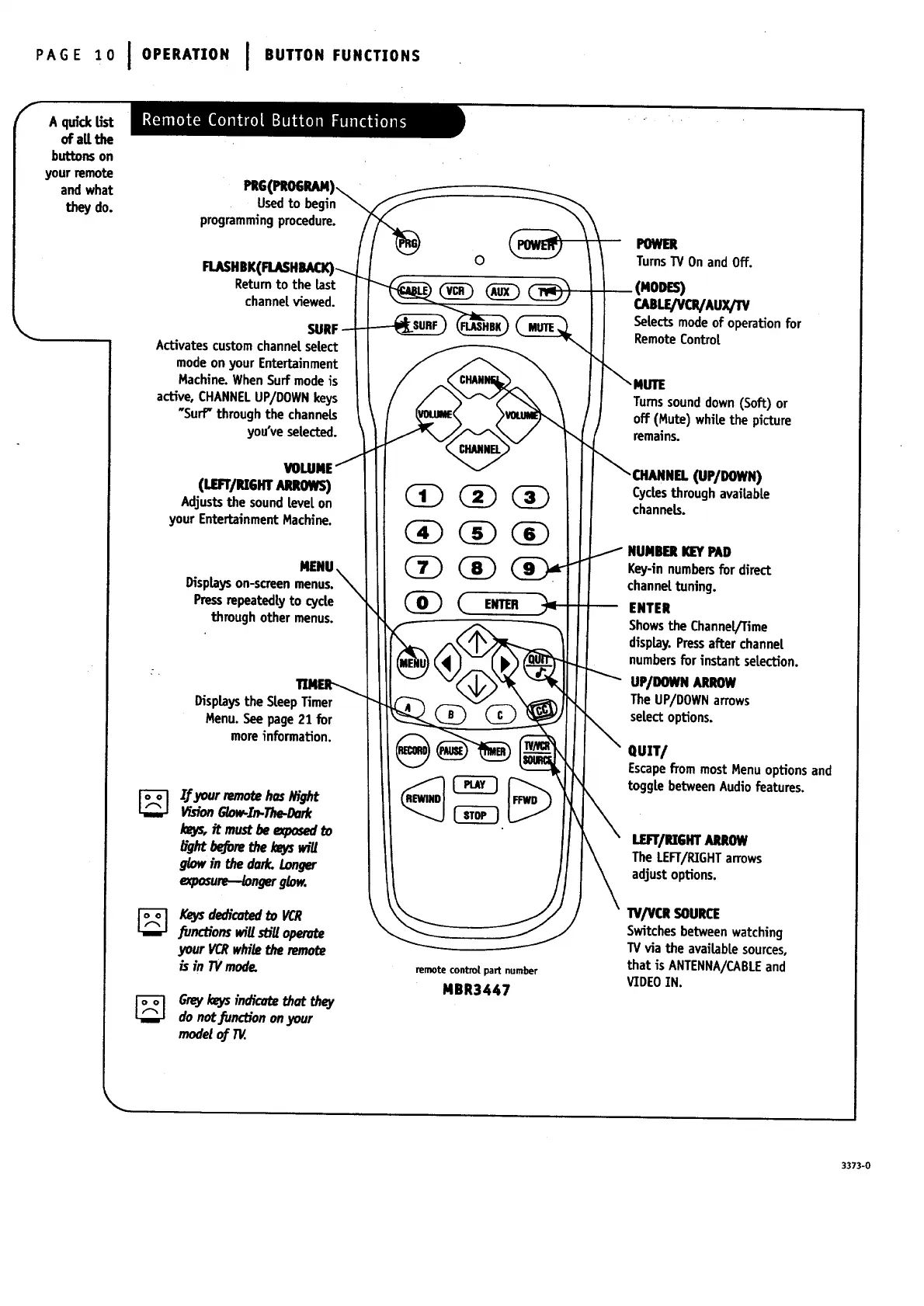
PR6_
Usedto begin
programmingprocedure.
Returnto the last
channetviewed.
SURF
Activates customchannelselect
modeonyour Entertainment
Machine.WhenSurf modeis
active, CHANNELUP/DOWNkeys
"Surf" throughthe channels
you've selected.
(uarr/P_SHT.,u_.ows)
Adjuststhe soundtevel on
your EntertainmentMachine.
MENU.
Displayson-screenmenus.
Pressrepeatedty to cycle
through other menus.
Displays the SteepTimer
Menu. See page21 for
moreinformation.
If ja_srremotehasI#ght
VisionGlow-Zn.The-Dork
Io_ it mustbe expo_ to
b'ght_re thekeysw_U
glow in the dark. Longer
#xposure-.._ngerglow.
Keysdedica_ to VCR
_nc_'ons wigstiUoper_
your _ whitethe remot_
is in TVmode.
Greykeysindicat_thatthey
donot.functiononyour
modetof TV.
0
(_ ENTER _
remote control part number
MBR3447
POWER
TurnsTVOnandOff.
(MODES)
CABLe/VOVAUXpV
Selectsmodeof operation for
RemoteControt
_NUTE
Turnssounddown (Soft) or
off (Mute) white the picture
remains.
_ OtMINEL (UP/DOWN)
Cyclesthrough availabte
channels.
/
NUMBERKEYPAD
Key-in numbersfor direct
channettuning.
ENTER
Showsthe Channel/Time
display.Pressafter channet
numbersfor instant seLection.
UP/DOWNARROW
The UP/DOWNarrows
selectoptions.
ClU]T/
Escapefrom mostMenuoptionsand
toggle betweenAudiofeatures.
LEFT/UGmAUOW
The LEFT/RIGHTarrows
adjustoptions.
•rv/vcRSOUR_
Switchesbetweenwatching
TVvia the availablesources,
that is ANTENNA/CABLEand
VIDEOIN.
3373-0




 To Next Page