PAGE,2IO,E,T,O.I F.O.,,ANE'<O.T.OLS
f
An exampleof
usingthe
panelon the
front of your
Entertainment
Machine.
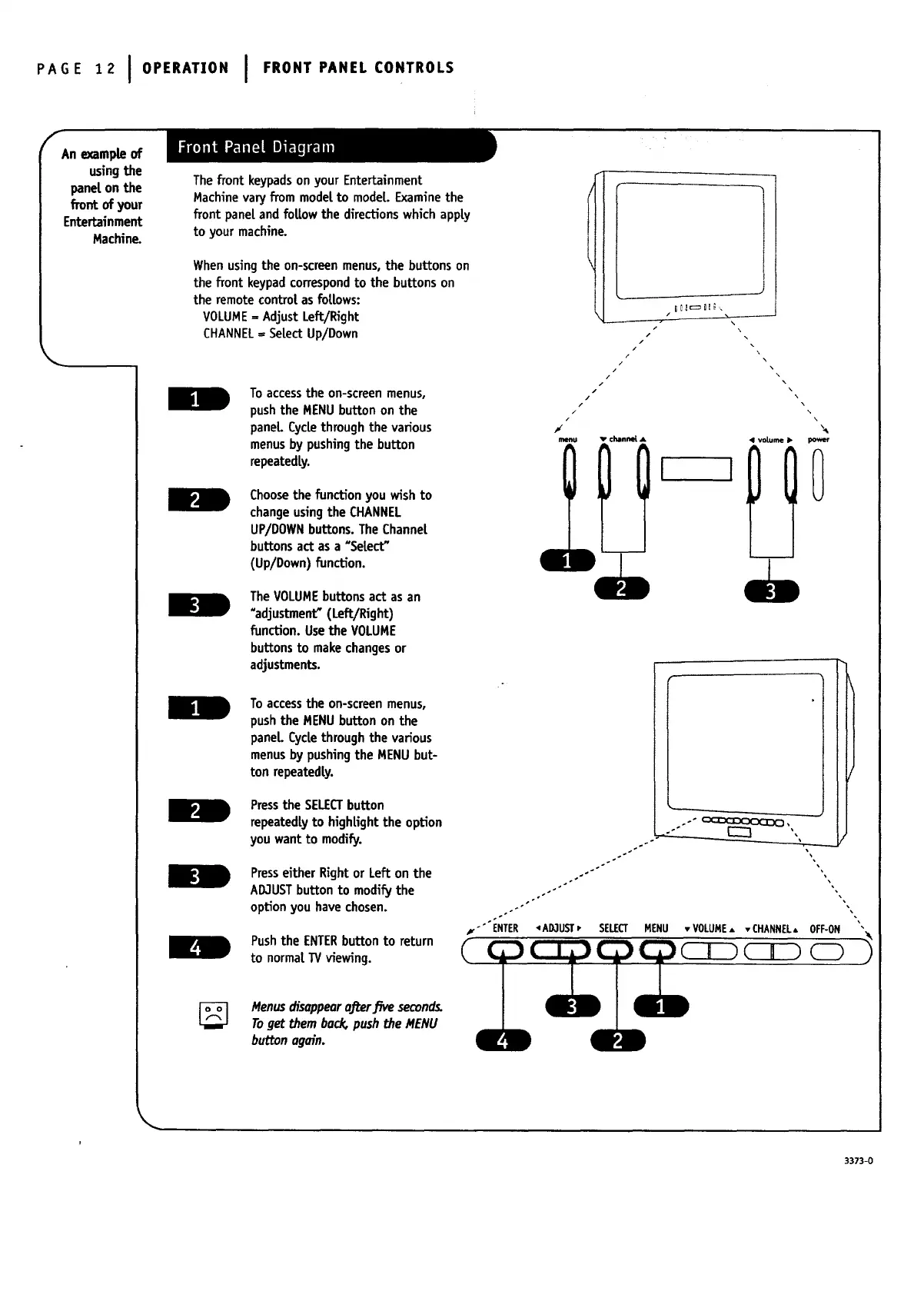
The front keypadson your Entertainment
Machinevary from modelto model. Examinethe
front panel and foUowthe directionswhichapply
to your machine.
Whenusingthe on-screenmenus, the buttons on
the front keypadcorrespondto the buttons on
the remote controlasfollows:
VOLUMEffiAdjust Left/Right
CHANNEL= SelectUp/Down
To access the on-screen menus,
push the MENU button on the
panel Cycle through the various
menus by pushing the button
repeatedly.
Choose the function you wish to
change using the CHANNEL
UP/DOWN buttons. The Channel
buttons act as a _Select"
(Up/Down) function.
The VOLUME buttons act as an
_adjustment" (Left/Right)
function. Use the VOLUME
buttons to make changes or
adjustments.
To access the on-screen menus,
push the MENU button on the
paneL Cycle through the various
menus by pushing the MENU but-
ton repeatedly.
Pressthe SELECTbutton
repeatedlyto highlightthe option
you want to modify.
Presseither Rightor Lefton the
AD3USTbutton to modifythe
option you havechosen.
Pushthe ENTERbutton to return
to normalTVviewing.
Menusrh'sappearoffer.five seconds.
Toget themback,pushthe MENU
buttonogain.
i
!
i
I
/
/
/
p
/
\\.
\\
\.
\\
menu v channel A 41 volume • power
/
/
/
/
,r
/
/
/
/
/
#
°
v'" ENTER '_AD,1UST_" SELECT
3373-0




 To Next Page