.ENOSI SP C,ALFEATUreSIPAOE23
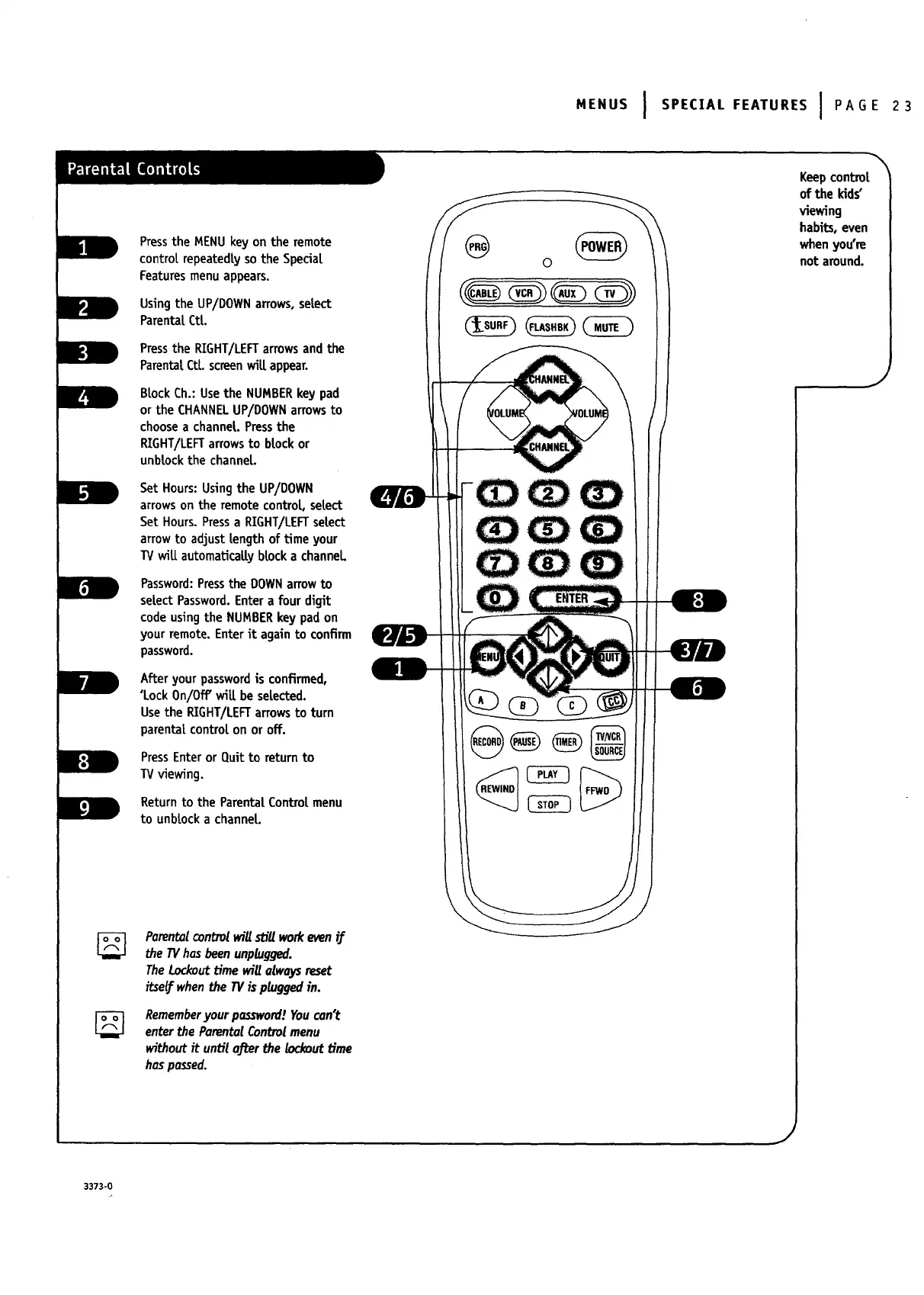
Pressthe MENU key on the remote
controt repeatedty so the Special
Features menu appears.
Usingthe UP/DOWNarrows,setect
Parentat Ctt.
Pressthe RIGHT/LEFTarrowsand the
ParentalCtl. sc_en will appear.
BlockCh.: Usethe NUMBERkey pad
or the CHANNELUP/DOWNarrowsto
choosea channeL.Pressthe
RIGHT/LEFTarrowsto brockor
unbtockthe channeL.
Set Hours:Usingthe UP/DOWN
arrowson the remotecontrol, setect
Set Hours.Pressa RIGHT/LEFTsetect
arrowto adjust length of Ume your
TVwiLLautomaUcallybrocka channel
Password:Pressthe DOWNarrowto
setectPassword.Entera four digit
codeusingthe NUMBERkey pad on
your remote.Enterit againto confirm
password.
Afteryour passwordis confirmed,
'Lock On/Off"will be selected.
Usethe RIGHT/LEFTarrowsto turn
parentalcontrolon or off.
PressEnteror Quitto return to
TVviewing.
Returnto the Parenta|Contro[menu
to unbtocka channel
Parentalcontrolwillsb'll workevenif
the IV hasbeenunplugged.
TheLockouttime will alwaysreset
itselfwhen the TVis plugged in.
Rememberyour password!Youcan't
enter the ParentalControlmenu
without it until afl:erthe h_kout time
haspassed.
0
Keepcontrol
of the kids"
viewing
habits, even
when you're
not around.
J
J
3373-0


 To Next Page
 Loading...


