3373-0
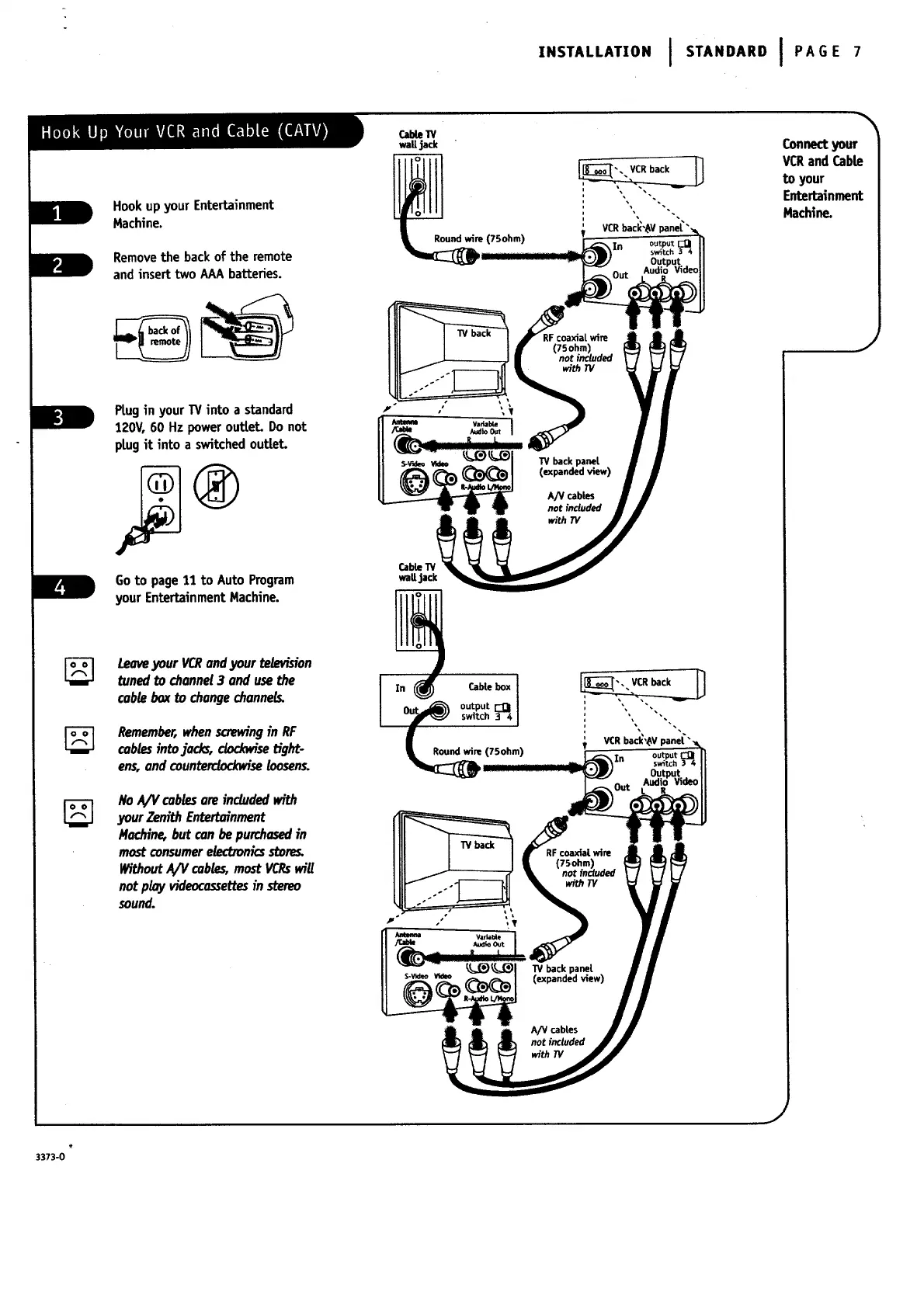
Hookupyour Entertainment
Machine.
Removethe back of the remote
and insert two AAAbatteries.
Ptugin your W into a standard
120V,60 Hz power outtet. Do not
plugit into a switchedoutlet.
Goto page11 to Auto Program
your Entertainment Machine.
LeaveyourVCRandyourte_,vision
tunedto channel3 andusethe
cableboxto changechannels.
Remember,whenscrewingin RF
cablesintojacks, dodoeisetight-
ens,and counterclockwiseloosens.
NoA/Vcablesareincludedwith
yourZenithEntertoinment
14addne,butconbepurchasedin
mostconsumerelectronicsstore_
WithoutA/V cables,mostVCR_wig
notplayvideocossettesin stereo
sound.
INSTALLATION I STANDARD I PAGE 7
Cable1V
wall jack
s-v_eoww W back panel
(expandedview)
A_ cabl.es
not included
wlthTV
CableW
wall jack
CabLebox
re (75ohm)
VCRbacl_,_Vpanel"
In output
sw_tch
Outpqt
Audid Video
W back panel
(expandedview)
A/V cables
not included
_th TV
Connectyour
VCRand Cable
to your
Entertainment
MacMne.
J




 To Next Page