P,G 01,"ST'LL'T'ONI ST'"O'RD
_ Connect an
off-air
antennaand
VCRto your Hook up your Entertainment
Machine.
Removethe backof the remote
and insert two AAAbatteries.
Plugin your TVinto a standard
120V,60 Hz power out|et. Do not
ptugit into a switchedoutlet.
Goto page11 to Auto Program
your EntertainmentMachine.
Remember,whenscrewing
RFcob_esintojacks, dodmq'se
b'ghtens,ond counterclockwise
loosen_
NoA/V tobiesore includedwith
your Zenith Entertm'nment
Nochine,but conbepurchosedin
mostconsumer elecbonic_store_
WithoutA/V cobtes,most V_
will not play videocmsettesin
stereo sound.
Ik_n a
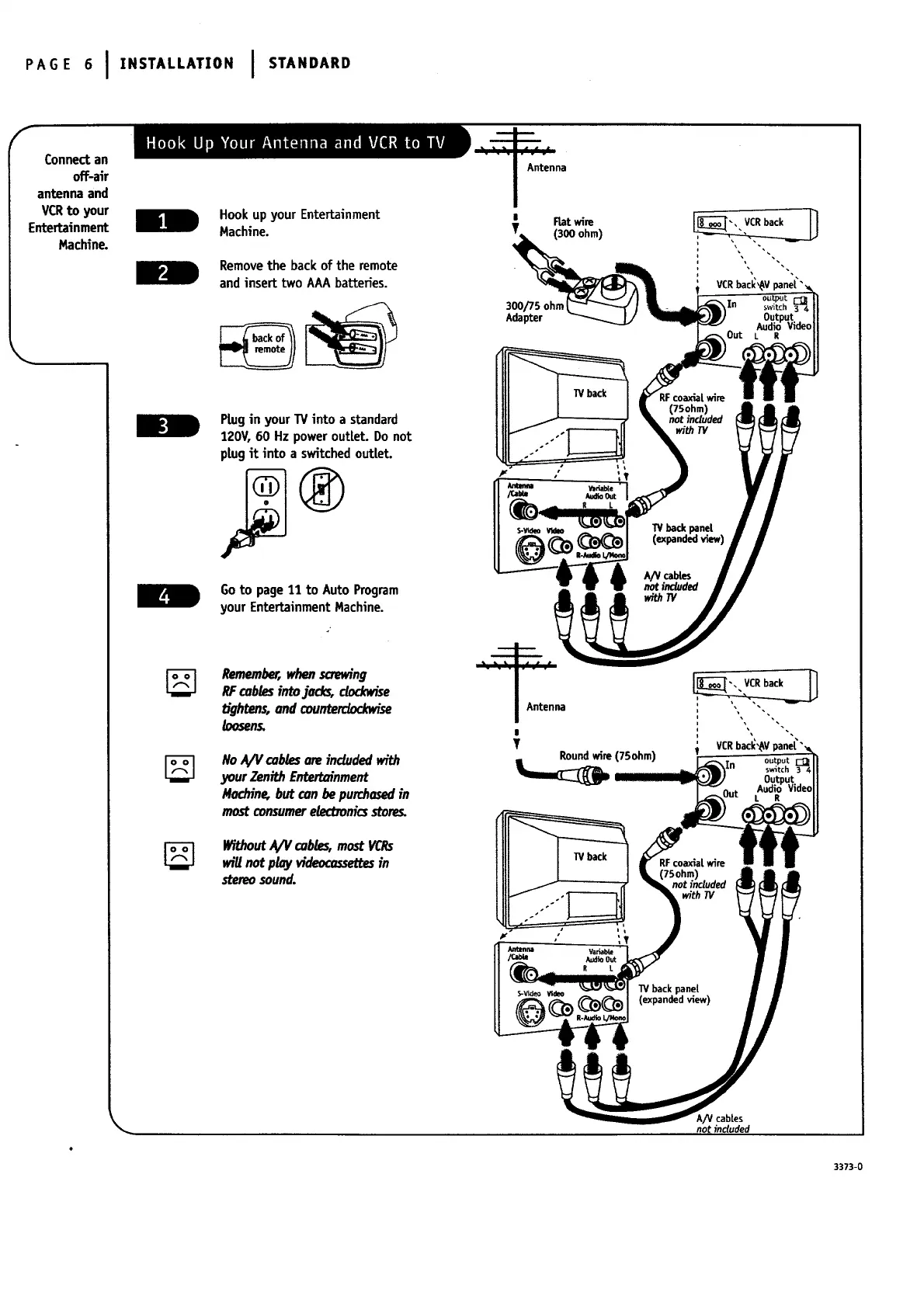
I Fiatwire
T (300 ohm)
300/75 ohm
Adapter
|
T
Round wire (75ohm)
with TV
VCRbac_'_V panL,4_"
output
switch 3[_4
Output.
Audio Vioeo
L R
RFcoaxialwire
5ohm)
not included
with TV
W back pane[
(expandedv_ew)
A/V cabtes
not included
3373-0




 To Next Page