,.STALL,T.ONIST,NO,.OIP,OE,
Hookupyour Entertainment
Hachine.
Remove the back of the remote
and insert two AAA batteries.
Ptug in your TVinto a standard
120V,60 Hz power outlet. Do not
plugit into a switchedoutlet.
Goto page11 to Auto Program
your EntertainmentMachine.
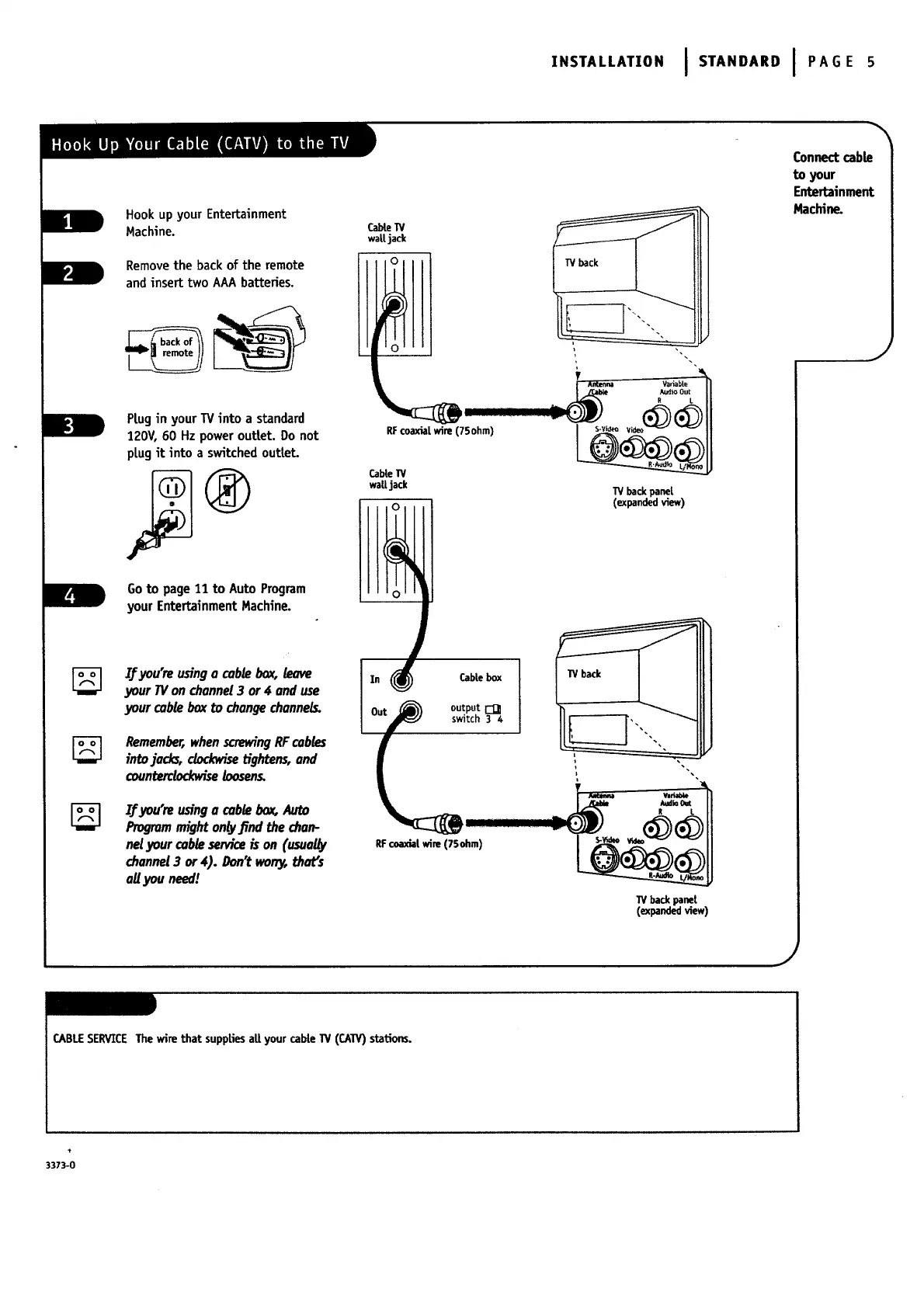
CabteI"V
wa|[ jack
Y
CableW
wattjack TV backpanet
Connect cab_
to your /
If you'reusinga cablebox,leave
your IV onchannel3 or4 anduse
your cableboxtochangechannels.
Remember,whenscrewingRF cables
intojock_, dock_'se tightens,and
counterdockwiseloosens.
IjFyou're usinga cable box,Auto
Programmighton_vJind the chart-
netyour cam seMce ison(usua_
channel 3 or4). Don'twor06that's
ag you need/
J
In (_ CabLebox
RFcoaxialwire (75ohm)
W backpanet
(expandedview)
J
CABLESERVICEThewire that suppEesaUyourcabte1V (CAW) stations.
3373-0




 To Next Page